If you need any further advice, please call our Technical Helpline on :-
020 8758 0338 (Mon-Fri)
PTY
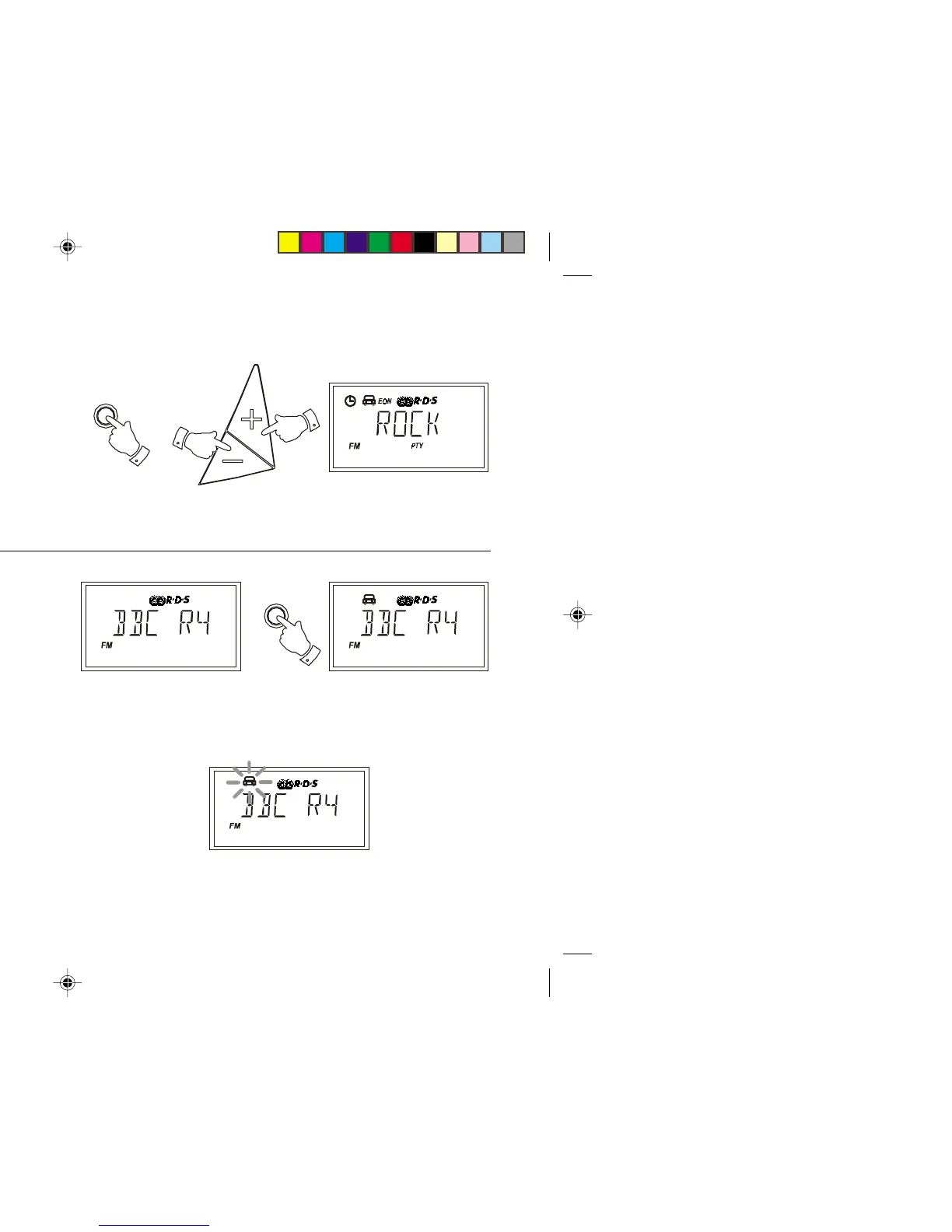
Programme type search
1. To search for a station of a particular type, repeatedly press and release
the PTY button until the required programme type is shown in the
display. Press and release either the + or - buttons.
2. Your radio will now search for a station of the selected type. When a
station of the required type is found the search will stop and the station
will play. The PTY indicator will flash during programme type search.
3. Programme type search may be stopped by pressing either the
+ or - buttons.
Traffic Announcements (TA)
1. Switch on the radio select the FM waveband and tune to an RDS
station. The symbol will appear in the display.
2. Press the Traffic button once. If the station provides traffic information
the symbol will appear in the display.
3. If the station does not provide traffic information the symbol will
not appear and the radio will beep indicating that no traffic information
is available.
4. During traffic announcements the symbol will flash in the display
and the volume will increase slightly.
T r a ffic
18
Tuning
R9906 Instruction Book.pm6 24/10/99, 14:2219



 To Next Page