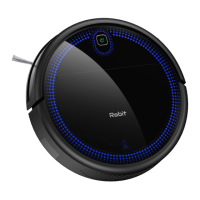
The Robit R3000 is a robot vacuum cleaner designed for indoor household use, offering various cleaning modes and smart features to maintain floor cleanliness.
Function Description:
The Robit R3000 is an automated cleaning device that navigates floors to remove dust, dirt, and small debris. It features multiple cleaning modes, including automatic cleaning, spot cleaning, edge cleaning, and single-room cleaning, to cater to different cleaning needs. The robot is equipped with anti-drop sensors to prevent falls from heights and can cross floors with heights up to 0.59 inches (15mm) and an inclination of 15 degrees, though it is not recommended for long-pile carpets. It is suitable for use on hard floors, tiles, and thin carpets (thinner than 0.3 inches / 0.8mm). The R3000 can be controlled via a remote control, allowing users to start/stop cleaning, select cleaning modes, set cleaning schedules, and adjust suction power. It also has a self-charging function, automatically returning to its charging base when the battery is low.
Important Technical Specifications:
- Model: R3000
- Input (Host): 19V 0.6A
- Rated Voltage (Host): 14.4V
- Rated Power (Host): 25W
- Battery: DC14.4V Li-ion battery 2600mAh
- Dust Box Capacity: 500ML
- Cleaning Time: 120 minutes
- Charging Time: 5-6 hours
- Input (Charging Base): DC19V 0.6A
- Output (Charging Base): DC19V 0.6A
- Working Temperature Range: -10°C to 50°C (14°F to 122°F)
- Remote Control Working Distance: 0-5 meters
- Obstacle Crossing Capability: Up to 0.59 inches (15mm) height, 15° inclination
- Minimum Clearance Height: Keep away from spaces lower than 2.4 inches (80mm) to prevent getting stuck.
- Maximum Object Diameter for Suction: Do not clean objects larger than 0.63 inches (16mm) to prevent blockage.
Usage Features:
- Quick Start: Connect the charging base, manage excess cables, and place the base on a hard, level surface against a wall, ensuring a 3ft/1m clear area on the left and right sides and 6ft/2m in front.
- Side Brush Installation: Properly install the side brushes before use.
- Activation: Turn on the power button at the bottom of the host (1 for ON, 0 for OFF). Place the robot on the charging base, ensuring the electrode contact pins align. A series of beeps and a lit switch button indicate successful activation.
- Start/Stop Cleaning: Press the power button on the host or the "AUTO" button on the remote control to start automatic cleaning. Press the power button on the host or the play/pause button on the remote control to pause or resume cleaning.
- Power Off: Press the power button on the host until the light goes out.
- Automatic Cleaning Mode: Initiated by pressing the power button on the main unit or the "AUTO" button on the remote control. The robot will return to the charging base if the battery is low.
- Spot Cleaning Mode: Select this mode via the remote control. The robot cleans a local area in an outward spiral (approx. 1m diameter) and then circles inward, increasing suction power for concentrated cleaning.
- Max. Suction Cleaning Mode: Available in automatic or single-room cleaning modes, activated by pressing the "MAX" button on the remote control to increase suction force for deeper cleaning. Default suction is off.
- Edge Cleaning Mode: Activated via the remote control, the robot sweeps along walls and around furniture legs.
- Single Room Cleaning Mode: Press the dedicated button on the remote control. The robot will clean for approximately 30 minutes. It is recommended to close the door to prevent the robot from leaving the room.
- Time and Schedule Cleaning: Set the current time and schedule cleaning times using the remote control. Ensure the remote control is close to the machine during setup. The remote control display time setting allows adjustment of hours and minutes.
- Scheduled Cleaning Setting: Set a cleaning schedule via the remote control.
- Cancel Scheduled Cleaning: Press and hold the schedule button on the remote control for about 4 seconds.
Maintenance Features:
Regular cleaning and maintenance are crucial for optimal performance and longevity.
- Dust Collector: Clean after each use. To clean, press the release button, remove the dust box, and empty its contents.
- Filter: Clean once per week. Pull the white label to remove the filter and shake off dust. Replace every 2 months.
- Roller Brush: Clean once per week. Remove the roller brush and clean the dust suction channel with a cloth. Use the provided cleaning tool to remove tangled hair from the roller brush. Replace every 6-12 months.
- Side Brushes: Clean once per month. Remove the side brushes and clean them with a cloth. Replace every 3-6 months.
- Roller Brush Protector: Clean once per month. Replace every 3-6 months.
- Sensor: Clean once per month. Use a cleaning brush to remove dust from the downward sensor to ensure optimal performance.
- Electrode Contact Pins: Clean once per month. Clean the electrode contact pins on both the robot and the charging base with a dry cloth.
- Universal Wheel: Clean once per month. Clean the universal wheel with a cleaning brush.
Troubleshooting:
The robot provides LED indicators and beeping sounds to signal issues.
- Breathing Orange: Charging.
- Solid Blue: Standby, Cleaning, Fully Charged.
- Light Off: Power Off (or inactive for 5 minutes when not on charging base).
- Solid Orange: Low Power, Searching Charging Dock.
- Breathing Red or Solid Red: Indicates a problem.
- Beeping Sounds: Specific beep patterns (1, 2, 3, or 4 beeps) indicate different issues such as obstacles in wheels or brushes, fan obstruction, bumper issues, dirty sensors, low battery, or charging problems. Solutions typically involve cleaning specific components, restarting the robot, or ensuring proper placement and charging.
The Robit R3000 comes with a 30-day money-back guarantee and a 12-month limited product warranty for quality-related issues.


 To Next Page
 General