013
Instructions for Use
Adding and Emptying Water
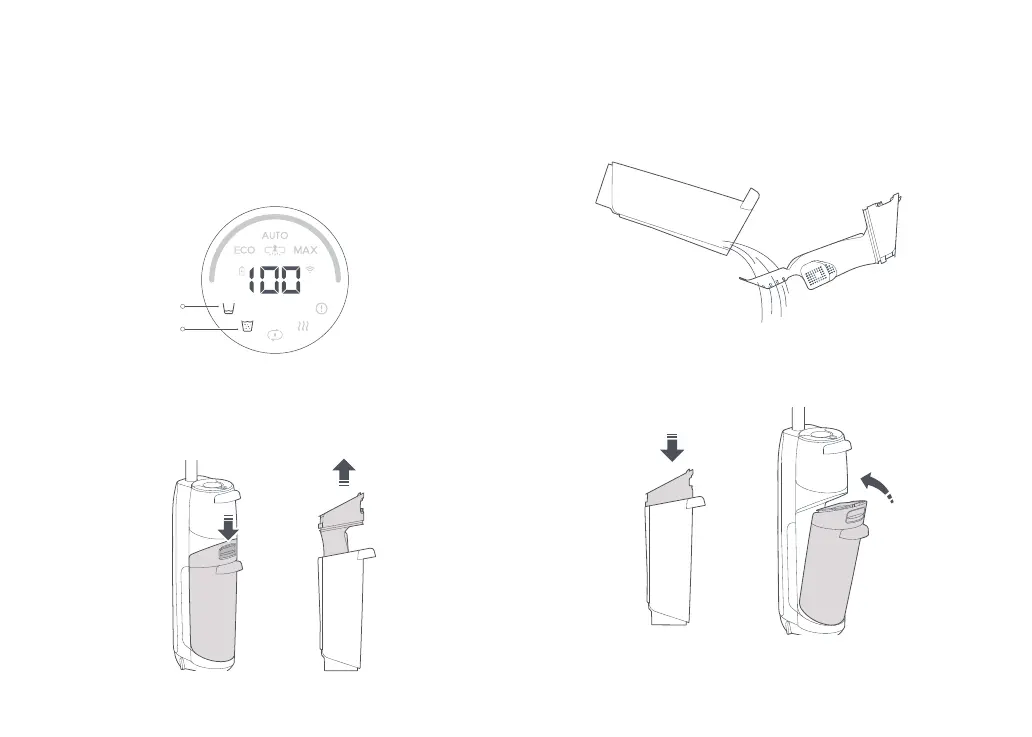
When the dirty tank is full or the clean tank is empty during use,
the vacuum cleaner will provide audio and visual alerts. Add water
into the clean tank or empty the dirty tank before continuing.
Dirty Tank Full
Clean Tank Empty
Emptying the Dirty Tank
1. Push the dirty tank release and remove the tank.
2. Hold the handle firmly with one hand, and gently lift out the
cover.
3. Pour out the dirty water. If there is any solid dirt in the tank,
filter it using the filter at the bottom of the cover.
4. Reinstall the cover, tilt the dirty tank, install the bottom in place,
and then gently push it inward to secure it in place.







 To Next Page