6 HDC2450 Motor Controller Datasheet Version 1.2. July 20, 2010
Default I/O Configuration
While the controller can be configured so that practically any Digital, Analog and RC pin can be used for any pur-
pose, the controller’s factory default configuration provides an assignment that is suitable for most applications.
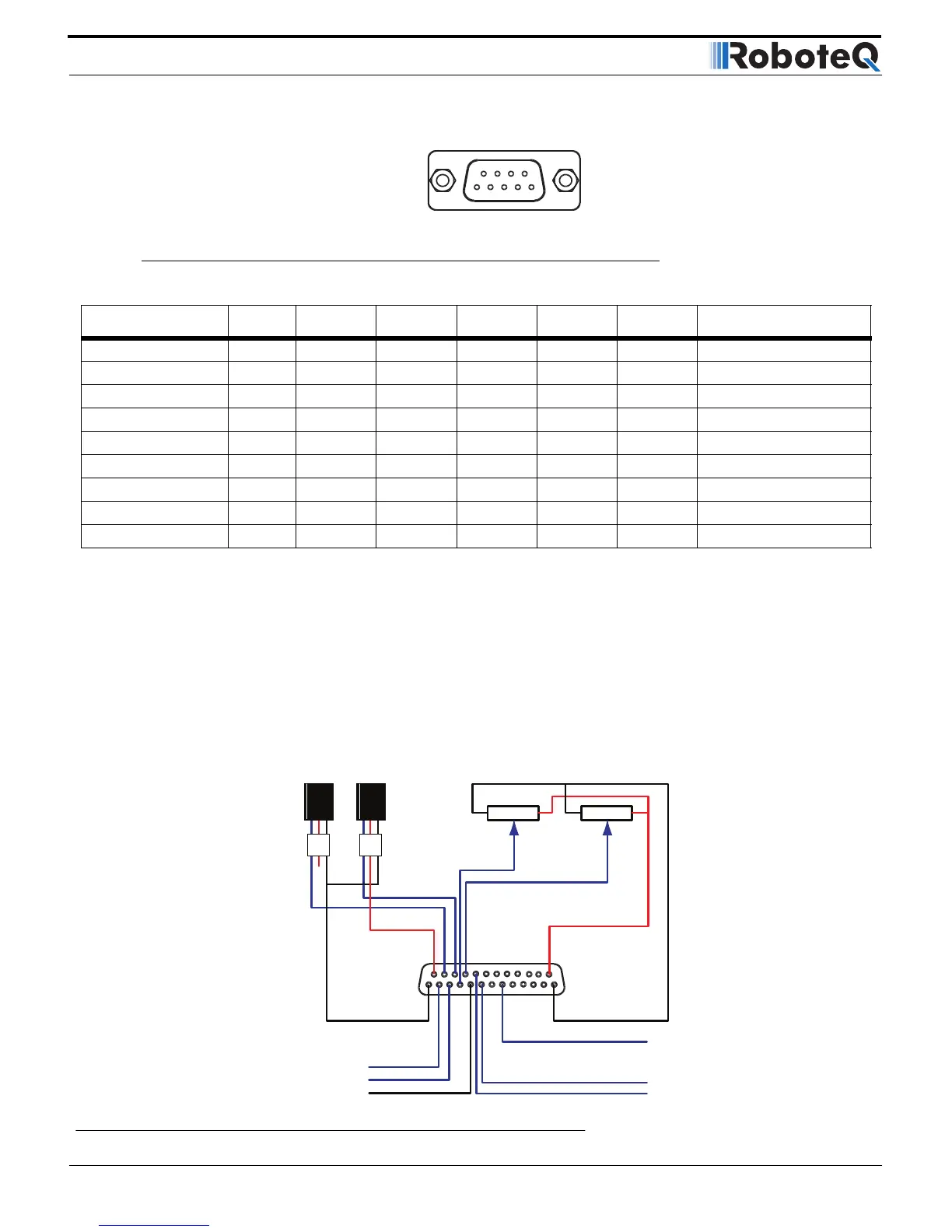
The figure below shows how to wire the controller to two analog potentiometers, an RC radio, and the RS232
port. It also shows how to connect two outputs to motor brake solenoids and another output to an external status
LED. You may omit any connection that is not required in your application. The controller automatically arbitrates
the command priorities depending on the presence of a valid command signal in the following order: 1-RS232, 2-
RC Pulse, 3-Analog. If needed, use the Roborun+ PC Utility to change the pin assignments and the command pri-
ority order.
TABLE 5.
Connector Pin Power Dout Com Pulse Ana Dinput Default Config
5 DOUT7 DIN18 Unused
95VOut
4SCLI Reserved
8SDAI Reserved
3 GND
7 CANH Reserved
2 CANL Reserved
6 GND
1 DOUT8 DIN19 Unused


 To Next Page