12
English
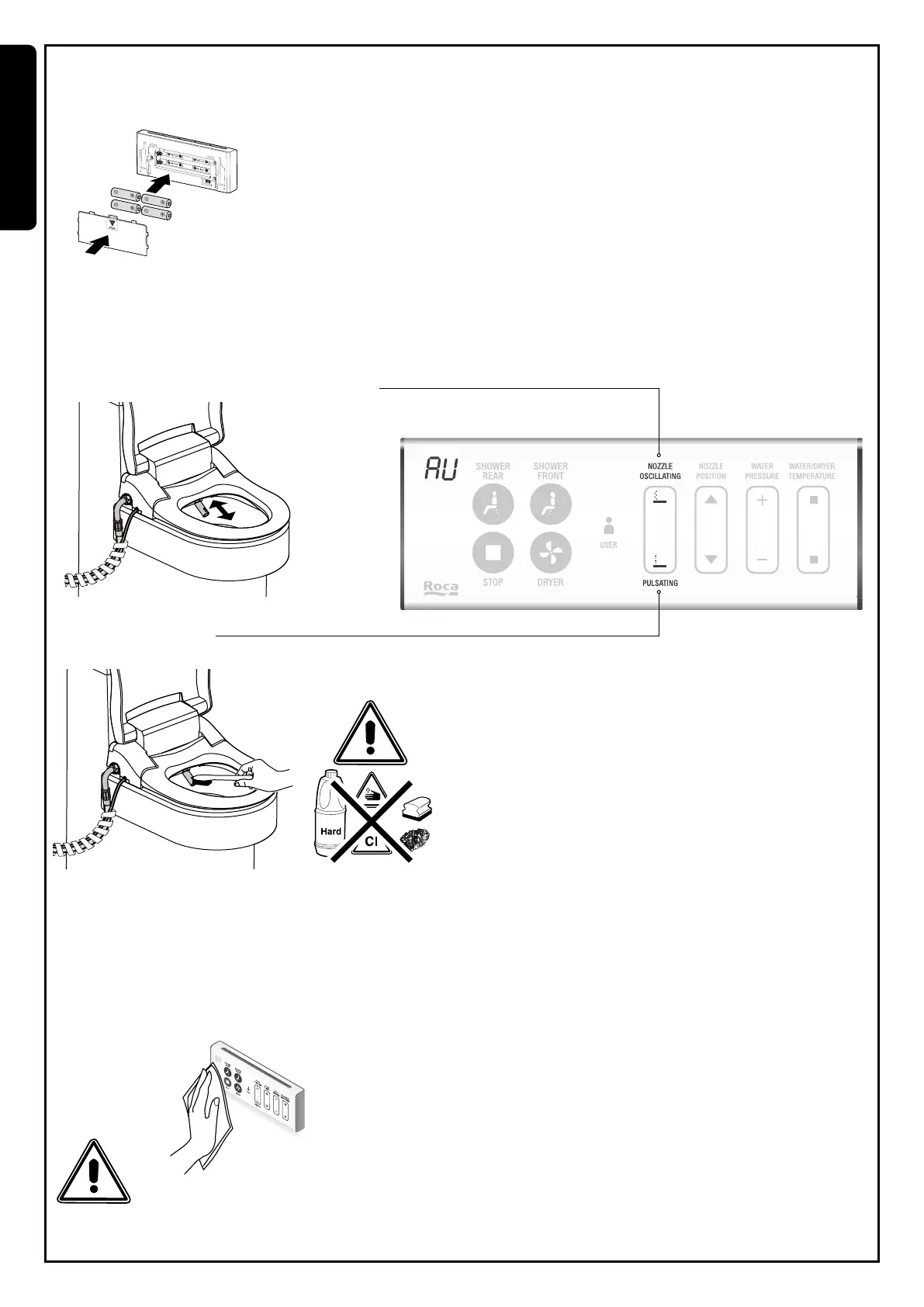
Removal of batteries from the remote control
If during use, the display indication blinks, this indicates low battery level.
Please replace the batteries (4x alkaline AA). Do not mix used and new batteries or from different brands.
Nozzle extension
Press pulsating button for 3 seconds. Nozzle reaches out automatically and will remain in this position for 1 minute.
Cleaning & maintenance
Nozzle cleaning
Press oscillating button for 3 sec to activate the nozzle. It will automatically oscillate forward and backward for 1 minute.
To deactivate this function, please press stop button.
Do not use aggressive products to clean. Only use neutral products
for cleaning.
Do not pull or push the nozzle manually.
Do not take out the nozzle by hand directly.
This product should not be washed with water or detergent directly.
Remote control cleaning
1. Please take out the batteries before cleaning.
2. Please wipe it softly with dampened cloth.
3. If the remote is too dirty, you may use a diluted neutral detergent on a damp cloth to clean it.


 To Next Page