11
English
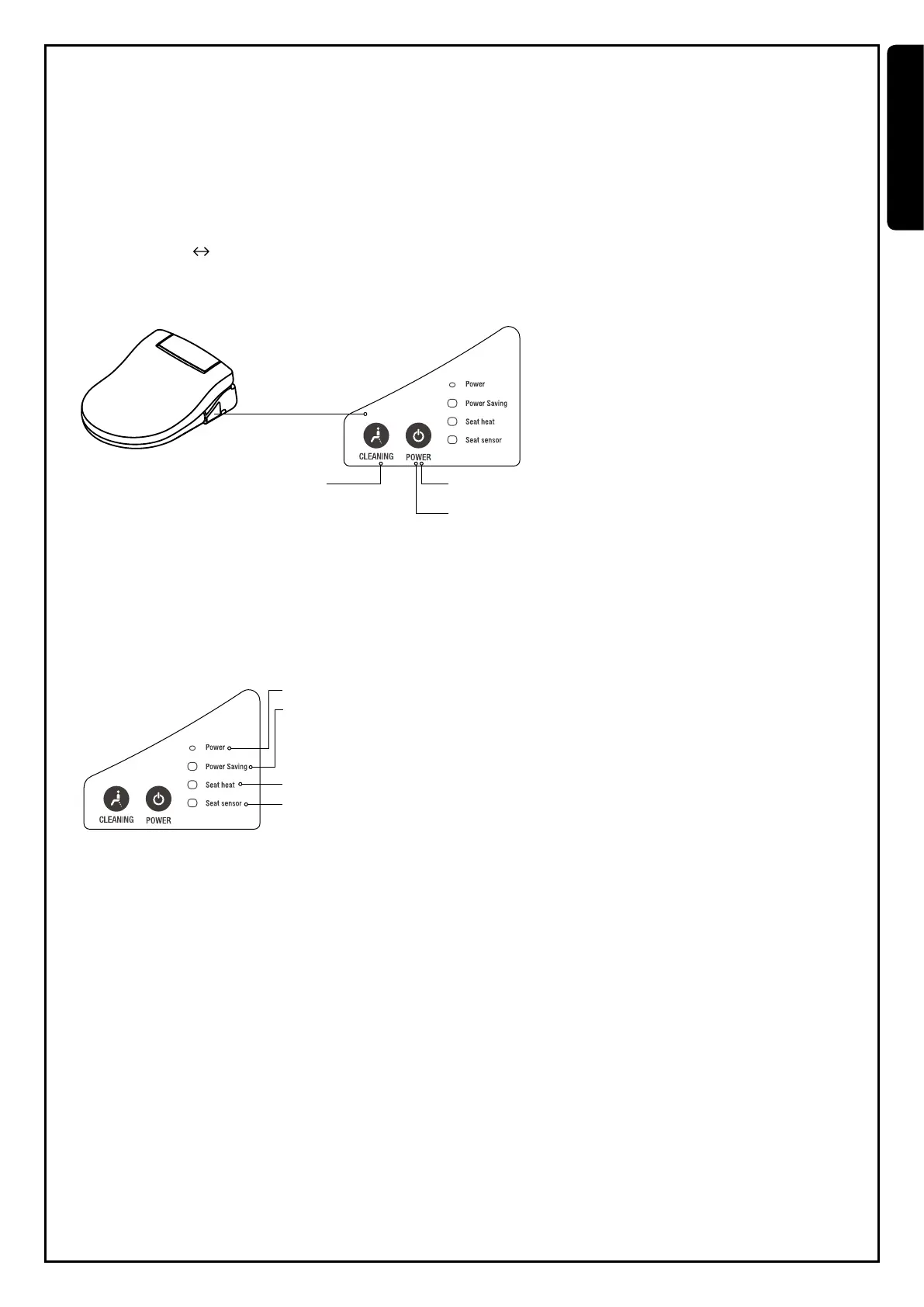
Auxiliary control panel operation
Should the remote control run out of batteries, user can use auxiliary panel to operate main functions.
Cleaning function
Light indication
1. Select cleaning
Press cleaning button to activate rear cleaning. Repeatedly press the same button for adjusting water pressure. (It is exclusively used
for rear cleaning function. Front cleaning function cannot be provided by operating auxiliary panel. )
2. Select dryer
Press power button to select dryer (Default temperature at middle level).
Temperature middle off
3. Stop
Press power button to stop cleaning or dryer. Cleaning and dryer function will automatically switch off 5min after activation.
1. Cleaning
2. Dryer
3. Stop cleaning and dryer
1. Switch on/off power
2. Power saving light indication
Light off : Power saving not activated.
Green light: Power saving mode is on standby.
Orange light: Power saving mode iactivated.
3. Seat heater light indication
4. Seat sensor light indication


 To Next Page