17
TCU – Tracking Control Unit
The Tracking Control Unit (TCU) is an additional
sensor that scans the surface of the mousepad
and then automatically adjusts the performance
of the sensor to match the surface.
This adjustment results in optimized tracking.
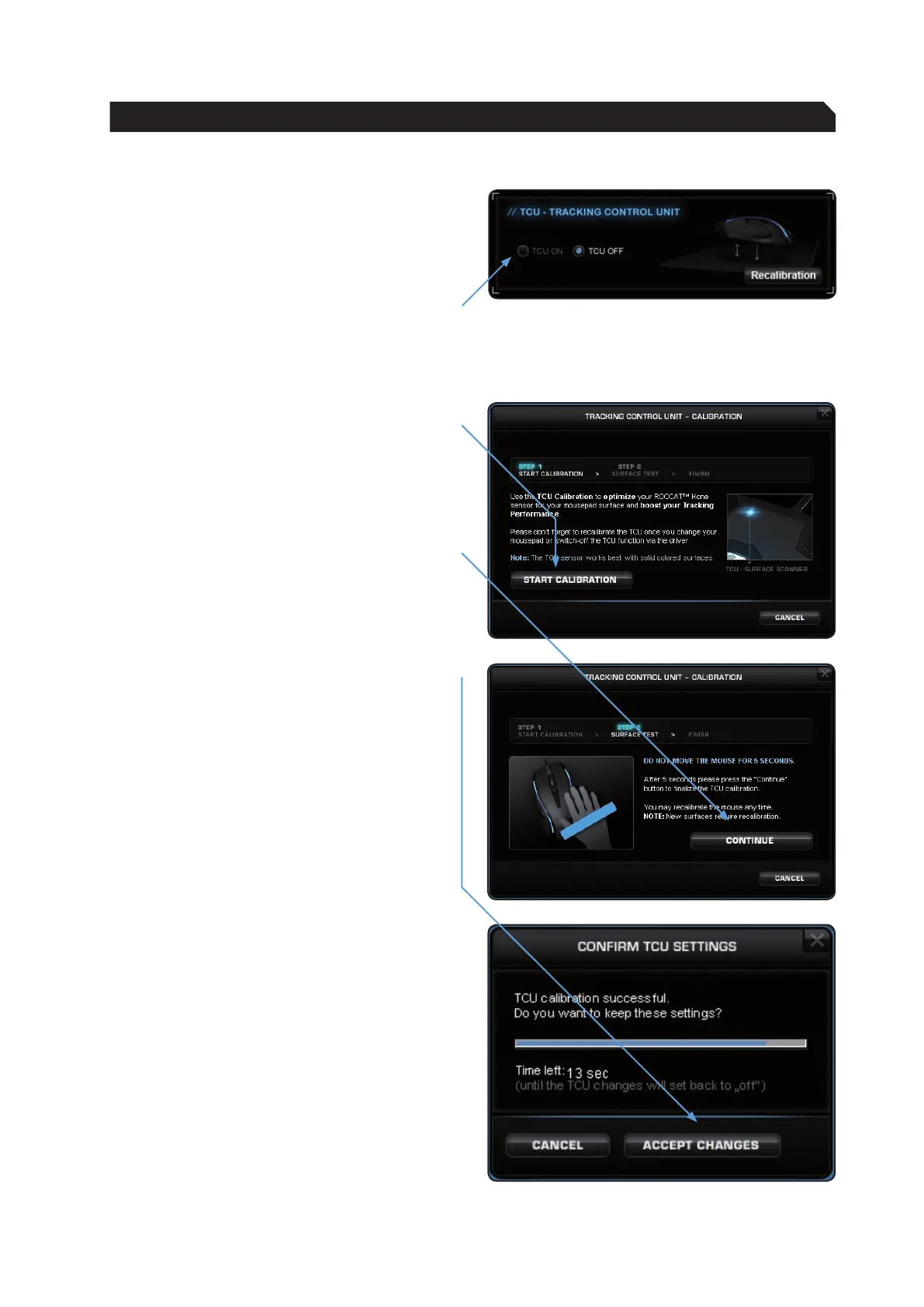
Activate the TCU by clicking ‘TCU ON’.
Now calibrate the laser by clicking ‘Recalibration’.
The ROCCAT™ Kone laser is calibrated in 3 steps:
Step 1:
Click the ‘Start Calibration’ button.
Step 2:
Do not move the mouse for 5 seconds; the
calibration process will be running during this
short period. After that, click ‘Continue’.
Step 3:
Following that click on ‘Accept Changes’.
The setting will now be saved on the mouse; this
may take a few seconds.
Note: When you want o use a different mousepad,
it is advisable, to recalibrate the ROCCAT™ Kone to
it. Please use your old mousepad and turn the TCU
off. Then change the mousepad, select ‘TCU on’
and start recalibrating the mouse. The calibration
process works best on solid colored mousepads.
ADVANCED SETTINGS


 To Next Page