9
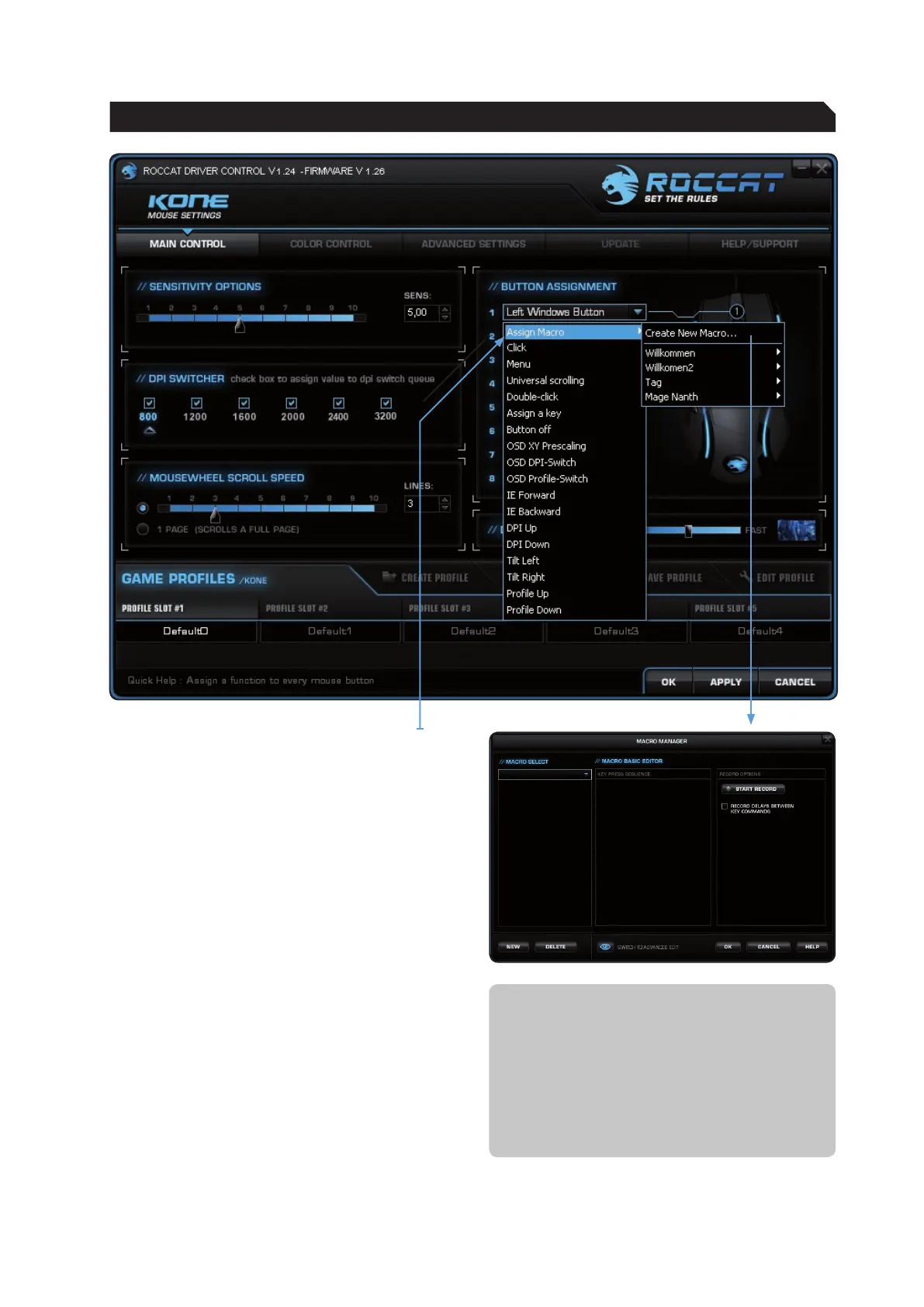
To access the Macro Manger, choose the index
‘Main Control’. Then click onto the arrow next
to any of the boxes under ‘Button Assignment’
to open a dropdown menu and select ‘Assign
Macro’. Choose ‘Create New Macro’ on the
following dropdown menu. This gives you direct
access to the Macro Manager.
The Macro Manager consists of three areas: on
the far left you can select, add or delete a macro
set or an individual macro (Macro Select); in the
middle area the ‘Macro Basic Editor’ displays
the key combination; and finally, the start/ stop
button (Start Record) is located in the right-hand
area.
To record a macro you must first create a macro
set. A macro set is a group which consists of
multiple individual macros. The set only serves to
give a better overview of the individual macros.
Only one macro, not an entire set, can be
assigned to an individual mouse button.
As soon as macros have been saved using the
Game Profile it doesn’t matter which computer
the mouse is connected to, they can be called
up at any time.
Note: A macro which is longer than 20 events
cannot be saved on the mouse. A notification
will appear saying that the macro will be saved
on your computer’s hard drive instead.
Two events are carried out when a key is
pressed: pressing the key, releasing the key.
For example, the key combination Alt+Ctrl+t
consists of 6 events.
MACRO MANAGER


 To Next Page