Pg 22 Pg 23
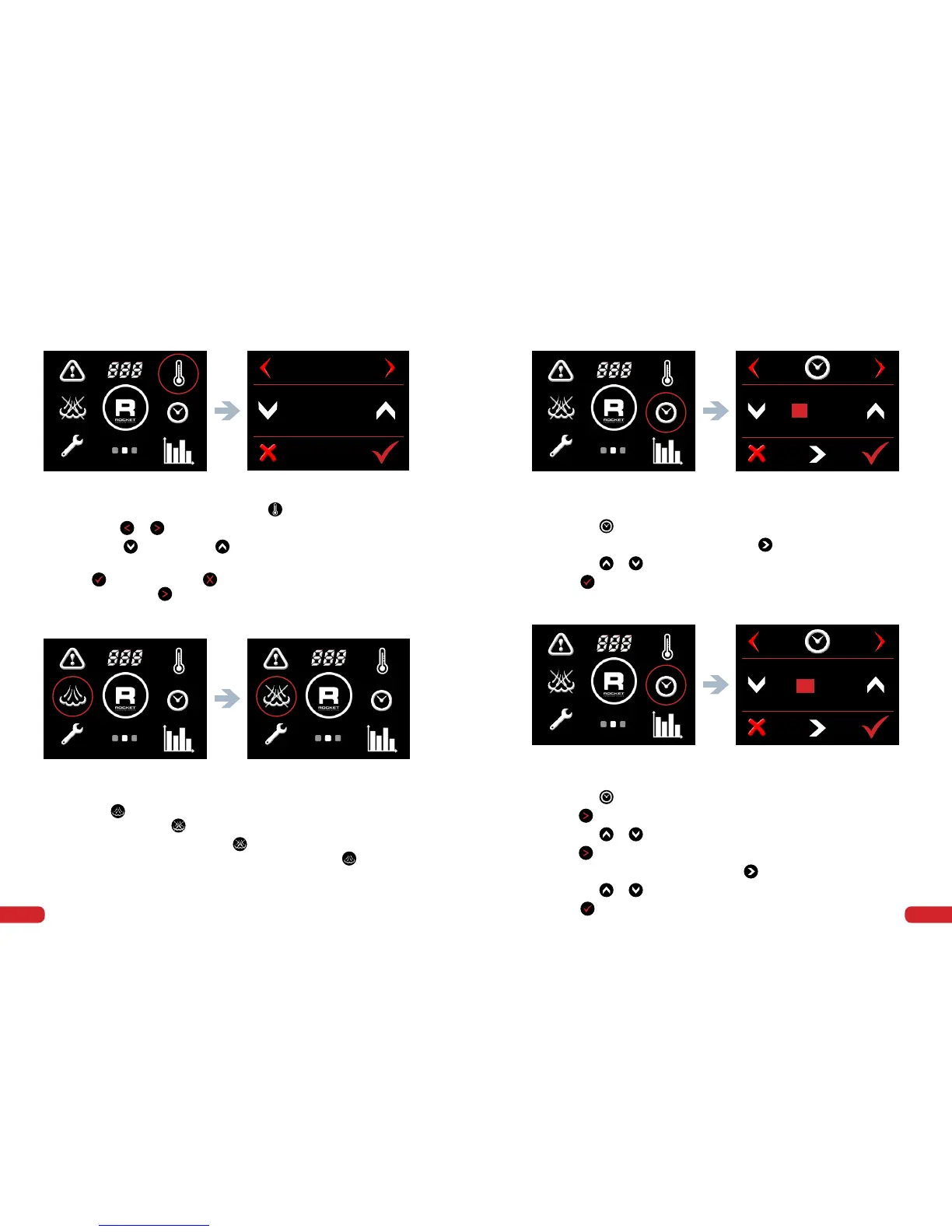
6. Switch Service Boiler On/Off
•
Go to the second screen menu.
•
Press the symbol to turn it off. Steam symbol with a cross
through it will appear
•
To turn the service boiler on press symbol.
The steam symbol without a cross through it will appear
•
Go to the second screen menu.
•
Press the symbol.
•
To scroll between year/month/date press
•
Press the
or arrows to change year/month/date.
•
Press to save.
7. Setting the Date
8. Setting the Day and Time
•
Go to the second screen menu.
•
Press the symbol.
•
Press
to select day.
•
Press the
or arrows to change day if necessary.
•
Press
to select time adjustment screen.
•
To scroll between hours/minutes press
•
Press the
or arrows to change hours/minutes.
•
Press to save.
•
Go to the second screen menu and press
symbol.
•
Press either
or
to navigate through to the steam temp screen.
•
Press either to decrease or to increase the service boiler
temperature.
•
Press to conrm or press to cancel and return to home screen.
Alternatively press to scroll to the next setting.
Screen 2 - Temperature Symbol Steam Temp adjust screen
STEAM TEMP
123°C
Screen 2 - Steam On Screen 2 - Steam Off
Screen 2 - Clock Date adjust screen
20 18 JUL 13
Screen 2 - Clock Time adjust screen
10
:
50
5. Change the Temperature of the Service Boiler



 To Next Page