6
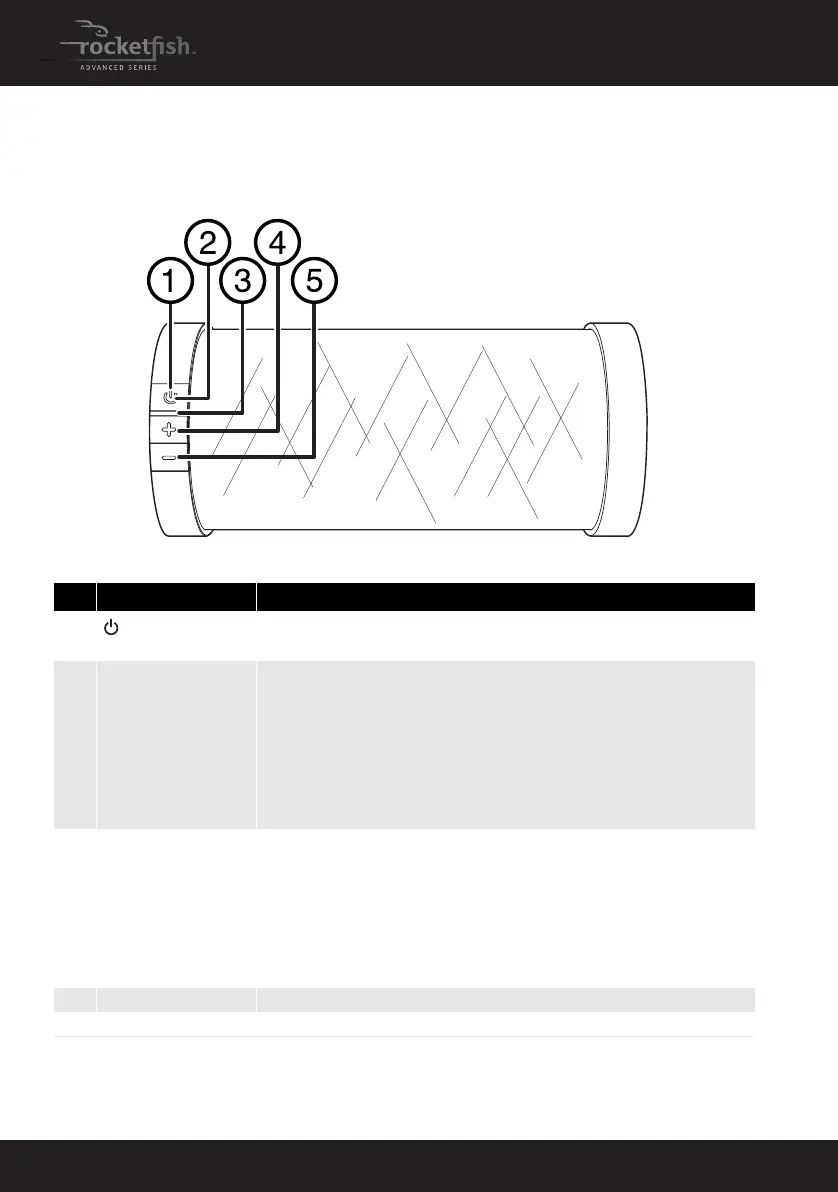
Front view
# Feature Function
1
(On/Off/
Pairing) button
Press to turn your speaker on or off.
Press and hold for two seconds to put the speaker into Bluetooth pairing mode.
2 Power/Pairing indicator Indicates the status of the speaker.
• Off - Speaker is off
• Red (slow blinking) - The speaker is on (after turning on the speaker it will be in this
state for approximately 4 seconds).
• Blue (slow blinking) - Speaker is on and idle, without any connection to a sound
source.
• Blue (fast blinking) - In Bluetooth pairing mode.
• Blue (steady)- Connected to a sound source.
• Blue(blink once)- When Volume +/- button is pressed
3 Battery indicator
Indicates the status of the built-in battery.
When the speaker is plugged into the AC adapter:
• Green - battery is fully charged. Note the indicator will turn off after five minutes if
the speaker is off. The indicator will also turn off after five minutes if the speaker is on
but not connected to a sound source.
• Amber - battery is charging
When the speaker is not plugged into the AC adapter:
• Red - battery power is low
4 Volume + button Press to increase the volume of the speaker.
5 Volume – button Press to decrease the volume of the speaker.
RF-WSP313_13-0633_MAN_V1_ENG.fm Page 6 Friday, August 9, 2013 2:02 PM



 To Next Page