EasyManua.ls Logo

RockJam RJ461 - User Manual

RockJam RJ461
33 pages
Print Icon
To Next Page IconTo Next Page
Loading...
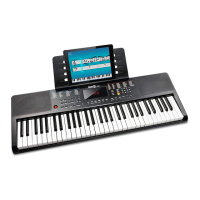
RJ461 61 Key Full Size Musical
Keyboard
User Guide

Questions and Answers

Summary

Important Information

Power Adapter Safety and Usage

Guidelines for safe and correct use of the AC/DC power adapter.

Front Panel Controls and Indicators

Initial Setup and Preparation

Powering the Keyboard: Adapter and Batteries

Instructions for connecting the power adapter and using batteries for operation.

Keyboard Operation: Power and Volume

Power Button Functionality

How to turn the keyboard on and off using the power button.

Master Volume Adjustment Dial

Instructions on how to adjust the main volume using the dedicated dial.

Keyboard Operation: Tone and Mixer Controls

Mixer Volume Adjustment Procedure

How to adjust the volume for chord, bass, or percussion using the mixer button and volume controls.

Tone Selection Methods

Guide to choosing different instrument tones using the TONE button and keypad.

Keyboard Operation: Dual Tone and Split Modes

Rhythm Styles and Control

Selecting Rhythm Styles

Guide to choosing from 300 built-in rhythms using the number keypad or +/- buttons.

Rhythm Features: Fill-in and Tempo

Adjusting Rhythm Tempo

How to adjust the tempo of rhythms, metronomes, or demo songs using tempo buttons.

Chord Accompaniment Modes

Single Finger Chord Playing Technique

How to activate and play chords using the single finger chord function.

Multi Finger Chord Playing Technique

How to activate and play chords using the multi-finger chord function.

Recording and Rhythm Programming

Recording and Playback Procedures

Steps for recording musical notes and playing back recorded content.

Teaching Modes Explained

Single Key Course Mode Instructions

Details on using the Single Key teaching mode for beginners.

Synchronised Course Mode Instructions

Instructions for the Synchronised teaching mode for more advanced users.

Concert Course Mode Instructions

Guidelines for the Concert teaching mode, suitable for highly advanced users.

Troubleshooting Common Issues

Resolving Keyboard Problems

Solutions for common problems like no sound, distorted sound, or incorrect pitch.

FCC Compliance Information

Summary

Important Information

Power Adapter Safety and Usage

Guidelines for safe and correct use of the AC/DC power adapter.

Front Panel Controls and Indicators

Initial Setup and Preparation

Powering the Keyboard: Adapter and Batteries

Instructions for connecting the power adapter and using batteries for operation.

Keyboard Operation: Power and Volume

Power Button Functionality

How to turn the keyboard on and off using the power button.

Master Volume Adjustment Dial

Instructions on how to adjust the main volume using the dedicated dial.

Keyboard Operation: Tone and Mixer Controls

Mixer Volume Adjustment Procedure

How to adjust the volume for chord, bass, or percussion using the mixer button and volume controls.

Tone Selection Methods

Guide to choosing different instrument tones using the TONE button and keypad.

Keyboard Operation: Dual Tone and Split Modes

Rhythm Styles and Control

Selecting Rhythm Styles

Guide to choosing from 300 built-in rhythms using the number keypad or +/- buttons.

Rhythm Features: Fill-in and Tempo

Adjusting Rhythm Tempo

How to adjust the tempo of rhythms, metronomes, or demo songs using tempo buttons.

Chord Accompaniment Modes

Single Finger Chord Playing Technique

How to activate and play chords using the single finger chord function.

Multi Finger Chord Playing Technique

How to activate and play chords using the multi-finger chord function.

Recording and Rhythm Programming

Recording and Playback Procedures

Steps for recording musical notes and playing back recorded content.

Teaching Modes Explained

Single Key Course Mode Instructions

Details on using the Single Key teaching mode for beginners.

Synchronised Course Mode Instructions

Instructions for the Synchronised teaching mode for more advanced users.

Concert Course Mode Instructions

Guidelines for the Concert teaching mode, suitable for highly advanced users.

Troubleshooting Common Issues

Resolving Keyboard Problems

Solutions for common problems like no sound, distorted sound, or incorrect pitch.

FCC Compliance Information

RockJam RJ461 Specifications

General IconGeneral
BrandRockJam
ModelRJ461
CategoryElectronic Keyboard
LanguageEnglish

Related product manuals