EasyManua.ls Logo

RockJam RJ461 - Front Panel Controls and Indicators; Front Panel Layout and Features

RockJam RJ461
33 pages
Print Icon
To Next Page IconTo Next Page
To Previous Page IconTo Previous Page
Loading...
5
Controls, Indicators and External Connections
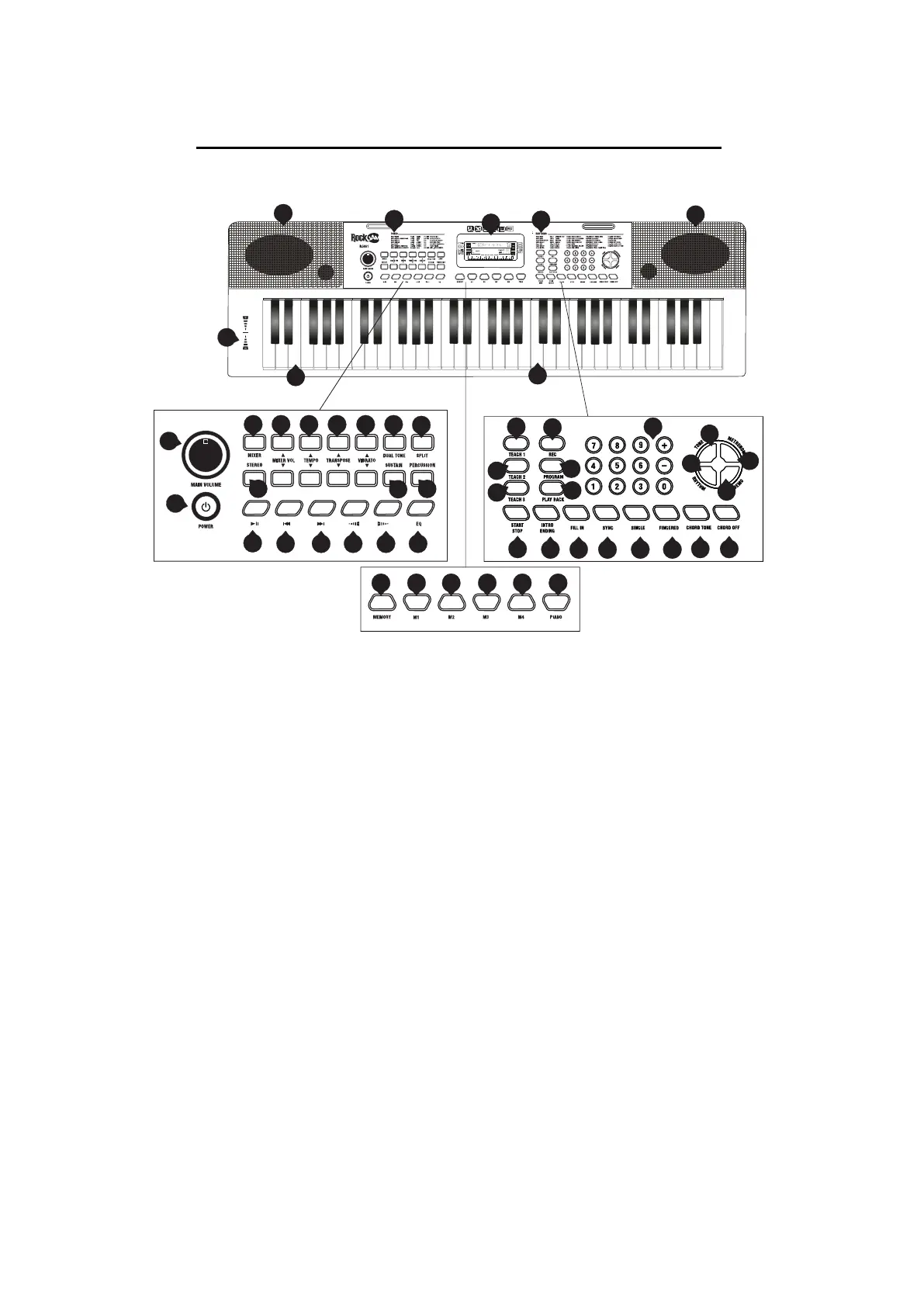
Front Panel
1. Speaker
2. Power Switch
3. Main Volume
4. Mixer
5. Mixer Vol +/-
6. Tempo +/-
7. Transpose +/-
8. Vibrato +/-
9. Dual Tone
10. Split
11. Stereo
12. Sustain
13. Percussion
14. Play/ Pause
15. Previous Song
16. Next Song
20 21 22 23 24 25
14
15 16 17 18 19
2
3
26
27
32
33 34 35 36 37
38 39
44
42
43
41
40
29
31
28
30
4
5 6 7 8 9
10
12
13
1
47
48
49
1
11
45
46
50
17.
Music Volume
-
18. Music Volume +
19. EQ
20. Memory
21. Memory Storage 1
22. Memory Storage 2
23. Memory Storage 3
24. Memory Storage 4
25. Piano Key
26. Teach 1
27. Record
28. Teach 2
29. Program
30. Teach 3
31. Playback
32. Start / Stop
33. Intro / Ending
34. Fill In
35. Sync
36. Single Finger Chord
37. Fingered Chord
38. Chord Tone
39. Chord Off
40. Demo
41. Rhythm
42. Tone
43. Metronome
44. Number Keys
45. Keyboard Playing Area
46. Chord Playing area
47. Tones List
48. LCD Screen
49. Rhythms List
50. Pitch Control

Related product manuals