Page | 6
Preparation Before First Use
Power
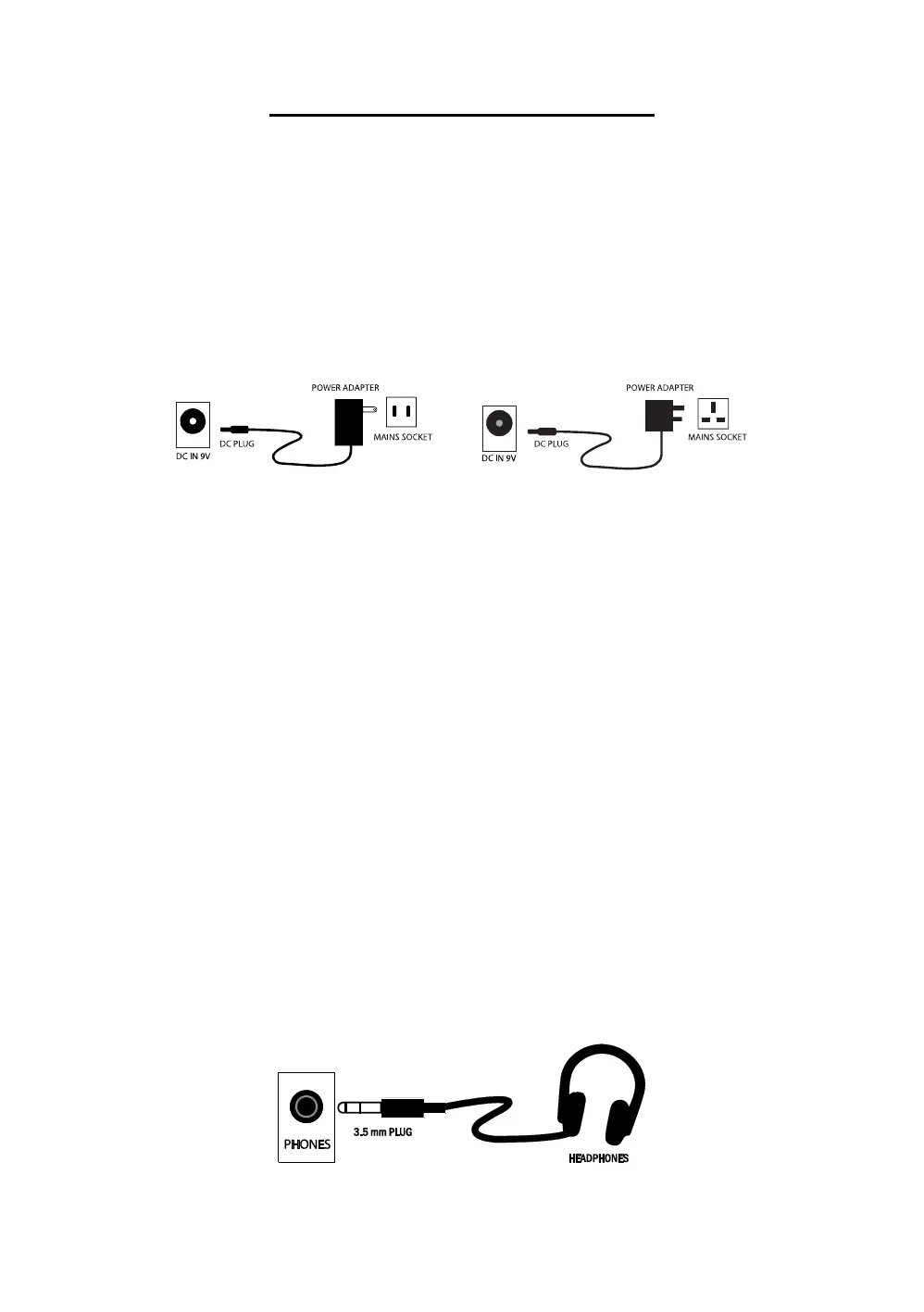
Use of DC power adapter:
Please use the DC power adapter that came with the electronic keyboard or a power adapter with 9V DC
output voltage and 500mA output current with a centre positive plug. Connect the plug of the power
adapter into the DC 9V power socket on the rear of the keyboard and then connect the other end into the
mains wall socket and switch on.
USA / Canada UK
Caution: When the keyboard is not in use you should unplug the power adapter from the mains power
socket.
Battery operation:
Open the battery lid on the underneath of the electronic keyboard using a small cross head screwdriver
and insert 6 x 1.5V Size AA alkaline batteries. Ensure the batteries are inserted with the correct polarity
and replace the battery lid.
Caution: Do not mix old and new batteries. Do not leave batteries in the keyboard if the keyboard is not
going to be used for any length of time. This will avoid possible damage caused by leaking batteries.
Jacks and Accessories
Using headphones:
Connect the 3.5mm headphone plug into the [PHONES] jack on the rear of the keyboard. The internal
speaker will cut off automatically once headphones are connected. Headphones not included.



 To Next Page