Page | 7
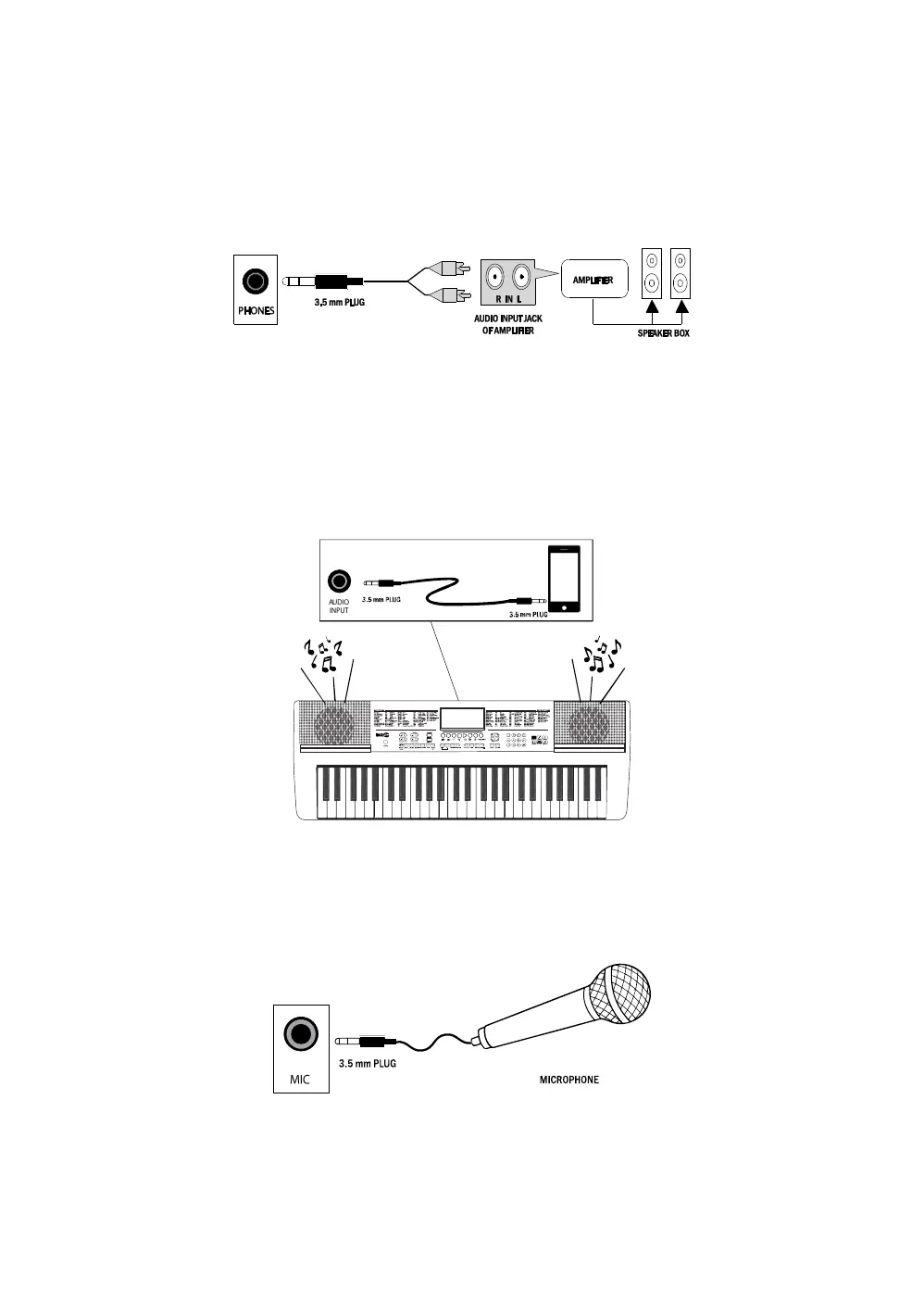
Connecting an Amplifier or Hi-Fi Equipment:
This electronic keyboard has a built-in speaker system, but it can be connected to an external amplifier or
other hi-fi equipment. First turn off the power to the keyboard and any external equipment you are looking
to connect. Next insert one end of a stereo audio cable (not included) into the LINE IN or AUX IN socket
on the external equipment and connect the other end into the [PHONES] jack on the rear of the electronic
keyboard.
Connecting a phone or audio device to the AUX Input to play music through the keyboard:
This keyboard has a built-in speaker system that can be used to play music from your phone or mobile
device. Insert one end of a stereo audio cable into the AUX IN socket on the back of the keyboard and
connect the other end into your phone or audio device. Make sure the keyboard is switched on. Use the
volume control of the phone to control the music volume. AUX in cable not included.
Connecting a Microphone:
Connect the 3.5mm microphone plug into the [MIC] jack on the rear of the keyboard. Note that the
keyboard requires an electret or condenser microphone, not supplied.



 To Next Page