3
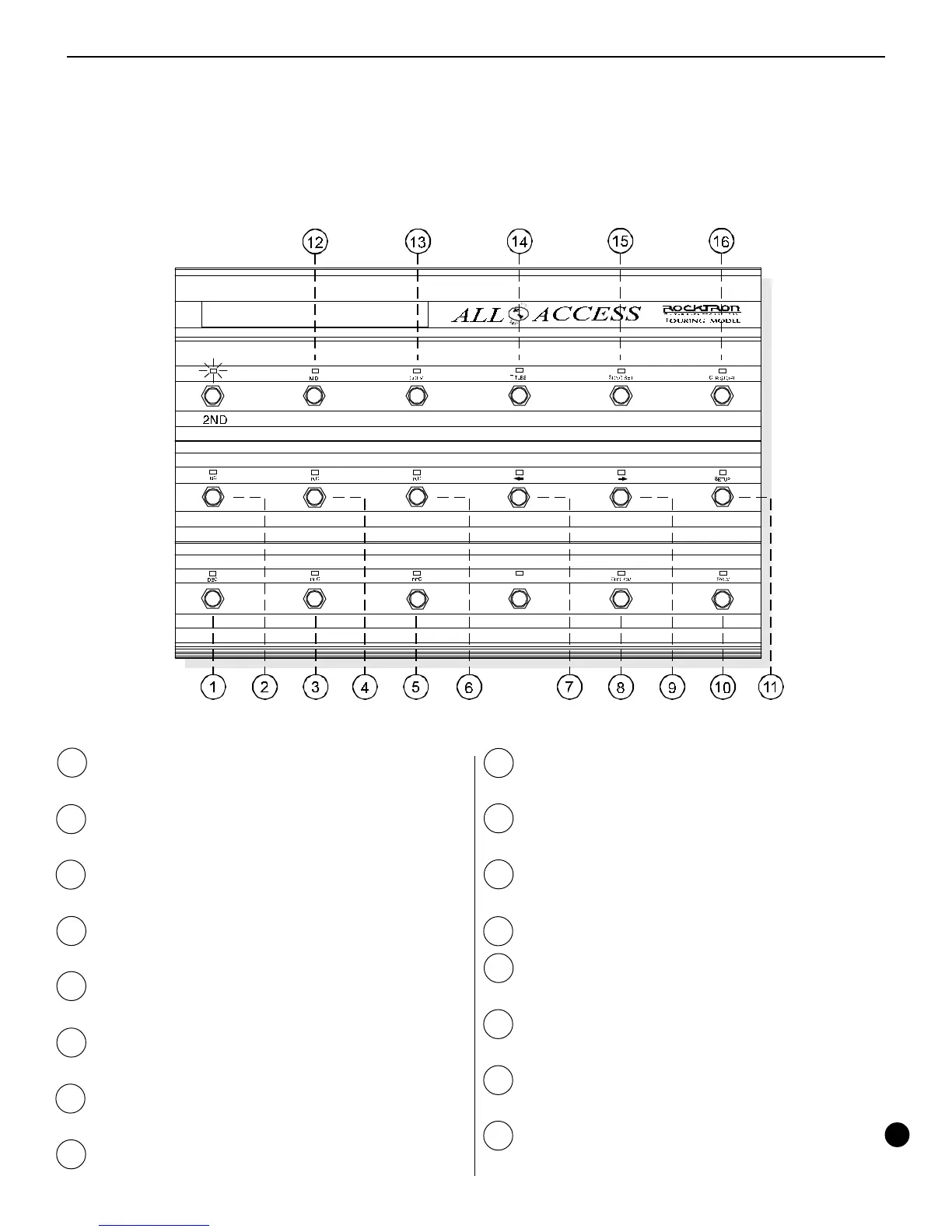
Secondary button functions (2ND L.E.D. on) of the All Access footswitch
1 DEC switch -
used to decrement data selection
currently shown on the left side of the display.
2 INC switch -
used to increment data selection currently
shown on the left side of the display.
3 DEC switch -
used to decrement data selection
currently shown in the center of the display.
4 INC switch -
used to increment data selection currently
shown in the center of the display.
5 DEC switch -
used to decrement data selection
currently shown on the right side of the display.
6 INC switch -
used to increment data selection currently
shown on the right side of the display.
7 ï switch -
used to access the previous page within an
editing program.
8 CUSTOM switch -
used to access the CUSTOM
editing program.
9 ð switch -
used to access the next successive page
within an editing program.
10 SYSX switch -
used to access the SYSX editing
program.
11 SETUP switch -
used to access the SETUP editing
program.
12 MIDI switch -
used to access the MIDI editing program.
13 COPY switch -
used to access the COPY editing
program.
14 TITLES switch -
used to access the TITLES editing
program.
15 SONG/SET switch -
used to access the SONG/SET
editing program.
16 CTR/STORE switch -
used to store the current on/off
status of the instant access switches for the current
preset.



 To Next Page