Performance Basics
39
In addition to all of its great Classic Organ, Drawbar/Tone-Wheel and Synth Tones, the W-5000 contains a
wide variety of percussion sounds. These sounds are organized into Drum Sets and are easily selected.
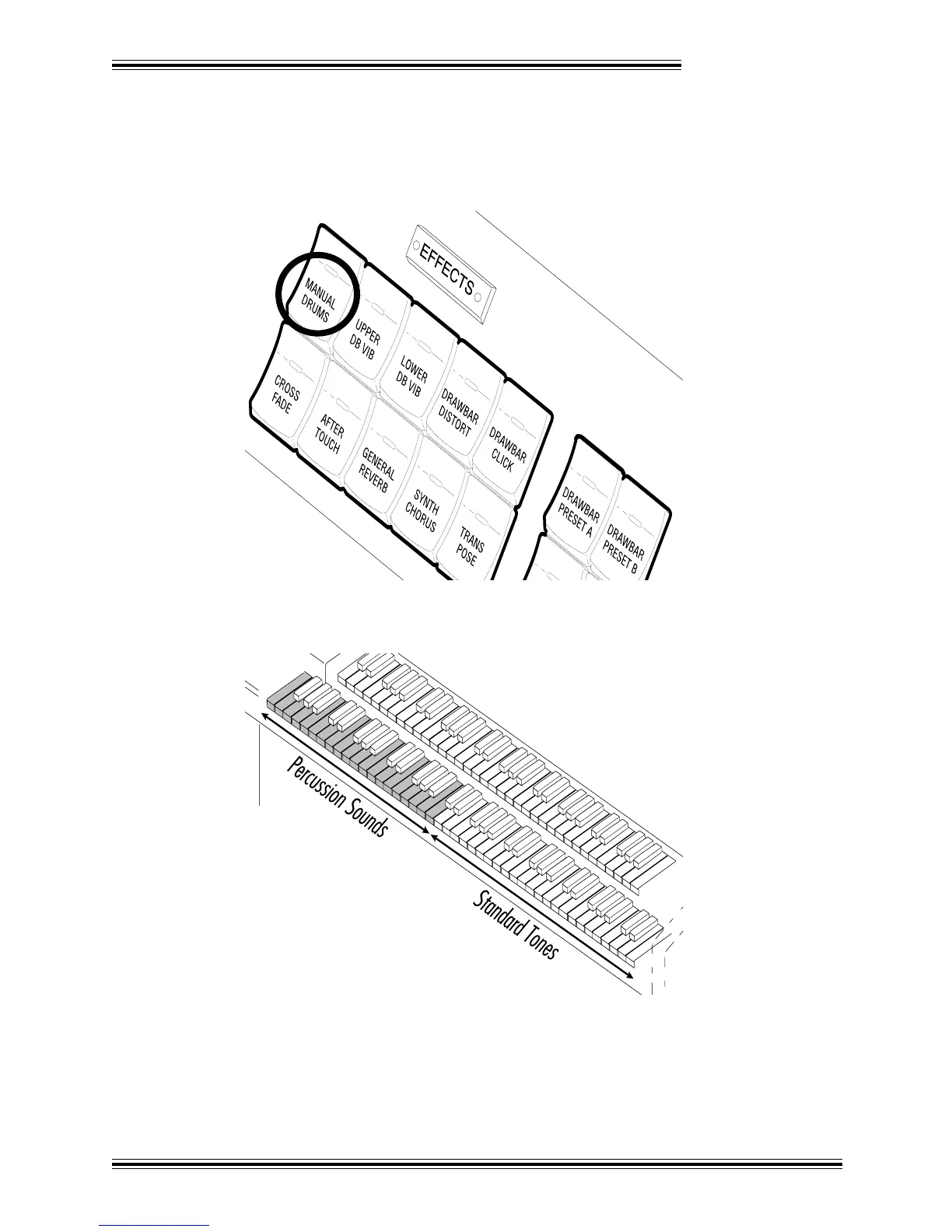
Ê Press the [MANUAL DRUMS] button in the EFFECTS section (on the far left-hand side of the panel)
:
Ë Play the Lower manual (towards the left) and you will hear that a different percussion sound has been
assigned to almost every key. (Note that some keys do not have an assigned sound.)
Ì (in the EDIT section) four or five times until the display stops changing. This simply moves the split
point farther and farther to the right.
Í Press the [NEXT] button until you see the words 'Manual Drums Standard Set 1' in the LCD. By
pressing the [+]/[-] buttons you can now select a different Drum Set (containing different sounds):



 To Next Page