35
Patch Mode
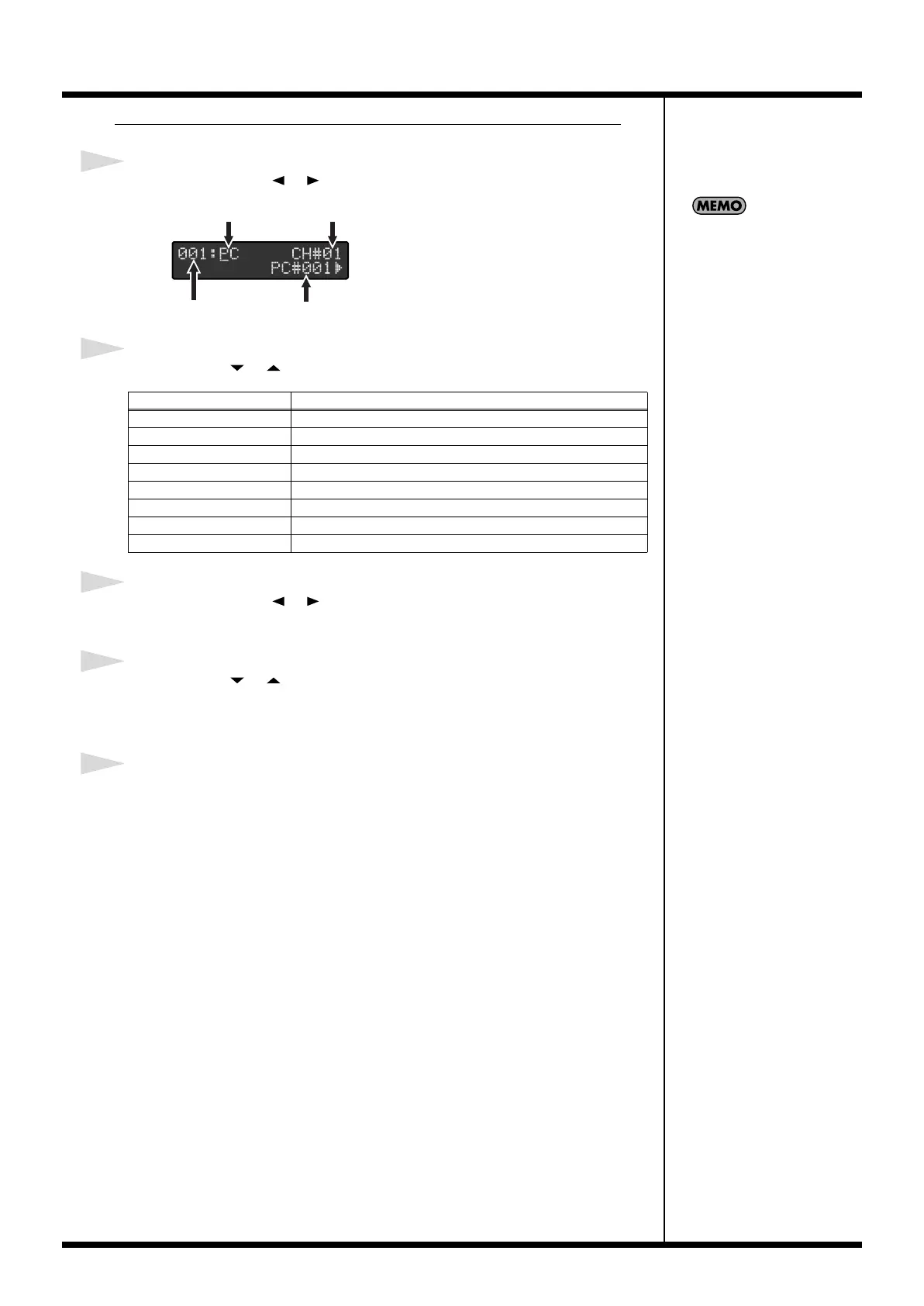
When Setting Channel Messages and Realtime Messages
1
Press PARAMETER [ ] [ ] to move the cursor to the MIDI message.
2
Press VALUE [ ] [ ] to select the MIDI message to be edited.
3
Press PARAMETER [ ] [ ] to move the cursor to the parameter you want
to change.
4
Press VALUE [ ] [ ] to change the value.
If there is any other message you want to change, select the message number as
instructed in Step 4 of
“Editing MIDI Streams”
(p. 34), then repeat Steps 1-4.
5
After making the changes, follow the instructions in “Storing (Saving)
Patches” (p. 44) to save the MIDI messages to a patch.
MIDI Message
Data
PC
MIDI Channel (CH#), Program Number (PC#)
CC MIDI Channel (CH#), Controller Number (CC#), Value (VAL)
N.ON MIDI Channel (CH#), Note Number (NOTE#), Velocity (V)
N.OFF MIDI Channel (CH#), Note Number (NOTE#), Velocity (V)
C.PRS MIDI Channel (CH#), VALUE
K.PRS MIDI Channel (CH#), Note Number (NOTE#), Velocity (V)
P.BEND MIDI Channel (CH#), Value (MSB, LSB)
REALTIME MIDI START/MIDI STOP/MIDI CONTINUE
When the MIDI channel is set
to Tx, the channel set with the
MIDI:Tx Channel parameter in
Utilities is set (p. 52).
DataMessage Number
MIDI Message MIDI Channel
FC-300_e1.book 35 ページ 2007年4月24日 火曜日 午前10時10分



 To Next Page