EasyManua.ls Logo

Roland GI-10 - Component Identification; Front Panel Controls and Connectors; Rear Panel Connectors; Connector Descriptions

Roland GI-10
30 pages
Print Icon
To Next Page IconTo Next Page
To Previous Page IconTo Previous Page
Loading...
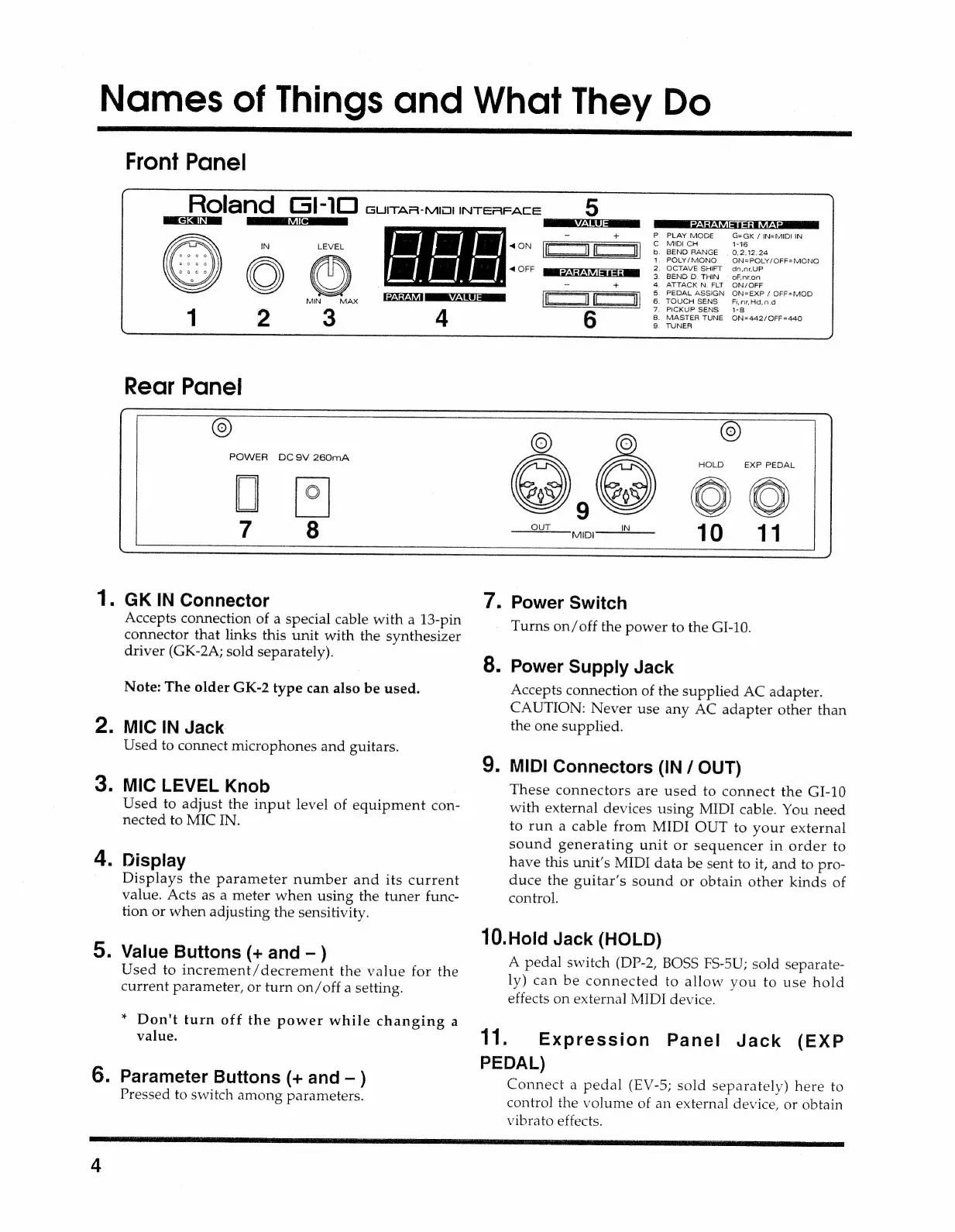
Names
of
Things
and
What
They
Do
if
2.
3.
4.
5.
6.
Front
Panel
Roland
2
3
4
Rear
Panel
Gl
-10
GUITAR-MIO
INTERFACE
=
iin
Oo
oa
VALUE
“PARAMETER
MAP
:
=
+
P.
PLAY
MODE
G=GK
/
IN=MIDI
IN
——
sa
Cc.
MIDI
CH
1-16
AON
i
coco
nance
os
aes
1,
POLY/MONO
=
ON#POLY/OFF=
MONO
“OFF
2.
OCTAVE
SHIFT
dn.nrUP
PARAMETER
3.
BEND
D.
THIN
ofinron
-
+
4.
ATTACK
N.
FLT
ON/OFF
a
5.
PEDAL
ASSIGN
ON=EXP
/
OFF=MOD
ll]
6
TOUCH
SENS
=
FiinrHa,nd
7,
PICKUP
SENS
1-8
6
8.
MASTER
TUNE
ON=442/OFF=440
9,
TUNER
POWER
DC9V
260mA
©
HOLD
EXP
PEDAL
GK
IN
Connector
Accepts
connection
of
a
special
cable
with
a
13-pin
connector
that
links
this
unit
with
the
synthesizer
driver
(GK-2A;
sold
separately).
Note:
The
older
GK-2
type
can
also
be
used.
MIC
IN
Jack
Used
to
connect
microphones
and
guitars.
MIC
LEVEL
Knob
Used
to
adjust
the
input
level
of
equipment
con-
nected
to
MIC
IN.
Display
Displays
the
parameter
number
and
its
current
value.
Acts
as
a
meter
when
using
the
tuner
func-
tion
or
when
adjusting
the
sensitivity.
Value
Buttons
(+
and
)
Used
to
increment/decrement
the
value
for
the
current
parameter,
or
turn
on/off
a
setting.
*
Don't
turn
off
the
power
while
changing
a
value.
Parameter
Buttons
(+
and
)
Pressed
to
switch
among
parameters.
Power
Switch
Turns
on/off
the
power
to
the
GI-10.
Power
Supply
Jack
Accepts
connection
of
the
supplied
AC
adapter.
CAUTION:
Never
use
any
AC
adapter
other
than
the
one
supplied.
MIDI
Connectors
(IN
/
OUT)
These
connectors
are
used
to
connect
the
GI-10
with
external
devices
using
MIDI
cable.
You
need
to
run
a
cable
from
MIDI
OUT
to
your
external
sound
generating
unit
or
sequencer
in
order
to
have
this
unit’s
MIDI
data
be
sent
to
it,
and
to
pro-
duce
the
guitar’s
sound
or
obtain
other
kinds
of
control.
10.Hold
Jack
(HOLD)
11.
A
pedal
switch
(DP-2,
BOSS
FS-5U;
sold
separate-
ly)
can
be
connected
to
allow
you
to
use
hold
effects
on
external
MIDI
device.
Expression
Panel
Jack
(EXP
PEDAL)
Connect
a
pedal
(EV-5;
sold
separately)
here
to
contro]
the
volume
of
an
external
device,
or
obtain
vibrato
effects.

Related product manuals