12
Getting Familiar
1.
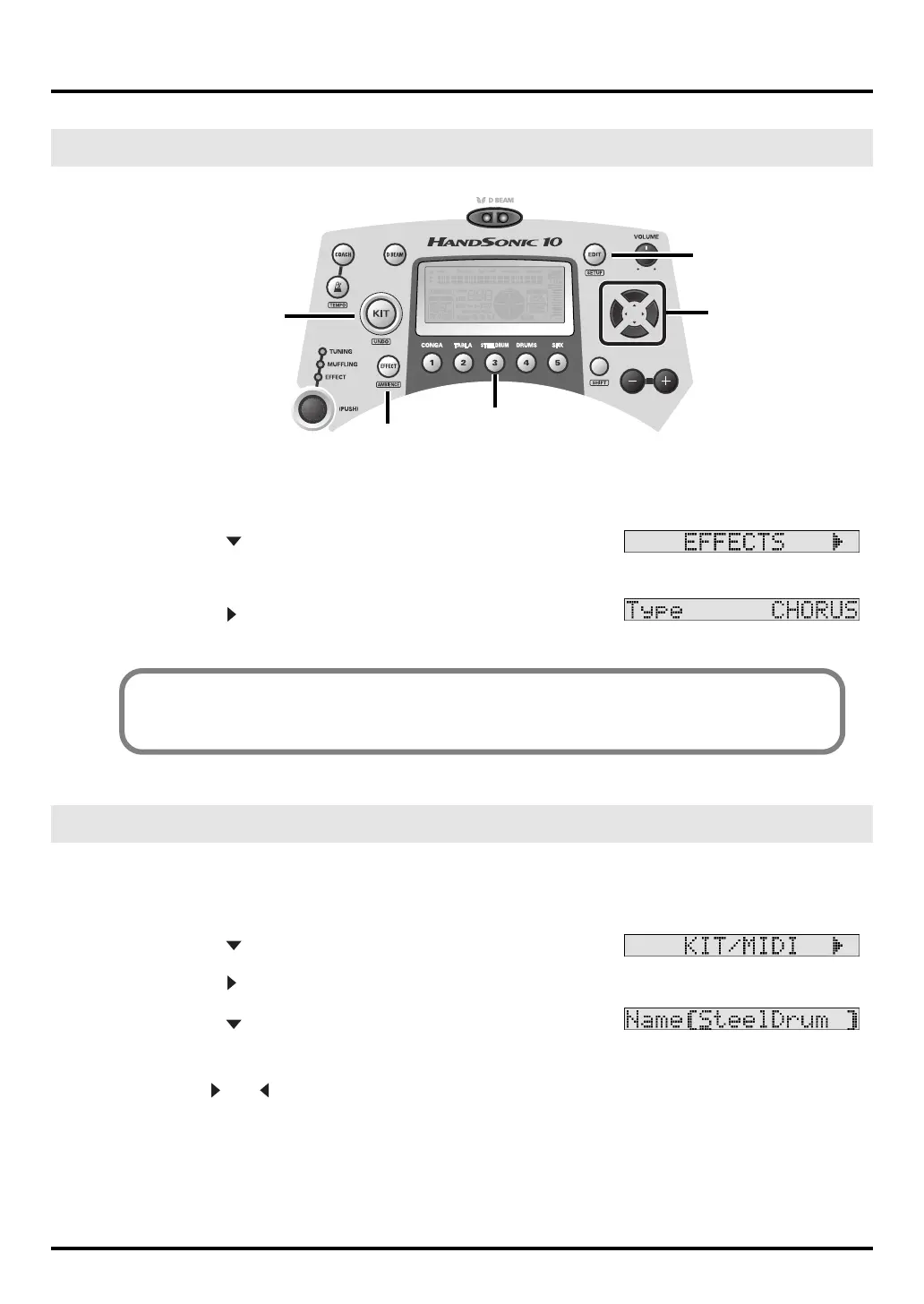
Press [KIT], then press [STEEL DRUM], then [EDIT], so you see
<INST> in the display again.
2.
Press the [ ] cursor until you see <EFFECTS> in the display.
Verify that the [EFFECT] button is also lit.
3.
Press the [ ] and you will see <Type> in the display.
Here is where you can change the effect being used. More about effects will be explained on page 21 and 30.
1.
Press [KIT], then press [STEEL DRUM], then [EDIT] so you see
<INST> in the display again.
2.
Press the [ ] cursor until you see <KIT/MIDI> in the display.
3.
Press the [ ], and you will see <Kit Volume>.
4.
Press the [ ] again and you will see:
5.
Use the [+]/[-] buttons or Control knob to change the name as you desire.
Use the [ ] or [ ] to move between the letters.
EFFECTS (Basic)
Naming a Kit
EDIT Button
CURSOR
KIT Button
STEEL DRUM Button
EFFECT Button
Short Cut Access to Effects Editing
While holding down the [EDIT] button, press [EFFECT].
HPD-10_e1.book 12 ページ 2006年4月7日 金曜日 午後2時14分


 To Next Page
 Loading...