Owner’s Manual
9
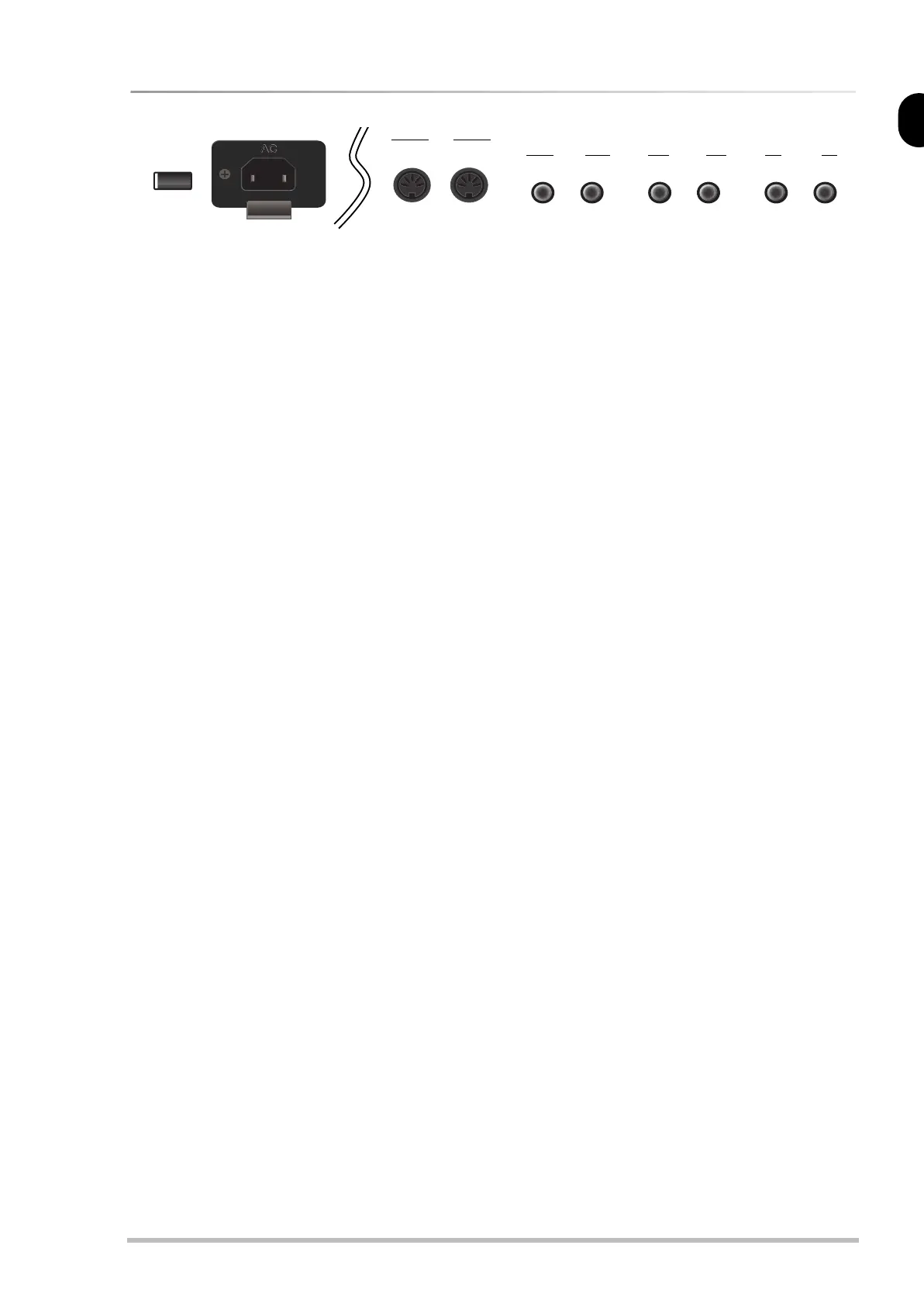
Rear panel
A
POWER button
Press this button to switch the RD-170 on and
off.
B
AC socket
This is where you need to connect the supplied
power cord.
C
MIDI IN & OUT sockets
If you wish to control an external instrument
from your RD-170, connect its MIDI IN jack to
the RD-170 MIDI OUT socket.
To control the RD-170 using an external MIDI
instrument (sequencer, synthesizer, etc.), con-
nect its MIDI IN socket to the MIDI OUT socket
of the external instrument.
D
PEDAL DAMPER socket
This is where you can connect the supplied
damper pedal that will function as Hold pedal
(and sustain the notes you are playing) with
half-pedal functionality.
E
PEDAL SOFT/EXPR. socket
This is where you can connect either an
optional DP-2, DP-6, or BOSS FS-5U footswitch
or an optional EV-5 expression pedal. If you
connect a footswitch, you can select the Soft or
Sostenuto function. If you connect an EV-5
pedal, it will function as expression pedal for
swelling effects.
Note: In either case, you can select whether the foot-
switch/expression affects only one part (Upper or
Lower) or both.
Note: Do not connect the supplied damper pedal to this
socket.
Note: See p. 30 for how to specify what exactly hap-
pens when you connect a footswitch or expression
pedal to the SOFT/EXPR. socket.
F
OUTPUT [R], [L/MONO] sockets
Connect these sockets to a keyboard amplifier
(KC series), your HiFi set, a pair of active speak-
ers (of the Roland MA series), etc. The RD-170
does not contain speakers.
G
PHONES 1 & 2 sockets
This is where you can connect optional stereo
headphones (e.g. of the Roland RH series). Feel
free to use either or both jacks simultaneously.
MIDI
PEDAL
OUTPUT PHONES
DAMPER R 1 2L (MONO)SOFT/
EXPR.
OUT IN
AB EF GCD
RD-170 OM_GB Page 9 Monday, March 17, 2003 10:23 AM


 To Next Page