16
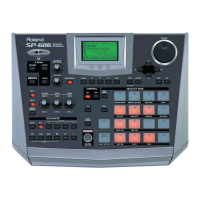
Top, Front, and Rear Panels
fig.top-panel
1
D BEAM controller
By placing your hand above this you can apply various
effects to a pattern or sample. (p. 72)
TRIGGER button
This lets you use the D Beam controller to play pads as an
alternative to striking the pads. (p. 72)
SYNTH button
This lets you use the D Beam controller to control the
pitch of a monophonic synthesizer. (p. 72)
FILTER button
This lets you use the D Beam controller to control a filter
that has an extremely steep slope. (p. 72)
2
V-LINK button
This turns V-LINK on/off. (p. 75)
Top Panel
1
2
3
5
67
4
SP-606_e.book 16 ページ 2004年6月21日 月曜日 午前10時8分


 To Next Page
 Loading...