Video Operations
33
Applying Eects to Video
You can apply eects to the main output video.
The VR-3EX has 11 types of built-in lter eects, including Afterimage and Colorize.
By factory default, “COLOR PASS” (FX1) and “SEPIA” (FX2) are assigned to the [VIDEO FX] knob. Changing the assigned eects enables you to use
dierent ones.
Selecting an Eect
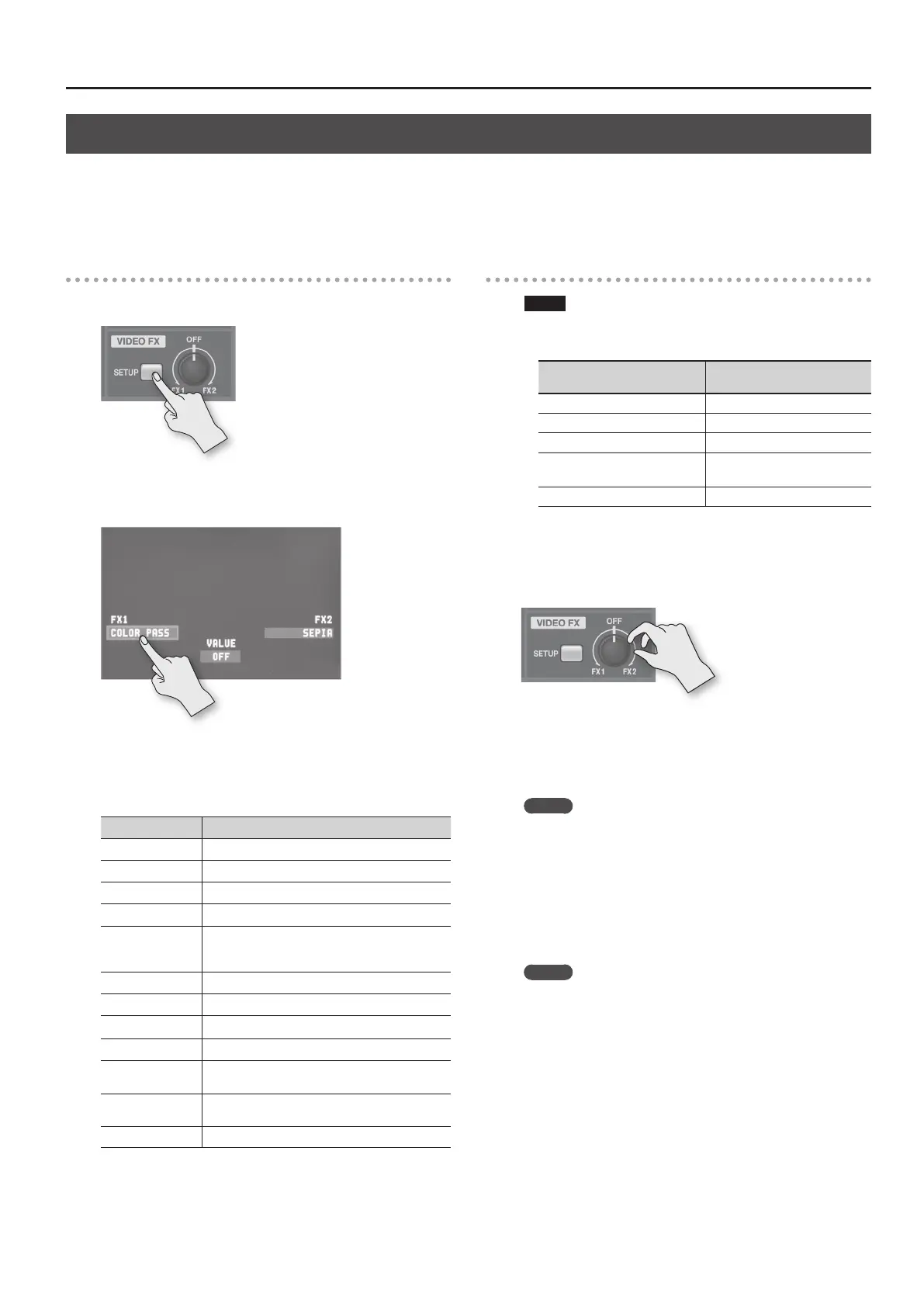
1. Press the VIDEO FX [SETUP] button.
The setup screen for eects is displayed.
2. Touch <FX1> or <FX2>.
You can assign separate eects to the counterclockwise (FX1) and
clockwise (FX2) directions of the [VIDEO FX] knob.
3. Turn the [VALUE] knob to change the eect.
Eect name Explanation
STROBE This adds a stop-motion eect to the video.
NEGATIVE This inverts the brightness and colors.
COLORIZE This adds color to the video.
FINDEDGE This extracts contours.
SILHOUETTE
This separates the video into light and dark areas,
and makes the dark areas black and adds a dierent
color to the light areas.
MONOCHROME This produces monochrome video.
SEPIA This adds a sepia eect to the video.
EMBOSS This adds a bas-relief eect to the video.
POSTERIZE This changes the gradations in brightness.
COLOR PASS
This produces monochrome video with a specic
color remaining.
MULTI
This divides the video vertically or horizontally to
produce multiple screens.
OFF This assigns no eect.
5. Press the VIDEO FX [SETUP] button to quit the setup
screen.
Applying an Eect
NOTE
Some eects cannot be used simultaneously with certain
compositing eects or transition eects.
Compositing/transition eect
Eects that cannot be used
simultaneously
PinP SILHOUETTE, MULTI
SPLIT SILHOUETTE, MULTI
QUAD STROBE, SILHOUETTE, MULTI
WIPE
* When Slide or Stretch is selected.
MULTI
WIPE SILHOUETTE
1. Output the video to which you want to apply an eect
(p. 24).
2. Turn the [VIDEO FX] knob to apply the eect.
Turning the [VIDEO FX] knob counterclockwise applies the “FX1”
eect. Turning it clockwise applies the “FX2” eect.
3. Turn the [VIDEO FX] knob to adjust the amount of eect
applied.
MEMO
The following eects are only switched on and o by the
[VIDEO FX] knob.
• MONOCHROME
• SEPIA
• EMBOSS
4. When you want to turn o an eect, return the [VIDEO FX]
knob to its “OFF” position.
MEMO
When the “FX1” and “FX2” eects are set to “OFF” (no assigned
eect), turning the [VIDEO FX] knob applies no eect.
This can help prevent inadvertently applying an eect to video
through mistaken operation of the [VIDEO FX] knob.



 To Next Page