Page | 43
CONNECTING THE PS1 SWITCH
Caution! Switch off the power to the RSC controller prior to installing the receiver board!
Caution! Use only supply cables with the following characteristics: Telephone line J-Y(ST)Y
2x2 x 0.6 mm², or identical construction.
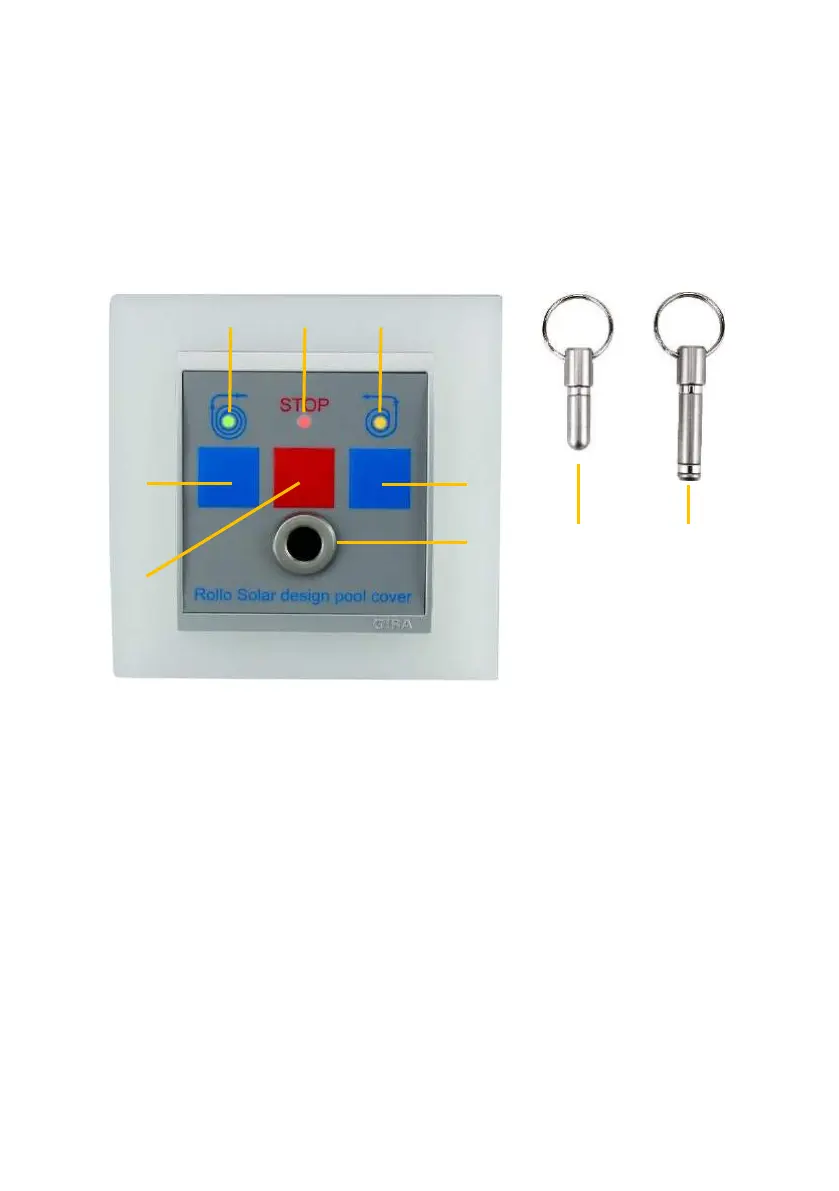
(1) LED (green) – roller shutter ‘ZU’ (CLOSED)
(2) LED (red) – ‘STOP’ roller shutter
(3) LED (yellow) – roller shutter ‘AUF’ (OPEN)
(4) ‘AUF’ (OPEN) operating switch
(5) ‘STOP’ operating switch
(6) ‘ZU’ (CLOSED) operating switch
(7) Unlocking the operating switch with the key (key sleeve)
(8) Customer key (one ring)
(9) Service key (two rings)



 To Next Page