Page | 53
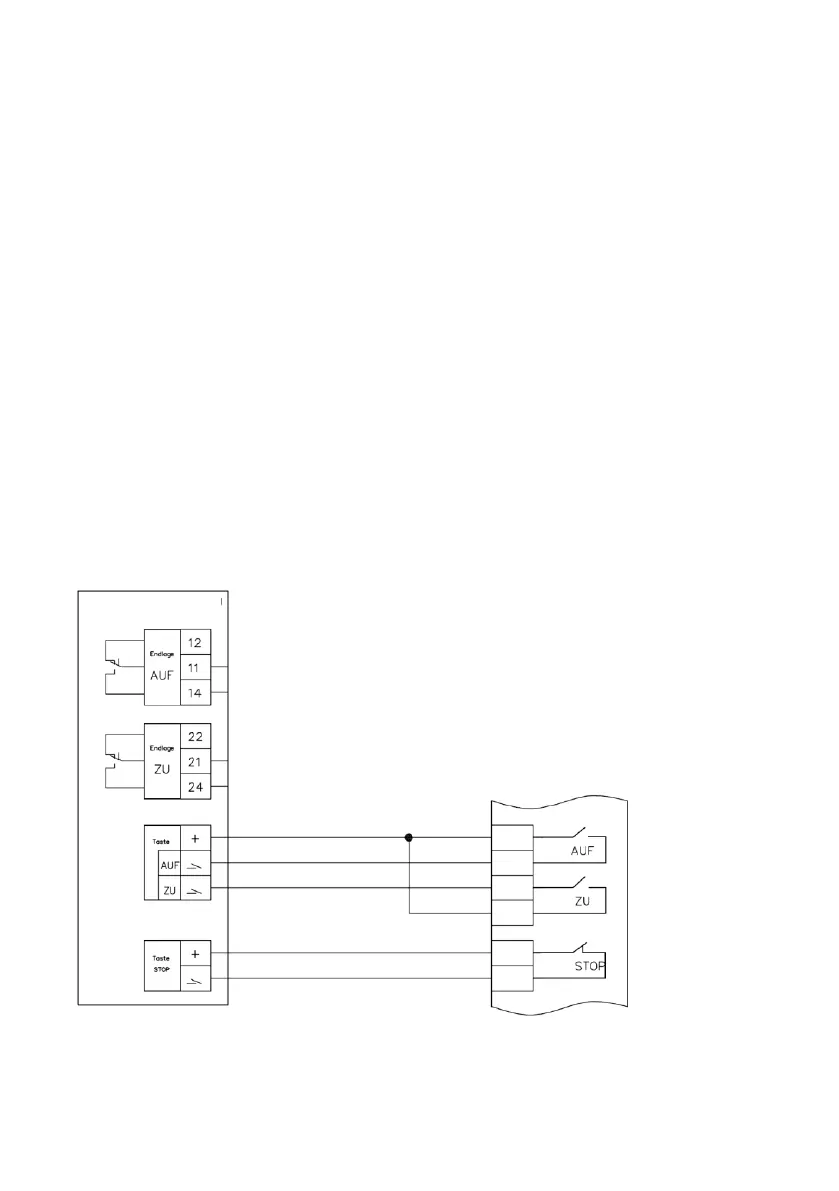
CONNECTION BETWEEN BUS – / EIB – SYSTEM
Electrical connection diagram for RSC and RSC-Pro cover controller with BUS/EIB
Description:
Any BUS/EIB controller can be connected to the RSC cover controller. It is important to
note here that the direct BUS/EIB signal is not connected to the controller. Instead, only
the contact outputs of the system-dependent actuator are connected with our control
board.
To do this, we need two ‘normally open contacts’ for AUF (OPEN) and ZU (CLOSED)
commands and one ‘normally closed contact’ for the stop command. All contacts
should be programmed with 1–2 second pulse outputs! The three commands (AUF
(OPEN)/STOP/ZU (CLOSED)) should be provided on the control panel. The roller cover
must be kept within sight at all times! Operating mode settings for the RSC controller
are made in automatic mode.
Cover control – Rollo Solar RSC



 To Next Page