4
4‑4
HYDRAULIC SYSTEM OIL LEVEL
OL1D-SM-GB02D
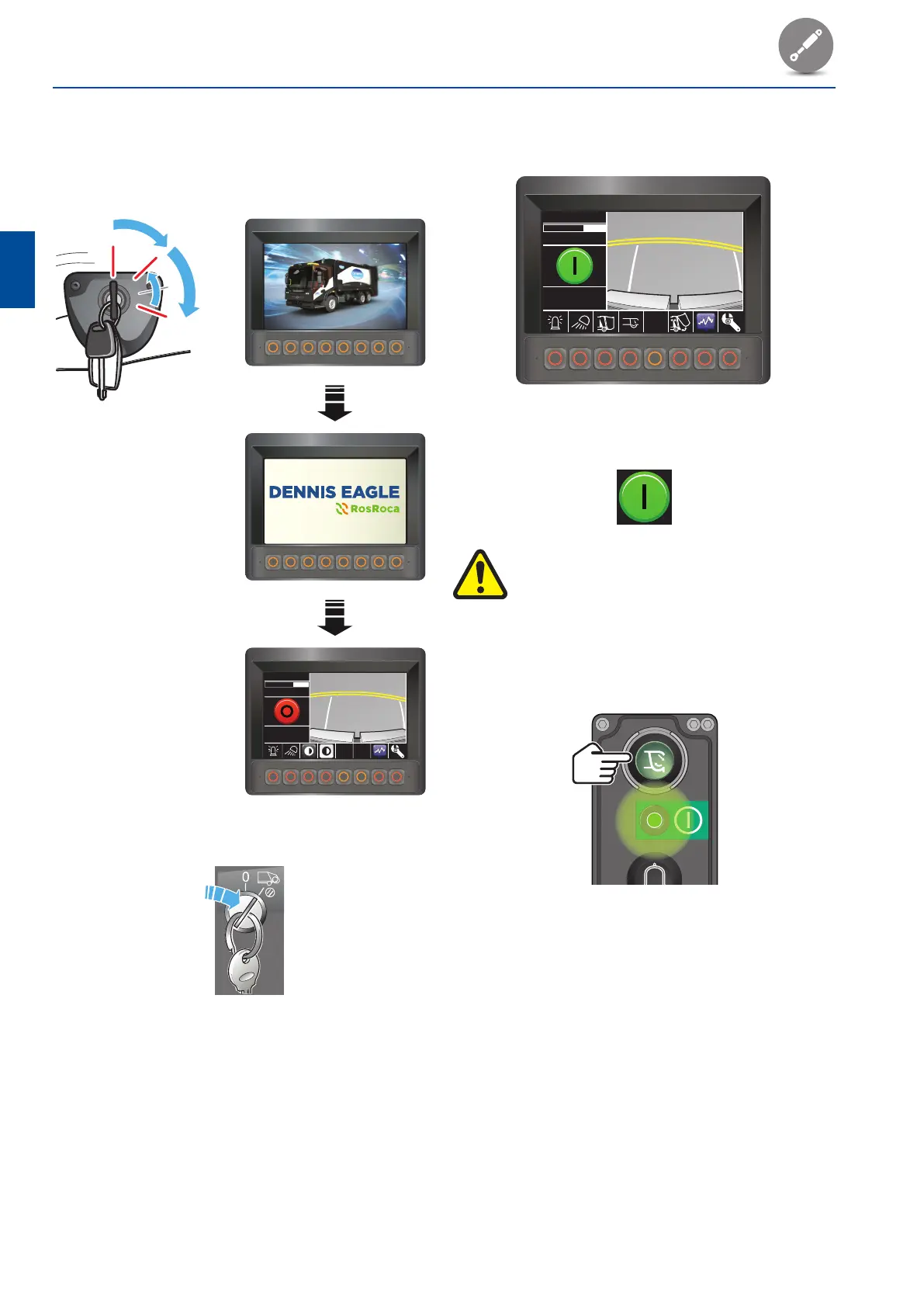
• The screen will display the ‘Body system run’
mode.
Hyd Oil Temp 32
o
C
01.06.2013 09:00:00
0 No errors
0 No errors
0 No errors
Check that the ‘System on’ pictogram displays in the
message area of the screen.
WARNING:
IF A WARNING PICTOGRAM DISPLAYS
IN THE MESSAGE AREA OF THE SCREEN,
INVESTIGATE AND RECTIFY THE CAUSE OF
THE WARNING BEFORE OPERATING THE
SYSTEM.
8. Press the ‘Start pack cycle’ push‑button on the
energised compaction mechanism control panel.
6. Switch the ignition on, then start and run the
engine.
• The cab control panel will initialise and then
display the ‘Body system off’ mode.
I
0
II
III
2748-DS002-OL1-D-GB-G2
01.06.2013
Hyd Oil Temp
09:00:00
32
o
C
0 No errors
0 No errors
0 No errors
7. Turn the ‘Body main’ switch on.



 To Next Page