SFC-6901 User Guide (v1.0) Gearbox Setup • 23
Gearbox Setup
This chapter outlines how to specify the SFC-6901 Gearbox mode.
For More Information on...
• bypassing the Gearbox feature, refer to “Bypassing the Gearbox”.
• the default I/O mapping when selecting a Gearbox DEMUX mode, refer to Table 3.
• the default I/O mapping when selecting a Gearbox MUX mode, refer to Table 4.
Before You Begin
Keep the following in mind:
• All signals must be at the same rate and format.
• All signals must be synchronized to one another (genlocked).
• Each signal must be within 237 samples of link 1.
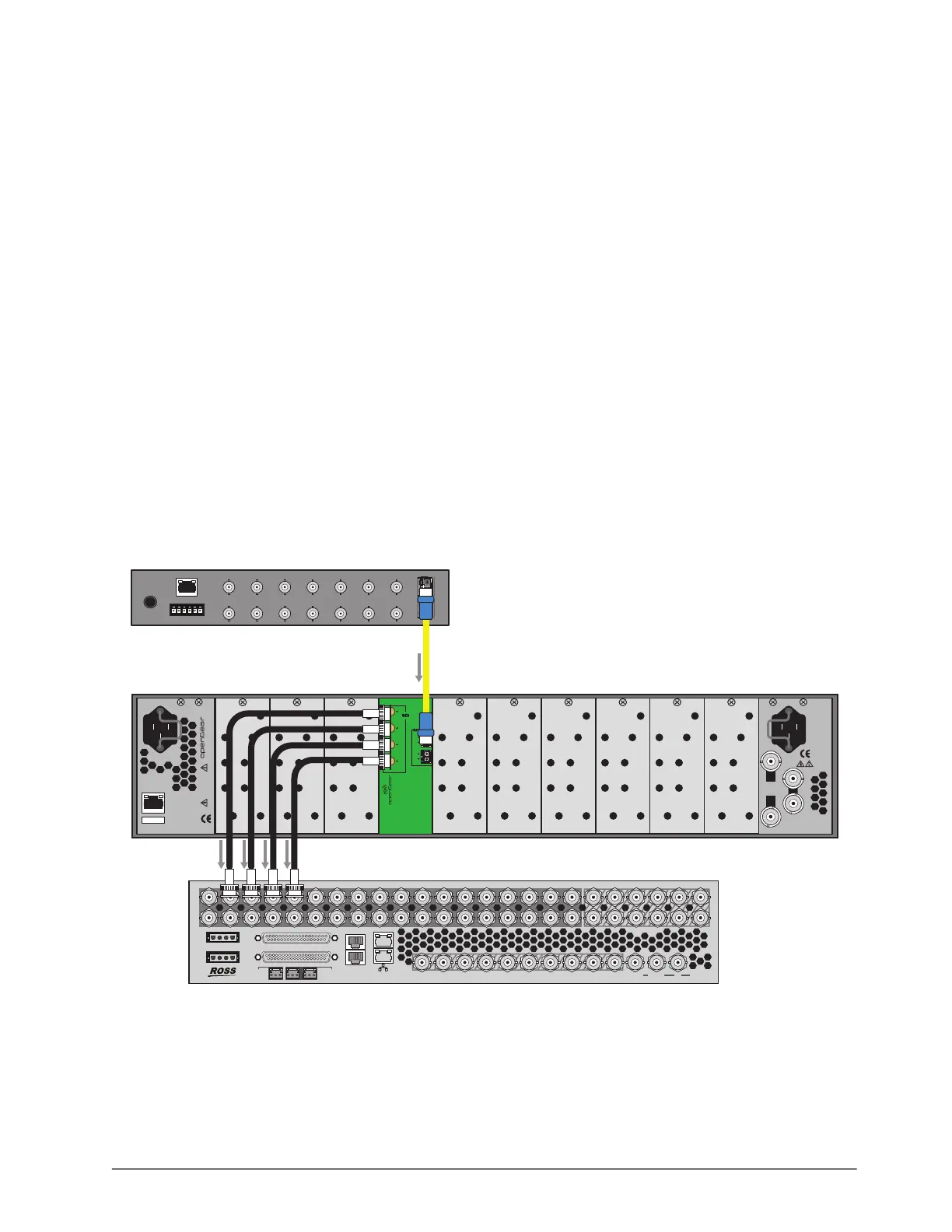
Configuring the SFC-6901 for De-multiplexing
Configure the SFC-6901 using one of the provided DEMUX modes. Selecting a mode automatically
sets the signal types for the Gearbox and maps the I/O for the rear module.
Figure 5 Example of De-multiplexing Setup
To assign the SFC-6901 to a Gearbox DEMUX mode
1. Display the SFC-6901 interface as outlined in “To access the SFC-6901 interfaces in
DashBoard”.
2. Select the Configuration tab.
OGX-FR Series Frame
PS1
100-240V~50-60Hz 600W
CAUTION: RISK OF SHOCK
DO NOT OPEN
REF 1
LOOP
REF 2
LOOP
PS2
ETHERNET
100-240V~50-60Hz 600W
CAUTION
RISK OF SHOCK
DO NOT OPEN
OGX-FR
SFC-6901
DA
1B
1A
2B
2A
2
3
1
4
Single-link 12Gbps
UHD Camera
12Gbps SDI Source
PORT 1 PORT 2 PORT 3 PORT 4 PORT 5 PORT 6 PORT 7
PORT 9 PORT 10 PORT 11 PORT 12 PORT 13 PORT 14 PORT 15
PSU
3Gbps
3Gbps
3Gbps
Production Switcher
SDI Frame
IN
19
1
20
2
21
3
22
4
23
5
24
6
25
7
26
8
27
9
28
10
29
11
30
12
31
13
32
14
33
15
34
16
35
17
36
18
17
11
18
12
19
13
20
14
22
16
21
15
1
1
PANEL
SERIAL
GPIO
TALLY
PS2
PS1
AES
1 2
LTC
2
OUT
2 3 4 5 6 7 8 9 10 OUT1
OUT
OUT2 IN REF
3Gbps



 To Next Page