EasyManua.ls Logo

Rotel RA-935BX - Understanding the Controls; Volume Control Operation; Input Selection Controls; General Operation Precautions

Rotel RA-935BX
5 pages
Print Icon
To Next Page IconTo Next Page
To Previous Page IconTo Previous Page
Loading...
©
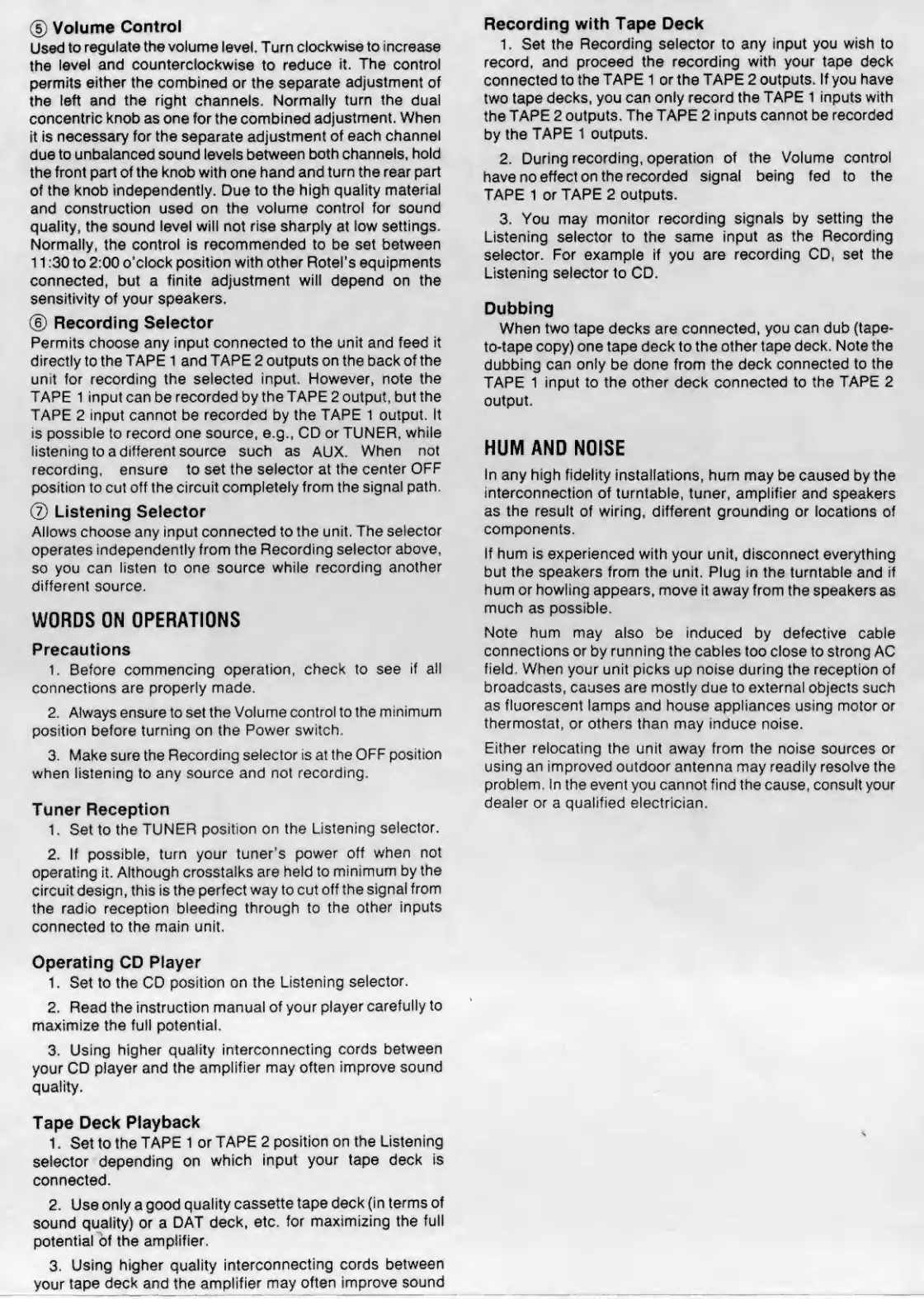
Volume
Control
Used
to
regulate
the
volume
level.
Turn
clockwise
to
increase
the
level
and
counterclockwise
to
reduce
it.
The
control
permits
either
the
combined
or
the
separate
adjustment
of
the
left
and
the
right
channels.
Normally
turn
the
dual
concentric
knob
as
one
for
the
combined
adjustment.
When
it
is
necessary
for
the
separate
adjustment
of
each
channel
due
to
unbalanced
sound
levels
between
both
channels,
hold
the
front
part
of
the
knob
with
one
h
and
and
turn
the
rear
part
of
the
knob
independently.
Due
to
the
high
quality
material
and
construction
used
on
the
volume
control
for
sound
quality,
the
sound
level
will
not
rise
sharply
at
low
settings.
Normally,
the
control
is
recommended
to
be
set
between
11:30
to
2:00
o’clock
position
with
other
Rotel's
equipments
connected,
but
a
finite
adjustment
will
depend
on
the
sensitivity
of
your
speakers.
©
Recording
Selector
Permits
choose
any
input
connected
to
the
unit
and
feed
it
directly
to
the
TAPE
1
and
TAPE
2
outputs
on
the
back
of
the
unit
for
recording
the
selected
input.
However,
note
the
TAPE
1
input
can
be
recorded
by
the
TAPE
2
output,
but
the
TAPE
2
input
cannot
be
recorded
by
the
TAPE
1
output.
It
is
possible
to
record
one
source,
e.g.,
CD
or
TUNER,
while
listening
to
a
different
source
such
as
AUX.
When
not
recording,
ensure
to
set
the
selector
at
the
center
OFF
position
to
cut
off
the
circuit
completely
from
the
signal
path.
©
Listening
Selector
Allows
choose
any
input
connected
to
the
unit.
The
selector
operates
independently
from
the
Recording
selector
above,
so
you
can
listen
to
one
source
while
recording
another
different
source.
WORDS
ON
OPERATIONS
Precautions
1,
Before
commencing
operation,
check
to
see
if
all
connections
are
properly
made.
2,
Always
ensure
to
set
the
Volume
control
to
the
minimum
position
before
turning
on
the
Power
switch.
3,
Make
sure
the
Recording
selector
is
at
the
OFF
position
when
listening
to
any
source
and
not
recording.
Tuner
Reception
1.
Set
to
the
TUNER
position
on
the
Listening
selector.
2.
If
possible,
turn
your
tuner's
power
off
when
not
operating
it.
Although
crosstalks
are
held
to
minimum
by
the
circuit
design,
this
is
the
perfect
way
to
cut
off
the
signal
from
the
radio
reception
bleeding
through
to
the
other
inputs
connected
to
the
main
unit.
Operating
CD
Player
1.
Set
to
the
CD
position
on
the
Listening
selector.
2.
Read
the
instruction
manual
of
your
player
carefully
to
maximize
the
full
potential,
3.
Using
higher
quality
interconnecting
cords
between
your
CD
player
and
the
amplifier
may
often
improve
sound
quality.
Tape
Deck
Playback
1.
Set
to
the
TAPE
1
or
TAPE
2
position
on
the
Listening
selector
depending
on
which
input
your
tape
deck
is
connected.
2.
Use
only
a
good
quality
cassette
tape
deck
(in
terms
of
sound
quality)
or
a
DAT
deck,
etc.
for
maximizing
the
full
potential
of
the
amplifier.
3.
Using
higher
quality
interconnecting
cords
between
your
tape
deck
and
the
amplifier
may
often
improve
sound
Recording
with
Tape
Deck
1.
Set
the
Recording
selector
to
any
input
you
wish
to
record,
and
proceed
the
recording
with
your
tape
deck
connected
to
the
TAPE
1
or
the
TAPE
2
outputs.
If
you
have
two
tape
decks,
you
can
only
record
the
TAPE
1
inputs
with
the
TAPE
2
outputs.
The
TAPE
2
inputs
cannot
be
recorded
by
the
TAPE
1
outputs.
2.
During
recording,
operation
of
the
Volume
control
have
no
effect
on
the
recorded
signal
being
fed
to
the
TAPE
1
or
TAPE
2
outputs.
3.
You
may
monitor
recording
signals
by
setting
the
Listening
selector
to
the
same
input
as
the
Recording
selector.
For
example
if
you
are
recording
CD,
set
the
Listening
selector
to
CD.
Dubbing
When
two
tape
decks
are
connected,
you
can
dub
(tape-
to-tape
copy)
one
tape
deck
to
the
other
tape
deck.
Note
the
dubbing
can
only
be
done
from
the
deck
connected
to
the
TAPE
1
input
to
the
other
deck
connected
to
the
TAPE
2
output.
HUM
AND
NOISE
In
any
high
fidelity
installations,
hum
may
be
caused
by
the
interconnection
of
turntable,
tuner,
amplifier
and
speakers
as
the
result
of
wiring,
different
grounding
or
locations
of
components.
If
hum
is
experienced
with
your
unit,
disconnect
everything
but
the
speakers
from
the
unit,
Plug
in
the
turntable
and
if
hum
or
howling
appears,
move
it
away
from
the
speakers
as
much
as
possible.
Note
hum
may
also
be
induced
by
defective
cable
connections
or
by
running
the
cables
too
close
to
strong
AC
field.
When
your
unit
picks
up
noise
during
the
reception
of
broadcasts,
causes
are
mostly
due
to
external
objects
such
as
fluorescent
lamps
and
house
appliances
using
motor
or
thermostat,
or
others
than
may
induce
noise.
Either
relocating
the
unit
away
from
the
noise
sources
or
using
an
improved
outdoor
antenna
may
readily
resolve
the
problem.
In
the
event
you
cannot
find
the
cause,
consult
your
dealer
or
a
qualified
electrician.

Other manuals for Rotel RA-935BX

Related product manuals