EasyManua.ls Logo

Rotel RCD-965BX - Loading a Disc

Rotel RCD-965BX
8 pages
Print Icon
To Next Page IconTo Next Page
To Previous Page IconTo Previous Page
Loading...
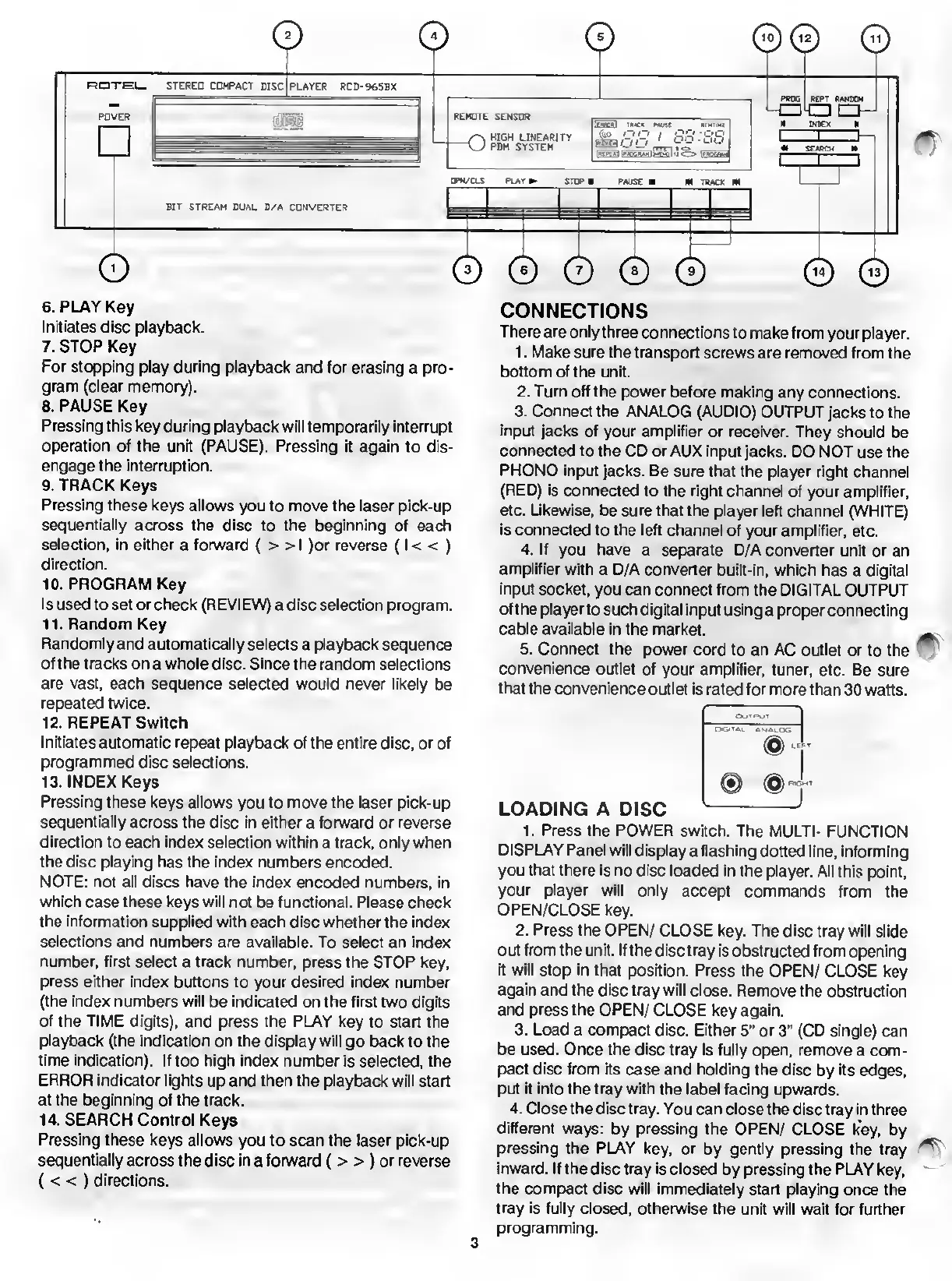
6.
PLAY
Key
Initiates
disc
playback.
7.
STOP
Key
For
stopping
play
during
playback
and
for
erasing
a
pro¬
gram
(clear
memory).
8.
PAUSE
Key
Pressing
this
key
during
playback
will
temporarily
interrupt
operation
of
the
unit
(PAUSE).
Pressing
it
again
to
dis¬
engage
the
interruption.
9.
TRACK
Keys
Pressing
these
keys
allows
you
to
move
the
laser
pick-up
sequentially
across
the
disc
to
the
beginning
of
each
selection,
in
either
a
forward
(
>
>
I
)or
reverse
(I
<
<
)
direction.
10.
PROGRAM
Key
Is
used
to
set
or
check
(REVIEW)
a
disc
selection
program.
11.
Random
Key
Randomly
and
automatically
selects
a
playback
sequence
of
the
tracks
on
a
whole
disc.
Since
the
random
selections
are
vast,
each
sequence
selected
would
never
likely
be
repeated
twice.
12.
REPEAT
Switch
Initiates
automatic
repeat
playback
of
the
entire
disc,
or
of
programmed
disc
selections.
13.
INDEX
Keys
Pressing
these
keys
allows
you
to
move
the
laser
pick-up
sequentially
across
the
disc
in
either
a
forward
or
reverse
direction
to
each
index
selection
within
a
track,
only
when
the
disc
playing
has
the
index
numbers
encoded.
NOTE:
not
all
discs
have
the
index
encoded
numbers,
in
which
case
these
keys
will
not
be
functional.
Please
check
the
information
supplied
with
each
disc
whether
the
index
selections
and
numbers
are
available.
To
select
an
index
number,
first
select
a
track
number,
press
the
STOP
key,
press
either
index
buttons
to
your
desired
index
number
(the
index
numbers
will
be
indicated
on
the
first
two
digits
of
the
TIME
digits),
and
press
the
PLAY
key
to
start
the
playback
(the
indication
on
the
display
will
go
back
to
the
time
indication).
If
too
high
index
number
is
selected,
the
ERROR
indicator
lights
up
and
then
the
playback
will
start
at
the
beginning
of
the
track.
14.
SEARCH
Control
Keys
Pressing
these
keys
allows
you
to
scan
the
laser
pick-up
sequentially
across
the
disc
in
a
forward
(
>
>
)
or
reverse
(
<
<
)
directions.
CONNECTIONS
There
are
only
three
connections
to
make
from
your
player.
1.
Make
sure
the
transport
screws
are
removed
from
the
bottom
of
the
unit.
2.
Turn
off
the
power
before
making
any
connections.
3.
Connect
the
ANALOG
(AUDIO)
OUTPUT
jacks
to
the
input
jacks
of
your
amplifier
or
receiver.
They
should
be
connected
to
the
CD
or
AUX
input
jacks.
DO
NOT
use
the
PHONO
input
jacks.
Be
sure
that
the
player
right
channel
(RED)
is
connected
to
the
right
channel
of
your
amplifier,
etc.
Likewise,
be
sure
that
the
player
left
channel
(WHITE)
is
connected
to
the
left
channel
of
your
amplifier,
etc.
4.
If
you
have
a
separate
D/A
converter
unit
or
an
amplifier
with
a
D/A
converter
built-in,
which
has
a
digital
input
socket,
you
can
connect
from
the
DIGITAL
OUTPUT
of
the
player
to
such
digital
input
using
a
proper
connecting
cable
available
in
the
market.
5.
Connect
the
power
cord
to
an
AC
outlet
or
to
the
convenience
outlet
of
your
amplifier,
tuner,
etc.
Be
sure
that
the
convenience
outlet
is
rated
for
more
than
30
watts.
LOADING
A
DISC
1.
P
ress
the
POWER
switch.
The
MULTI-
FUNCTION
DISPLAY
Panel
will
display
a
flashing
dotted
line,
informing
you
that
there
is
no
disc
loaded
in
the
player.
All
this
point,
your
player
will
only
accept
commands
from
the
OPEN/CLOSE
key.
2.
Press
the
OPEN/
CLOSE
key.
The
disc
tray
will
slide
out
from
the
unit.
If
the
disc
tray
is
obstructed
from
opening
it
will
stop
in
that
position.
Press
the
OPEN/
CLOSE
key
again
and
the
disc
tray
will
close.
Remove
the
obstruction
and
press
the
OPEN/
CLOSE
key
again.
3.
Load
a
compact
disc.
Either
5"
or
3"
(CD
single)
can
be
used.
Once
the
disc
tray
is
fully
open,
remove
a
com¬
pact
disc
from
its
case
and
holding
the
disc
by
its
edges,
put
it
into
the
tray
with
the
label
facing
upwards.
4.
Close
the
disc
tray.
You
can
close
the
disc
tray
in
three
different
ways:
by
pressing
the
OPEN/
CLOSE
key,
by
pressing
the
PLAY
key,
or
by
gently
pressing
the
tray
inward.
If
the
disc
tray
is
closed
by
pressing
the
PLAY
key,
the
compact
disc
will
immediately
start
playing
once
the
tray
is
fully
closed,
otherwise
the
unit
will
wait
for
further
programming.
3

Related product manuals