EasyManua.ls Logo

Rotel RCD-965BX - Disc Care and Troubleshooting Guide; Common Operational Faults and Causes

Rotel RCD-965BX
8 pages
Print Icon
To Next Page IconTo Next Page
To Previous Page IconTo Previous Page
Loading...
and
then
PLAY
symbol
will
appear.
(When
selecting
’10’,
press
’1’
and
'O’
successively
and
quickly,
and
so
on
for
’11'
and
above
correspondingly.)
-The
direct
random
access
to
the
track
selection
will
also
^make
the
programming
simpler.
Just
press
any
desired
number
on
the
10-
key
and
push
the
PROGRAM
key.
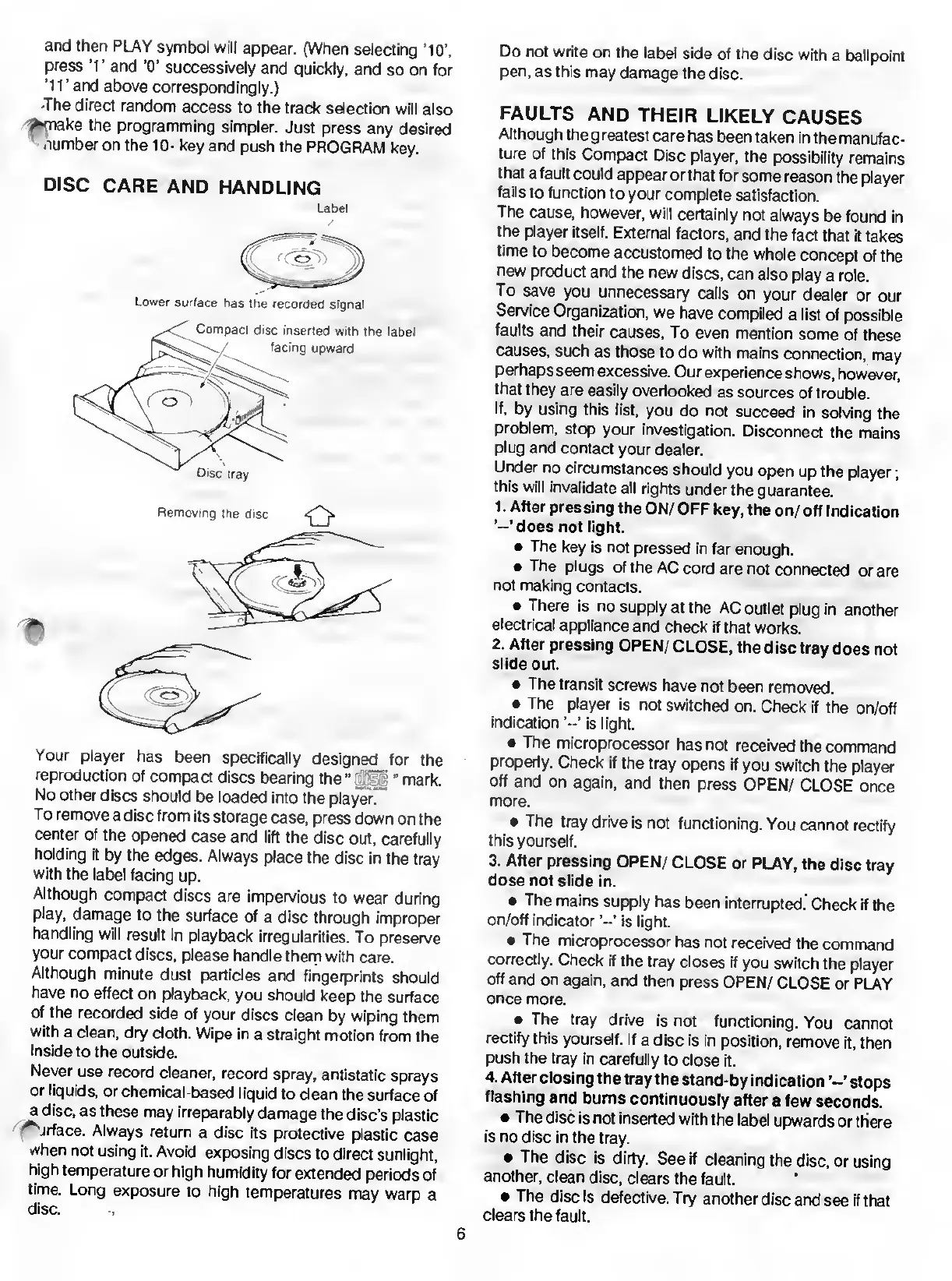
DISC
CARE
AND
HANDLING
Label
Lower
surface
has
the
recorded
signal
Your
player
has
been
specifically
designed
for
the
reproduction
of
compact
discs
bearing
the"
"
mark.
No
other
discs
should
be
loaded
into
the
player”
To
remove
a
disc
from
its
storage
case,
press
down
on
the
center
of
the
opened
case
and
lift
the
disc
out,
carefully
holding
it
by
the
edges.
Always
place
the
disc
in
the
tray
with
the
label
facing
up.
Although
compact
discs
are
impervious
to
wear
during
play,
damage
to
the
surface
of
a
disc
through
improper
handling
will
result
in
playback
irregularities.
To
preserve
your
compact
discs,
please
handle
them
with
care.
Although
minute
dust
particles
and
fingerprints
should
have
no
effect
on
playback,
you
should
keep
the
surface
of
the
recorded
side
of
your
discs
clean
by
wiping
them
with
a
clean,
dry
cloth.
Wipe
in
a
straight
motion
from
the
inside
to
the
outside.
Never
use
record
cleaner,
record
spray,
antistatic
sprays
or
liquids,
or
chemical-based
liquid
to
clean
the
surface
of
a
disc,
as
these
may
irreparably
damage
the
disc’s
plastic
^
jrface.
Always
return
a
disc
its
protective
plastic
case
when
not
using
it.
Avoid
exposing
discs
to
direct
sunlight,
high
temperature
or
high
humidity
for
extended
periods
of
time.
Long
exposure
to
high
temperatures
may
warp
a
disc.
Do
not
write
on
the
label
side
of
the
disc
with
a
ballpoint
pen,
as
this
may
damage
the
disc.
FAULTS
AND
THEIR
LIKELY
CAUSES
Although
the
greatest
care
has
been
taken
in
the
manufac¬
ture
of
this
Compact
Disc
player,
the
possibility
remains
that
a
fault
could
appear
or
that
for
some
reason
the
player
fails
to
function
to
your
complete
satisfaction.
The
cause,
however,
will
certainly
not
always
be
found
in
the
player
itself.
External
factors,
and
the
fact
that
it
takes
time
to
become
accustomed
to
the
whole
concept
of
the
new
product
and
the
new
discs,
can
also
play
a
role.
To
save
you
unnecessary
calls
on
your
dealer
or
our
Service
Organization,
we
have
compiled
a
list
of
possible
faults
and
their
causes,
To
even
mention
some
of
these
causes,
such
as
those
to
do
with
mains
connection,
may
perhaps
seem
excessive.
Our
experience
shows,
however,
that
they
are
easily
overlooked
as
sources
of
trouble.
If,
by
using
this
list,
you
do
not
succeed
in
solving
the
problem,
stop
your
investigation.
Disconnect
the
mains
plug
and
contact
your
dealer.
Under
no
circumstances
should
you
open
up
the
player;
this
will
invalidate
all
rights
under
the
guarantee.
1.
After
pressing
the
ON/
OFF
key,
the
on/
off
Indication
does
not
light.
The
key
is
not
pressed
in
far
enough.
The
plugs
of
the
AC
cord
are
not
connected
or
are
not
making
contacts.
There
is
no
supply
at
the
AC
outlet
plug
in
another
electrical
appliance
and
check
if
that
works.
2.
After
pressing
OPEN/
CLOSE,
the
disc
tray
does
not
slide
out.
The
transit
screws
have
not
been
removed.
The
player
is
not
switched
on.
Check
if
the
on/off
indication
’«’
is
light.
The
microprocessor
has
not
received
the
command
properly.
Check
if
the
tray
opens
if
you
switch
the
player
off
and
on
again,
and
then
press
OPEN/
CLOSE
once
more.
The
tray
drive
is
not
functioning.
You
cannot
rectify
this
yourself.
3.
After
pressing
OPEN/
CLOSE
or
PLAY,
the
disc
tray
dose
not
slide
in.
The
mains
supply
has
been
interrupted.
Check
if
the
on/off
indicator
is
light.
The
microprocessor
has
not
received
the
command
correctly.
Check
if
the
tray
closes
if
you
switch
the
player
off
and
on
again,
and
then
press
OPEN/
CLOSE
or
PLAY
once
more.
The
tray
drive
is
not
functioning.
You
cannot
rectify
this
yourself.
If
a
disc
is
in
position,
remove
it,
then
push
the
tray
in
carefully
to
close
it.
4.
After
closing
the
tray
the
stand-by
indication
stops
flashing
and
burns
continuously
after
a
few
seconds.
The
disc
is
not
inserted
with
the
label
upwards
or
there
is
no
disc
in
the
tray.
The
disc
is
dirty.
See
if
cleaning
the
disc,
or
using
another,
clean
disc,
clears
the
fault.
The
disc
is
defective.
Try
another
disc
and
see
if
that
clears
the
fault.
6

Related product manuals