6/10
Setting the minimum oor temperature
Floor temperature setting is only available on the type of room
thermostat with a oor temperature sensor (IR).
The factory setting is 15°C. Setting range 15 - 30°C.
› Hold down for 5 seconds to access the user menu. The
display shows P-01.
› Press until the display shows P-02.
› Press , the display shows the oor temperature setpoint and
the symbol .
› Press or to change the setpoint.
› Press to conrm the new setpoint. The display shows P-03.
› Press to leave the user menu
9. Carrying out a link test
Pairing test (link test)
The pairing test allows you to view channel placement.
› Hold down and on the wireless room thermostat simul-
taneously for 5 seconds
› The display on the wireless room thermostat shows “Pair” –
“Test” and the CH LED(s), and the LED for the allocated channel
shines on the control device. If the wireless room thermostat has
been paired with more than one channel, the LEDs for all paired
channels shine.
› The LED/LEDs goes/go o aer 5 seconds. Pairing has been
tested.
NOTE: If the display shows the symbol ERR 1, the radio
connection between the wireless room thermostat and the
wireless control device has been lost.
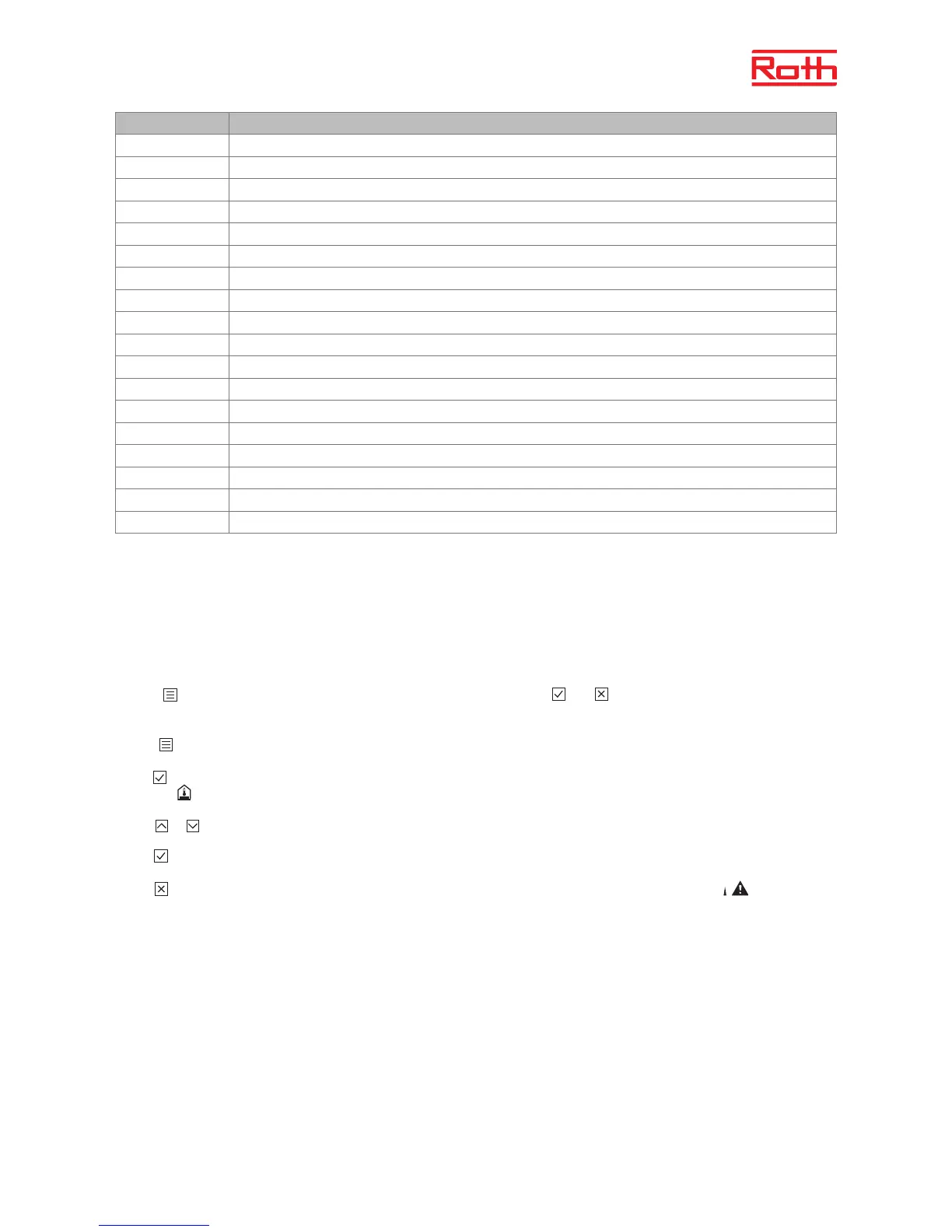
Parameter Description
P-01
Set the display to standby: actual temperature or time
P-02
Set the setpoint for minimum oor temperature (for versions with integrated IR sensor only)
P-03
Set the maximum and minimum values for room temperature setpoint
P-04
Change time programs
P-05
Reset time programs to factory settings
P-06
Set the display for standby (max. battery saving mode)
P-07
Activate or deactivate sensor button sounds
P-08
Show ID number for wireless room thermostat
P-09
Show ID number for wireless control device
P-10
Multi-function menu, switch in-between cooling and party mode.
P-SE
Access with access code only, factory settings “1234”
P-21
Show soware version for wireless room thermostat
P-22
Show soware version for wireless control device
P-23
Show actual status of wireless control device and I/O box
P-24
Reset parameter to factory settings. To reset a control device or room thermostat, see parameter P-24 on page 7
P-32
Set temperature to frost protection function
P-51
Boiler enable via C/O Output potential volt-free relay, see parameter P-51 on page 9 or wiring diagram on page 4
P-66
Activate or deactivate “optimised thermomotor control” function



 To Next Page