13P/N 1010807 Rev. I 06/12
VERTICAL CONTACT TOASTER
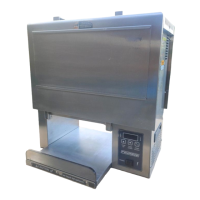
Figure 13. Removing Conveyor Belt Chain
Rotation
Upper Support Rod
Large Link
P/N 0800121
Small Link
P/N 0800204
Checking the Conveyor Belt Chains
NOTE: The Bun Thickness Compression Knobs
(Figure 7) must be set to “6 & 6” prior to measur-
ing or removing or reinstalling the Conveyor Belt
Chains.
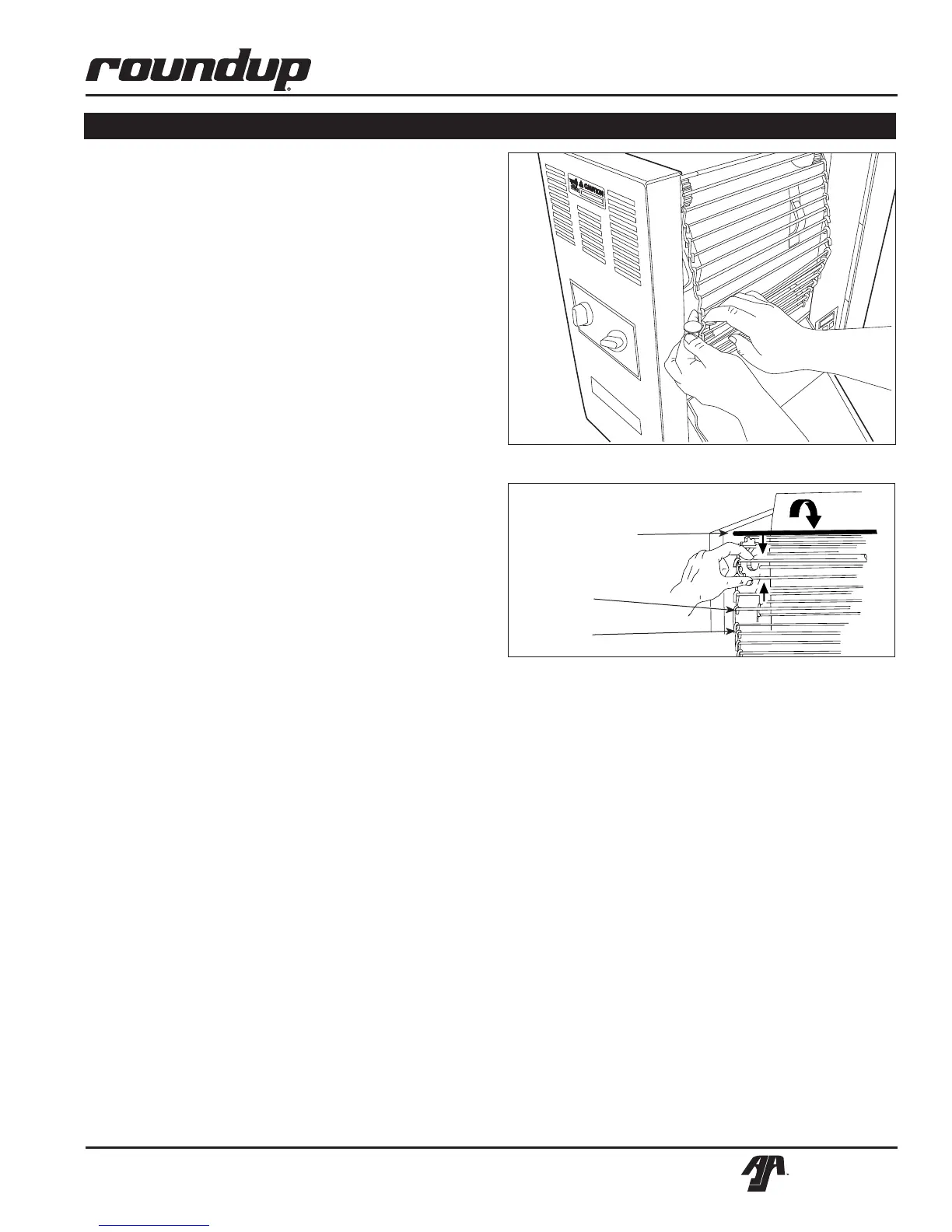
Figure 12. Removing Conveyor Belt Chain
MAINTENANCE (continued)
MEASURING CONVEYOR BELT CHAINS
1. Turn the unit off, unplug the power cord, and
allow the unit to cool.
2. Remove the Bun Feeder, Butter Wheel, Pan, and
Heat Shield (Figure 1) and set the Bun Thickness
CompressionKnobsto6&6.
3. Open both Conveyor Covers and pull the Belt
Wrap Pin out of the zipper (Figure 9).
4. Remove the Belt Wrap.
5. Facing the toaster, locate the approximate center-
point of the Conveyor Chain.
6. Pull the Conveyor Chain away from the edge of
the toaster (Figure 12).
7. StandaU.S.Dimeonendbetweentheframe
and the chain (Figure 12).
8. If the gap is significantly wider than the coin,
REMOVE links as described below.
9. DisconnecttheConveyorBeltChainbysqueez-
ing any two links together and unhooking both
ends one link (Figure 13). Needle-nose pliers
may be used.
NOTE: There are two small 1/2” links on each side
of the Conveyor Belt Chain. The rest are large 3/4”
links.
10. Remove one 1/2” link from the belt.
11. Reassemble the Conveyor Belt Chain onto the
sprockets as described in Replacing Conveyor
Belt Chains.
12. Measure the gap again to ensure it is not too
tight.
13. Check the opposite side of the toaster using the
same steps.
NOTE: If the Conveyor Belt Chain is too tight to be
reassembled, remove an additional small 1/2” link
and install a large 3/4” link in its place. This will
shorten the Conveyor Belt Chain by 1/4” overall.
REPLACING CONVEYOR BELT CHAINS
1. Turn the power off, unplug the power cord, and
allow the unit to cool before proceeding.
2. Remove the Butter Wheel, Pan, and Heat Shield
andsettheCompressionControlKnobsto6&6.
3. Open both Conveyor Covers and pull the Belt
Wrap Pin out of the zipper.
4. Remove and discard the old Belt Wrap(s).
5. DisconnecttheConveyorBeltChainbysqueezing
any two links together and unhooking both ends
of one link (Figure 13).
5. Place the replacement Conveyor Belt Chain on
the top sprockets with hook ends down.
NOTE: The ends of the hooks must point down
(Figure 13).
6. Wrap the Conveyor Belt Chain around the top
and lower sprockets and connect by hooking both
ends together.
NOTE: Make sure the Conveyor Belt Chain is
installed under the Upper Support Rod and over the
Lower Support Rod.


 To Next Page