CD and Radio Digital Audio
2
2
1
ICE0119A
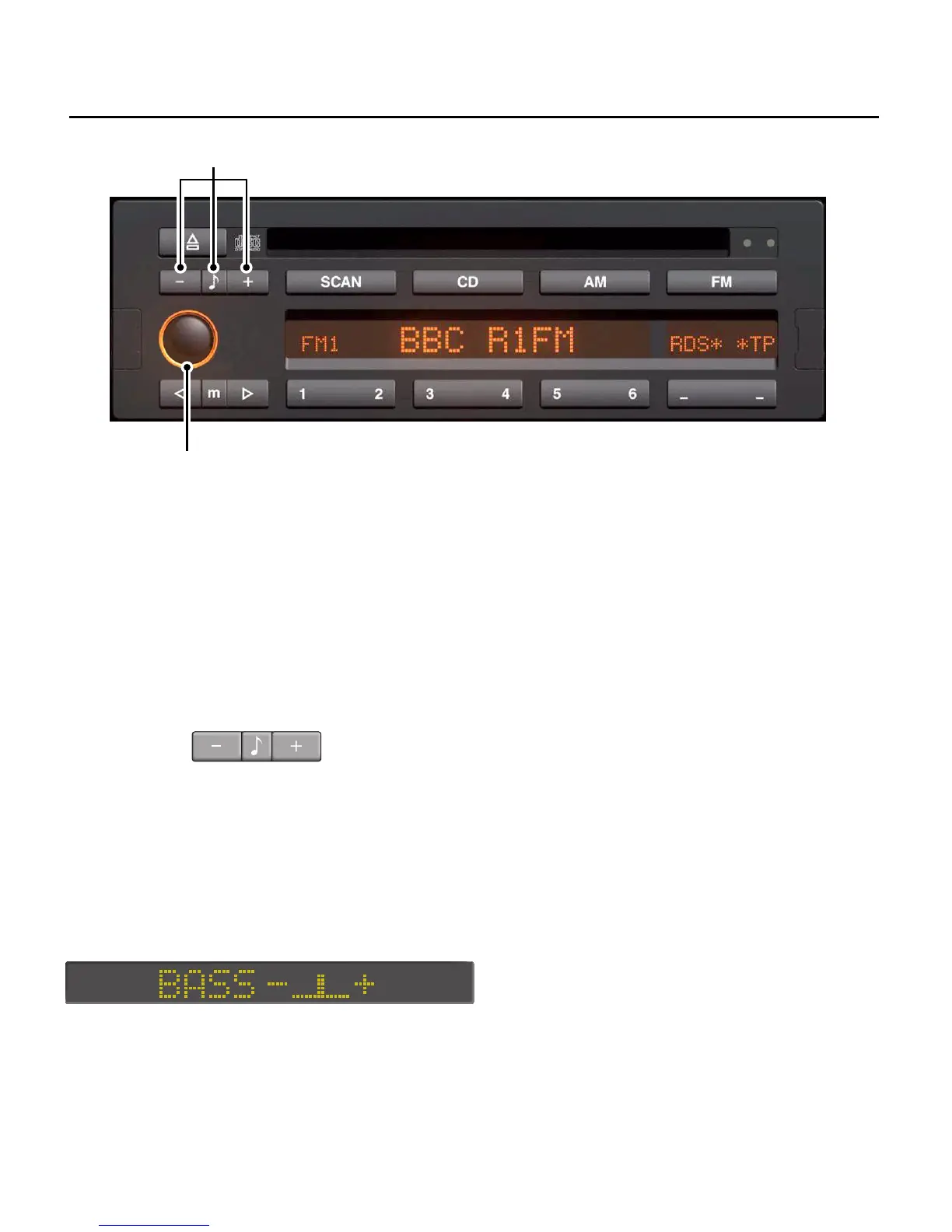
SOUND CONTROLS
1. On/off and volume control
Press to switch on and off (display
illuminates when on), and rotate to
adjust the volume.
2. Tone Control - bass, treble, fader and
balance control
Bass: Press the tone control button once
(centre button), then press or hold down
the ’+’ button to increase the bass
response or the ’-’ button to decrease
the bass response. The display shown
below is for bass at a midpoint setting
(similiar displays will be evident for all
other tone control settings).
Treble: Press the tone control twice
(centre button), then press the ’+’ button
to increase the treble response or the ’-’
button to decrease the treble response.
Fader: Press the tone control three times
(centre button), then press the ’+’ or ’-’
button to adjust the balance between
front and rear speakers.
Balance: Press the tone control four times
(centre button), then press the ’+’ or ’-’
button to adjust the balance between
left and right speakers.


 To Next Page