CD and Radio Digital Audio
8
1112
ICE0125A
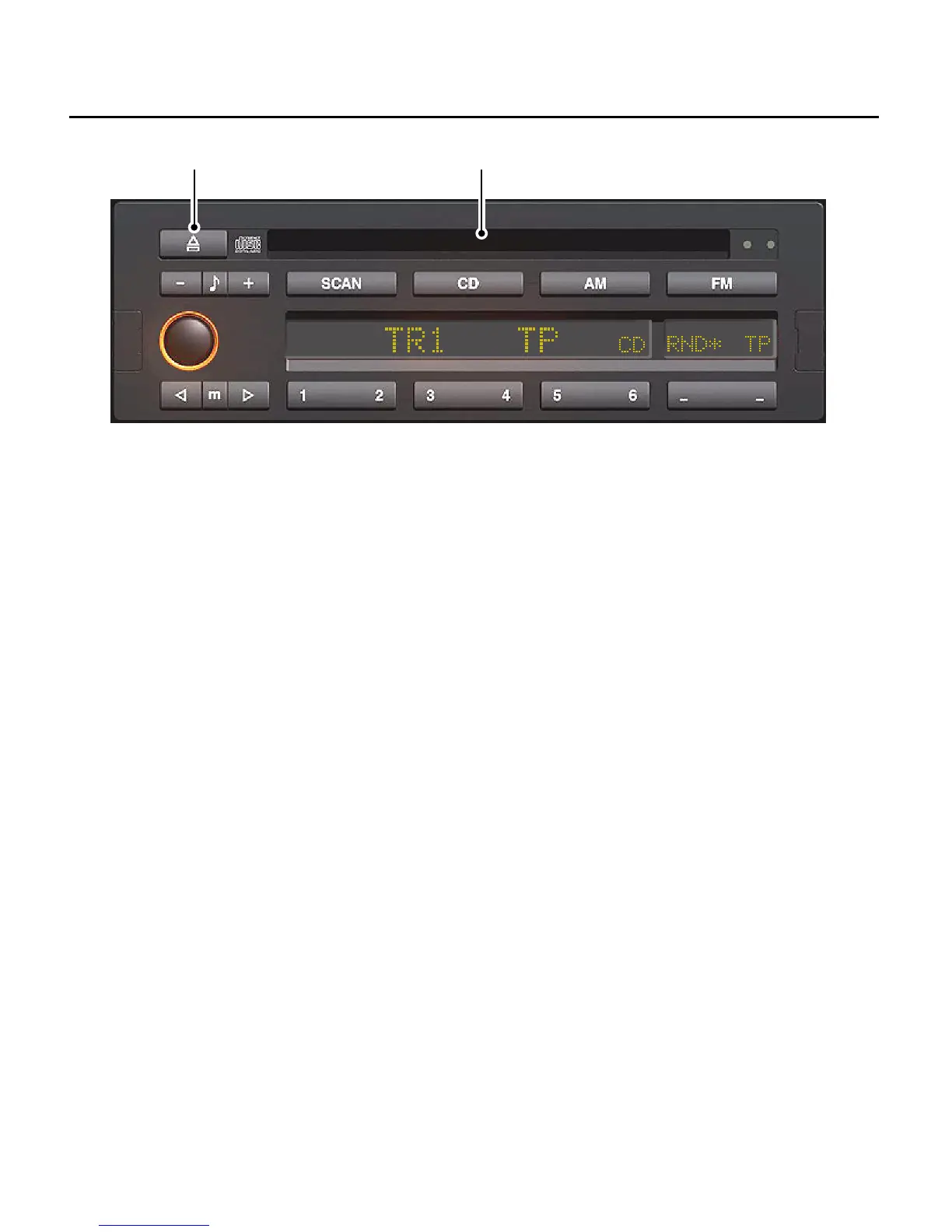
COMPACT DISC PLAYER CONTROLS
11. CD compartment
Push the CD into the CD compartment
with the label side uppermost. If the radio
is already switched on the CD will start to
play and ’CD’ mode will be indicated on
the display screen. The display also shows
the track number that is currently playing
(e.g. ’TR 1’).
NOTE: If a CD is damaged or has been
inserted in the CD compartment upside
down, ’CD ERROR’ will be indicated on
the display screen.
If the radio is not switched on and there is
no CD currently loaded in the CD
compartment, inserting a CD into the CD
compartment will cause it to be loaded,
but play will not commence until the unit
is switched on.
NOTE: If the starter switch is in the off
position, the CD will not load.
If a CD is already loaded but radio mode
is operational, pressing the ’CD’ button
(3) will switch to CD play.
NOTE: If there is no CD loaded, ’NO DISC’
will be indicated on the display screen.


 To Next Page