SECURITY CAMERA User Manual
WWW.RSRTENG.COM Page.69.
Notice:
a. Don't input any power into the "DC24V/2A OUTPUT"port of the tester to avoid destroy.
Man-made damage is not within our company's warranty
b. Don't output this DC24V/2A power to DC12V/ IN port to avoid destroy. otherwise the tester will
damage, and man-made damage is not within our company's warranty.
c. The IPC tester power output is close to 2A, if the IP camera's power is over 2A, the tester will auto
enter protection mode. Disconnect all the connections of the tester and then connect the tester with
power adaptor to resume the tester.
d. Make sure the tester is full charged or more than 80% charged, otherwise the tester will shows
"low power","not able to supply power"
3.3.22 Cable Test
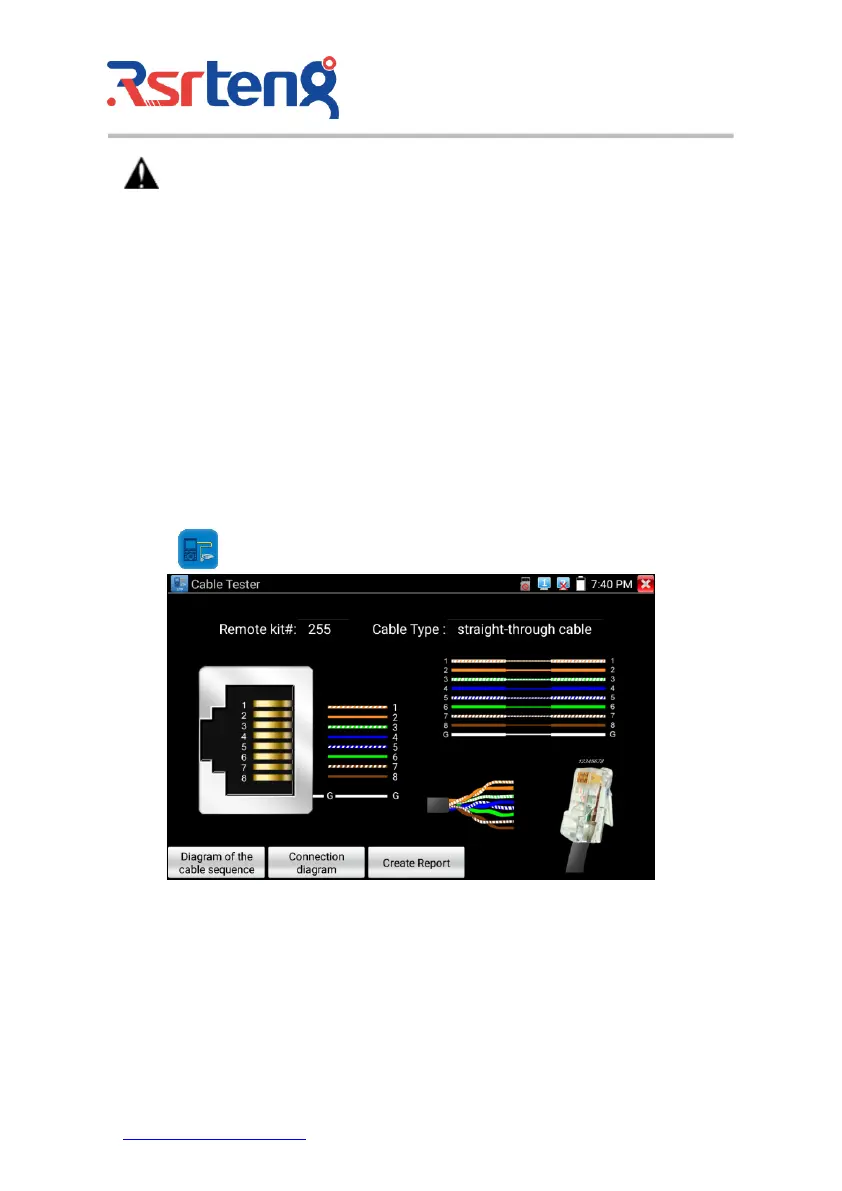
Click icon to enter
Test LAN cable or telephone cable.
Connect LAN cable or telephone cable with the CCTV tester and cable tester. And then the
connecting status, cable type and the sequence of wires as well as the serial number of the cable tester
kit will be displayed.
The number of the cable tester is 255.



 To Next Page