EasyManua.ls Logo

RTS Altus - Removing a RTS Control from the Motor; Prepare Motor for Control Removal; De-Program RTS Control from Motor

RTS Altus
15 pages
Print Icon
To Next Page IconTo Next Page
To Previous Page IconTo Previous Page
Loading...
RTS Motors
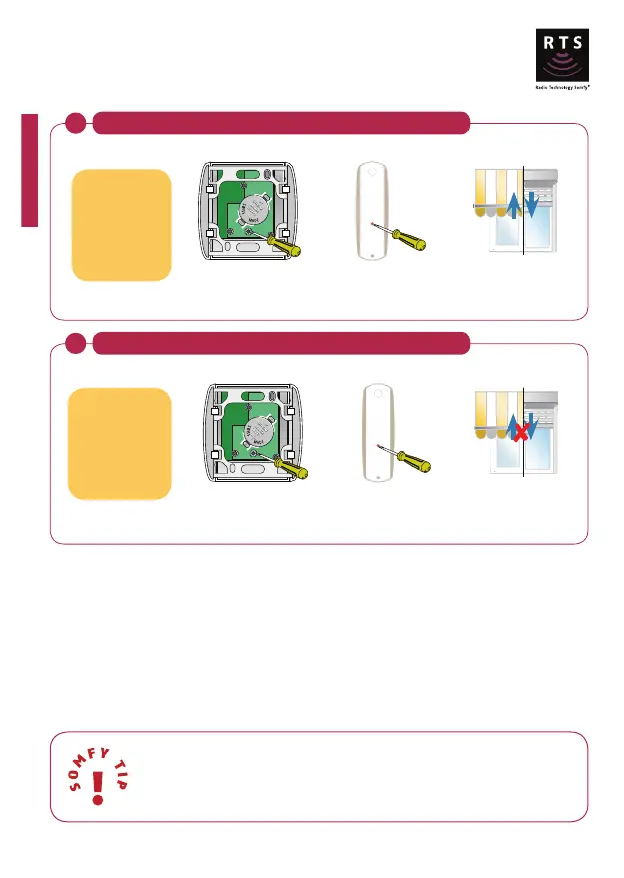
Removing a RTS control from the motor
1
Set the motor in programming mode with an existing RTS control
jiggle = motor ready
to remove control
Centralis RTS Telis RTS
OR
Press
for 3
secs
Press
for 3
secs
2
De-Program the RTS control
jiggle =
control removed
Centralis RTS Telis RTS
OR
Press
for 1
secs
Press
for 1
secs
RTS control
to be removed
from the motor
28
Using this method you will not be able to delete the final remote programmed.
Refer to 'erasing the memory of the motor' section to delete all remotes and sensors.
RTS control
already assigned
to the motor

Related product manuals