22
Altus RTS & Sonesse RTS
Adjusting motor limit positions
2
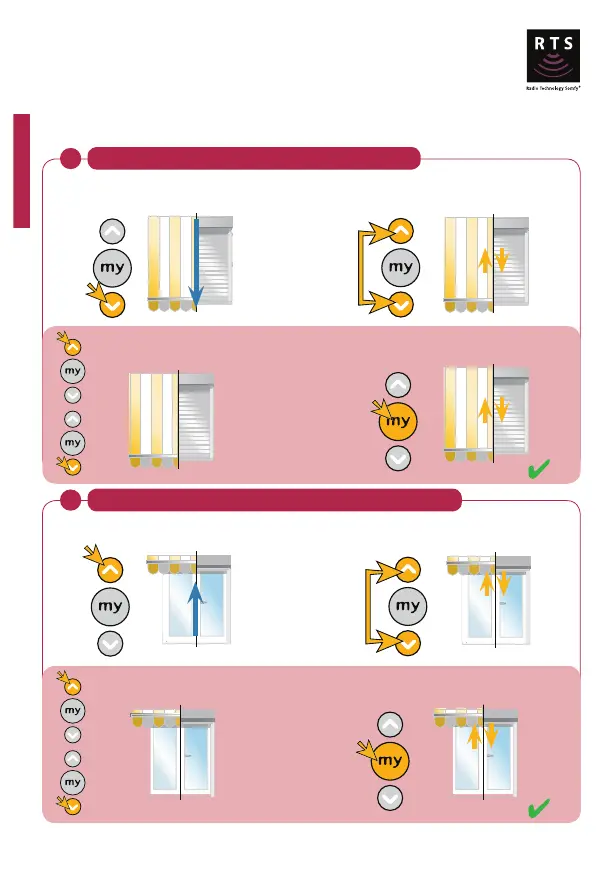
Adjustment of the upper limit position - Not applicable for Orea
Adjust to the correct position using
either the Up or Down button.
Press and hold the Stop button until the
product jiggles.
Press for
3 secs
New limit position set
Press the Up button and send the product to
the existing upper limit position.
Press and hold the Up and Down buttons
until the product jiggles.
Press for
5 secs
Adjust to the correct position using
either the Up or Down button.
Press and hold the Stop button until
the product jiggles.
Press for
3 secs
New limit position set
Press the Down button and send the
product to the existing lower limit position.
Press and hold the Up and Down buttons until
the product jiggles.
Press for
5 secs
Adjustment of the lower limit position
1
Note: the following procedure will only work if the limit is accessible, otherwise please refer to 'erasing the
memory of the motor' section.



 To Next Page