34 RUSH MH 1 Profile Plus User Manual
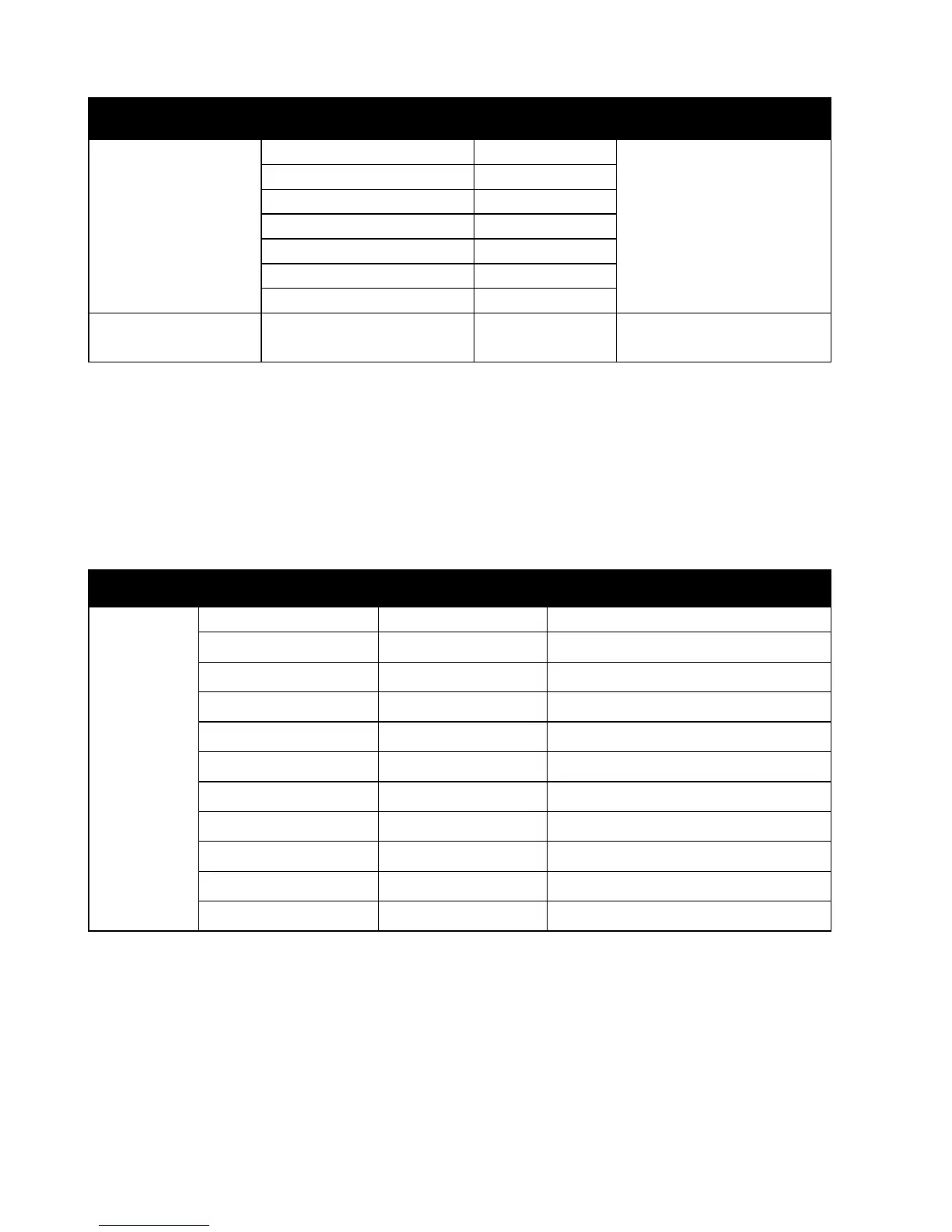
Menu Sub-menu Setting/value Explanation
Reset Functions
Pan & Tilt Yes/No
Reset effects to
home position
Color Yes/No
Gobo Yes/No
Prism Yes/No
Iris Yes/No
Focus Yes/No
All Yes/No
Special
Functions
Factory Settings Yes/No
Return all settings to
factory defaults
Offset menu
The Offset menu is used to adjust the home position of the various effects.
To access the Offset menu, press the MENU button to enter the menu
structure and then press and hold the ENTER button for three seconds.
Menu Sub-menu Setting Explanation
Offset
Pan -128...127
Tilt -128...127
Color 1 -128...127
Color 2 -128...127
Gobo 1 -128...127 Wheel with rotating gobos
R Gobo 1 -128...127 Rotating gobos
Gobo 2 -128...127 Wheel with fixed gobos
Iris 0-255
Prism 0-255
R prism -128...127
Focus 0-255


 To Next Page