Need help?
Do you have a question about the Russound CAS44 and is the answer not in the manual?
Important warnings regarding electric shock, fire hazards, and appliance safety.
Guidelines for safe operation, handling, and placement of the appliance.
Precautions to take before and during operation for optimal performance and safety.
Covers unpacking system components, tools needed, and installation considerations.
Factors to consider before installing the Russound CAS44 system.
Details the CAT-5 T568A wiring standard for RJ-45 terminations.
Explains CAT-5 wire connections to the 110 punchdown on the keypad.
Guidance on running and connecting speaker wire.
Provides steps for conducting an initial hardware test after installation.
Steps to follow if no sound is heard during the initial test.
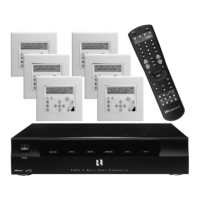
Explains the features and functions of the CAS-RC remote control.
Steps to program the remote for controlling various devices.
Details how to search for and check IR codes for the CAS-RC remote.
Guides on KPL keypad setup, factory initialization, and version check.
Allows installer to run a diagnostic check on the keypad.
 Audio Specifications
| audio sources | 4 |
|---|---|
| zones per controller | 4 |
| zones per system | 8 maximum |
Interface and Connectivity| keypad ports | RJ45, T568A standard |
|---|---|
| interface port | DB9 for RS-232 serial data |
| source input connectors | RCA left and right |
Audio Input Specifications| source input impedance | 50 kilohms |
|---|---|
| source input level | 2.2 Vrms max |
| amplifier channels | 8 (2 per zone) |
Power Output and Performance| power output | 20 watts per channel RMS into 8 ohms |
|---|---|
| frequency response | 20 Hz to 20 kHz +0/–2.5 dB |
| distortion | <0.10% THD+N from 20 Hz to 20 kHz |
Sound Quality| signal-to-noise ratio | >90 dB A-weighted, >88 dB unweighted |
|---|---|
| speaker impedance | 8 ohms nominal, 6 ohms minimum |
| speaker connectors | Removable 4-pole color-coded snap connectors |
Trigger and Power Specifications| mute trigger input | 12 VDC |
|---|---|
| system trigger output | 12 VDC, 100 mA maximum |
| trigger connectors | 1⁄8-inch TS, tip positive |
Electrical Specifications| power rating | 100–120 VAC 3 A or 220–240 VAC 1.25 A, 50–60 Hz |
|---|---|
| fuse rating USA and Canada | F3.0A H 250V |
| fuse rating Europe | TF1.25A H 250V |
 Weight and Dimensions
| dimensions | 17” W x 3.9” H x 11.5” D (43 x 9.9 x 29.2 cm) |
|---|---|
| weight | 17 lb 6.5 oz (7.9 kg) |

 To Next Page