Installation
14
Method 1 (Use VSM-AV
Mount
Stem)
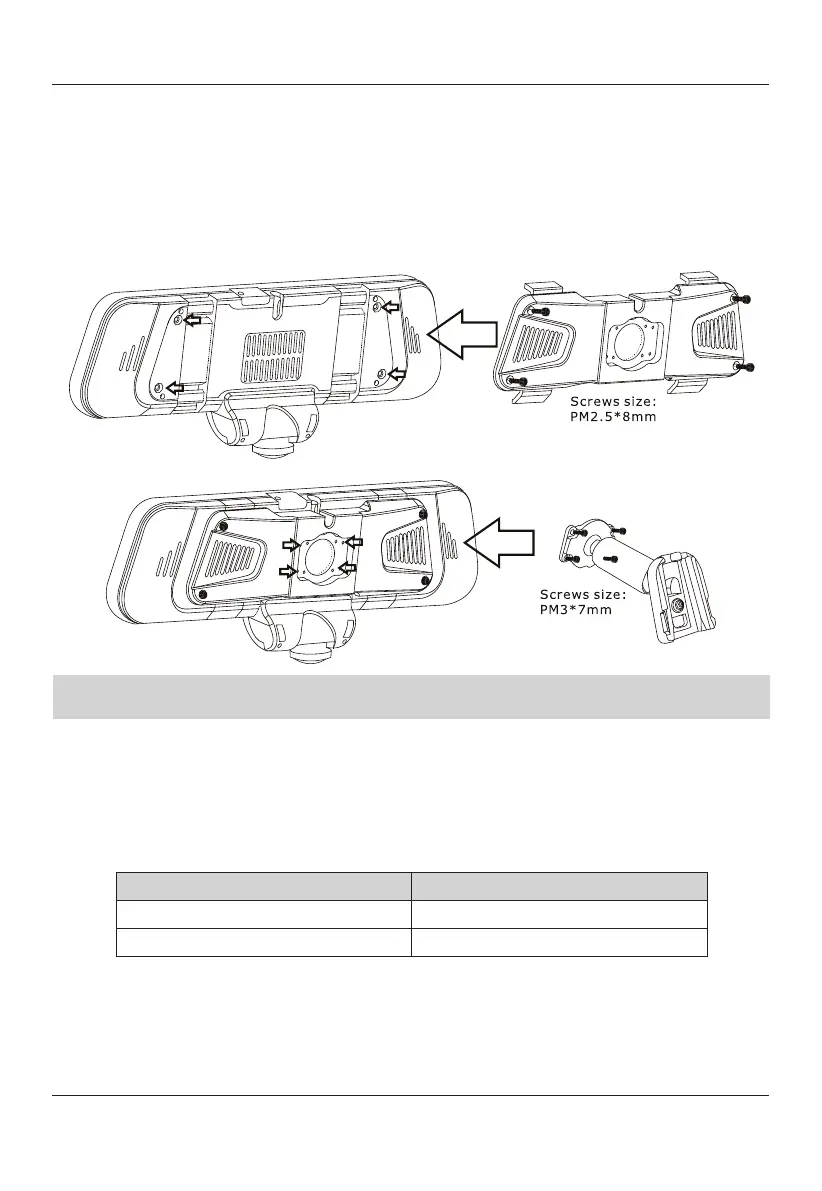
1) Insert TOMBO
360 Mirror Back Plate for windshield mount onto the back side of
the TOMBO 360 mirror, using provided screws.
2) Attach VSM-AV mount onto the TOMBO 360 Back Plate using provided screws.
3) Reattach the TOMBO 360 mirror by sliding the VSM-AV mount onto the factory
windshield tab.
4) Adjust to the suitable angle to the mirror, then proceed to Step 2.
Note: If Rydeen Mirror does not fit into factory windshield tab, please use the
included universal mounting solution.
Method 2
(Use Universal Mount Package)
1)
Insert TOMBO 360 Mirror Back Plate for windshield mount onto the back side of
the TOMBO 360 mirror, using provided screws.
2) Attach Universal mount onto the TOMBO 360 Back Plate using provided screws.
3) Select correct insert size for your vehicles application.
Universal Mount Adaptor Size
Mount Adaptor Inserts Diameter
Small
14mm-21mm
Large
23mm-27mm
4) Mount TOMBO 360 onto factory stem and firmly secure the mount nut.
5) Adjust to the suitable angle to the mirror, then proceed to Step 2.
MIC


 To Next Page