7
5
6
7
8 9
4
1
3
2
Remove the small white fi lter
from the tank and store it in a dry
place sheltered from dust.
Fill the tank with fresh drinking
water and reinsert it into the
machine.
Set the Intenza Aroma System:
A = Light water
B = Medium water (standard)
C = Hard water
For further details see page 21
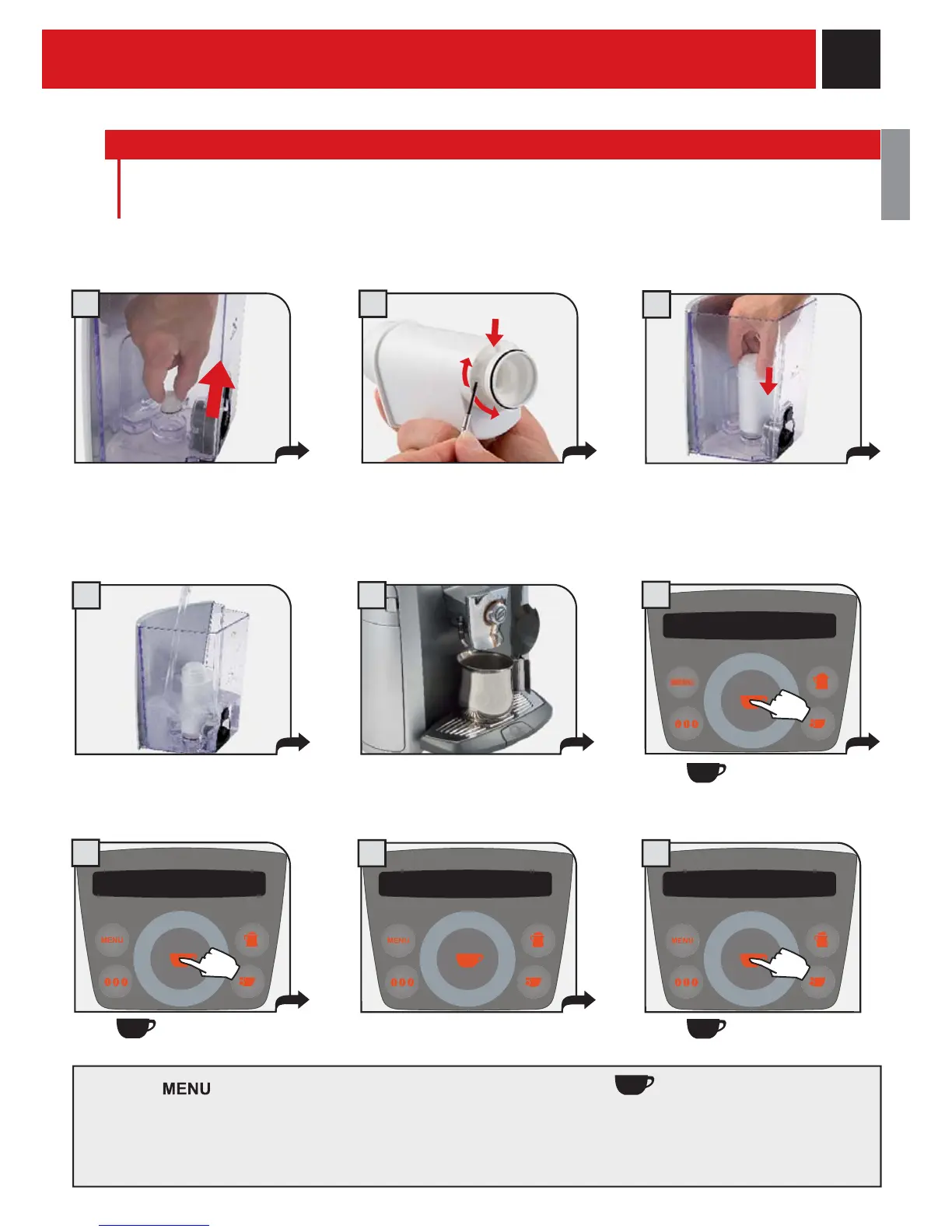
INTENZA WATER FILTER
To improve the quality of the water you use, and extend the life of your machine at the same time, it is
recommended that you install the water fi lter. After installation, go to the water fi lter initialization program
(see programming). In this way, the machine informs the user when the water fi lter must be replaced.
Remove the water fi lter from its packaging, immerse it vertically (with the opening facing upwards)
in cold water and gently press its sides so as to let the air bubbles out.
Insert the fi lter in its place within
the empty tank (see fi gure);
Press down until it clicks into
place.
The machine initialises the fi lter.
Then, press repeatedly. When the “exit” message is displayed, press . In this way, the machine ends
the start-up phase. Wait until at the end of the procedure, the display shows what is shown on page 8.
NOTE: if the Intenza water fi lter is not available, insert the small white fi lter previously removed (see point 1)
into the tank.
Place a container under the
spout.
Press
.
water filter inserted
yes
push ok
initialisation
in progress
initialisation
Press again.
done
initialisation
Press again.










 To Next Page