© Safe Fleet | September 2019 | All rights reserved
SSV9 Installation and Setup Guide
27
R2
System Conguration
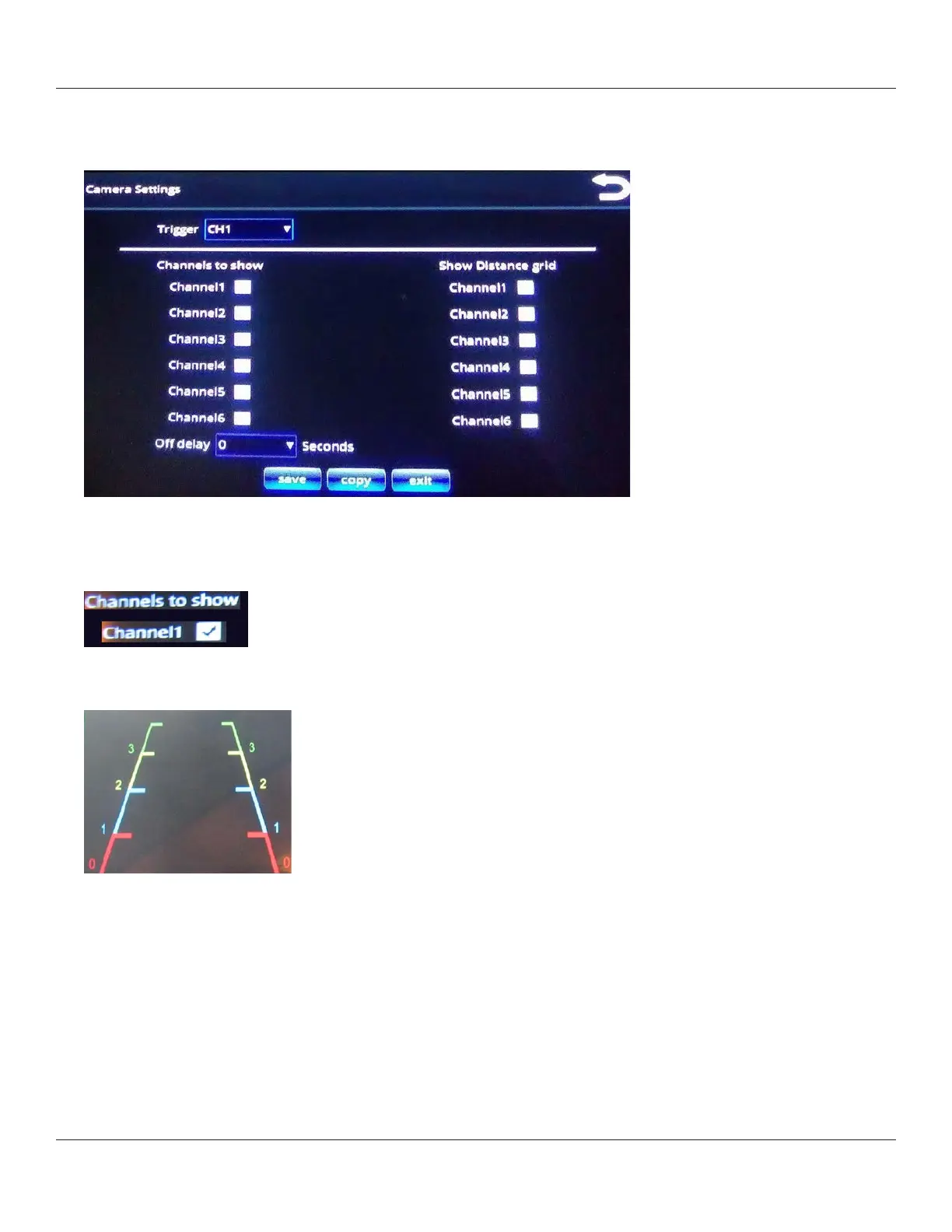
The Camera Settings menu enables you to dene, on a per-trigger basis, which camera channels are shown, along
with the option to display a distance grid on the image.
After you select a trigger from the Trigger menu, you can apply properties for that trigger’s display, as described in the
following steps.
2. Channels to show: use the check boxes to enable and disable display for the channels.
3. Show distance grid: use the check boxes to determine whether a distance grid should be overlaid on the channel’s
display.
4. O delay:
• Use the drop down menu to choose a delay (in seconds) before turning o the channel displays.
• This function can also be used to keep the camera image displayed on the monitor during the turn signal cycle.
i. Use the drop-down menu to choose the appropriate channel.
ii. Then choose the amount of time (0 to 5 seconds) that you want the o delay to be activate and allow the camera
image to be displayed on the monitor during the turn signal cycle.



 To Next Page