Remote
conguration
with telephone:
step 2
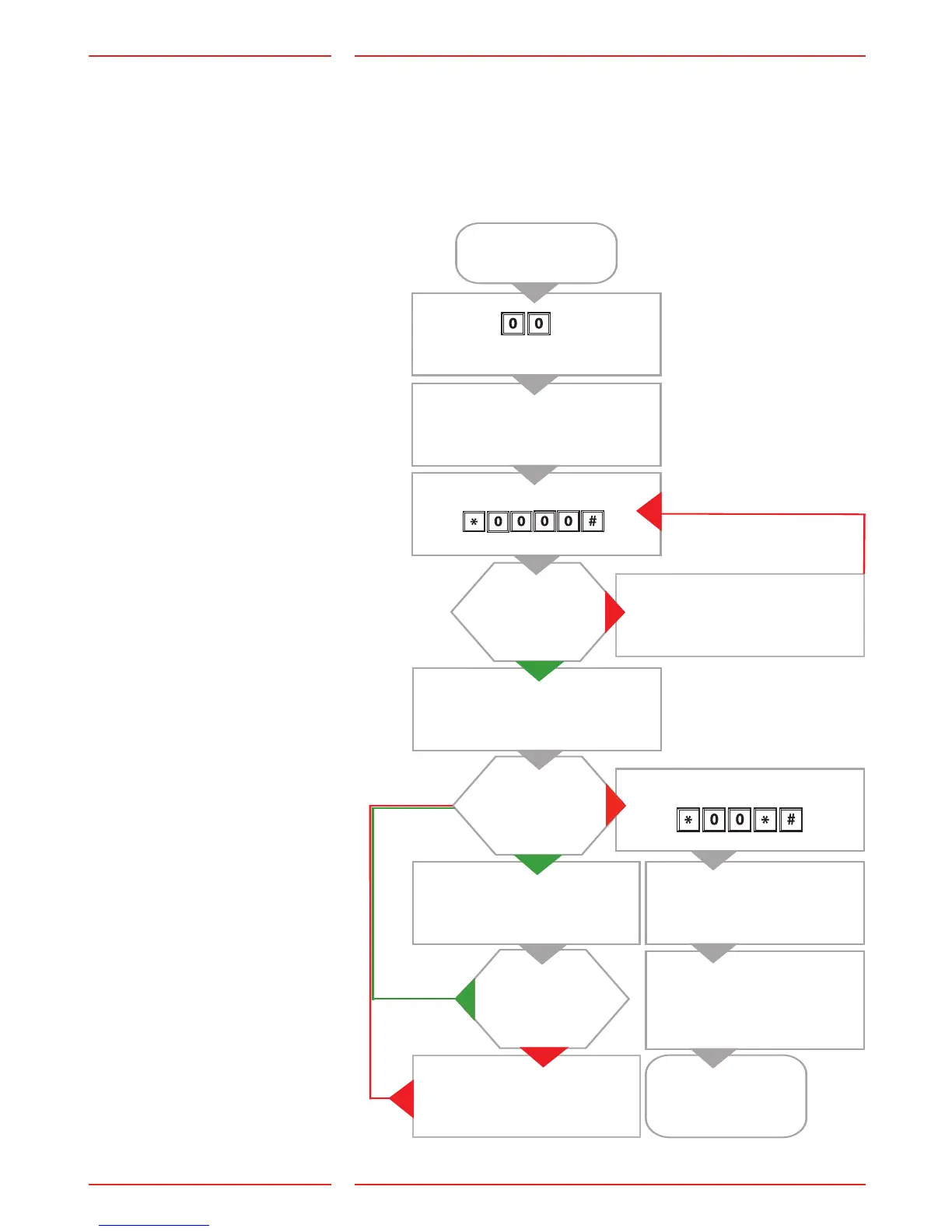
After having entered voice communication mode, use the parameter
codes found in the "Parameter List" to remotley congure the SL6+.
Remote conguration,
external telephone
2 short beeps
(waiting for PIN code)
Valid password?
Dial
to enter
conguration mode
Enter the password
2 short beeps
(entering cong. mode)
2 short beeps
Continue
congure?
Quit conguration
Invalid password
(one long tone)
2 short beeps?
Invalid input (one long tone)
Last code has to be re-entered
Call disconnected or
end of conguration
SL6+ will restart
with new settings
Enter prex, eg: *11*012341234#
Enter setting, eg: *11*012341234#
End parameter: *11*012341234#
Note: If the time between the
operation of two keys exceeds
10 seconds, the code has to be
re-entered. If the time between
exceeds 30 seconds, the call is
disconnected or conguration
mode is ended.


 To Next Page