- 5 -
Data Field Display Function& Programming Options [ ] = Programmed Table 1 Default Values
39
3939
39
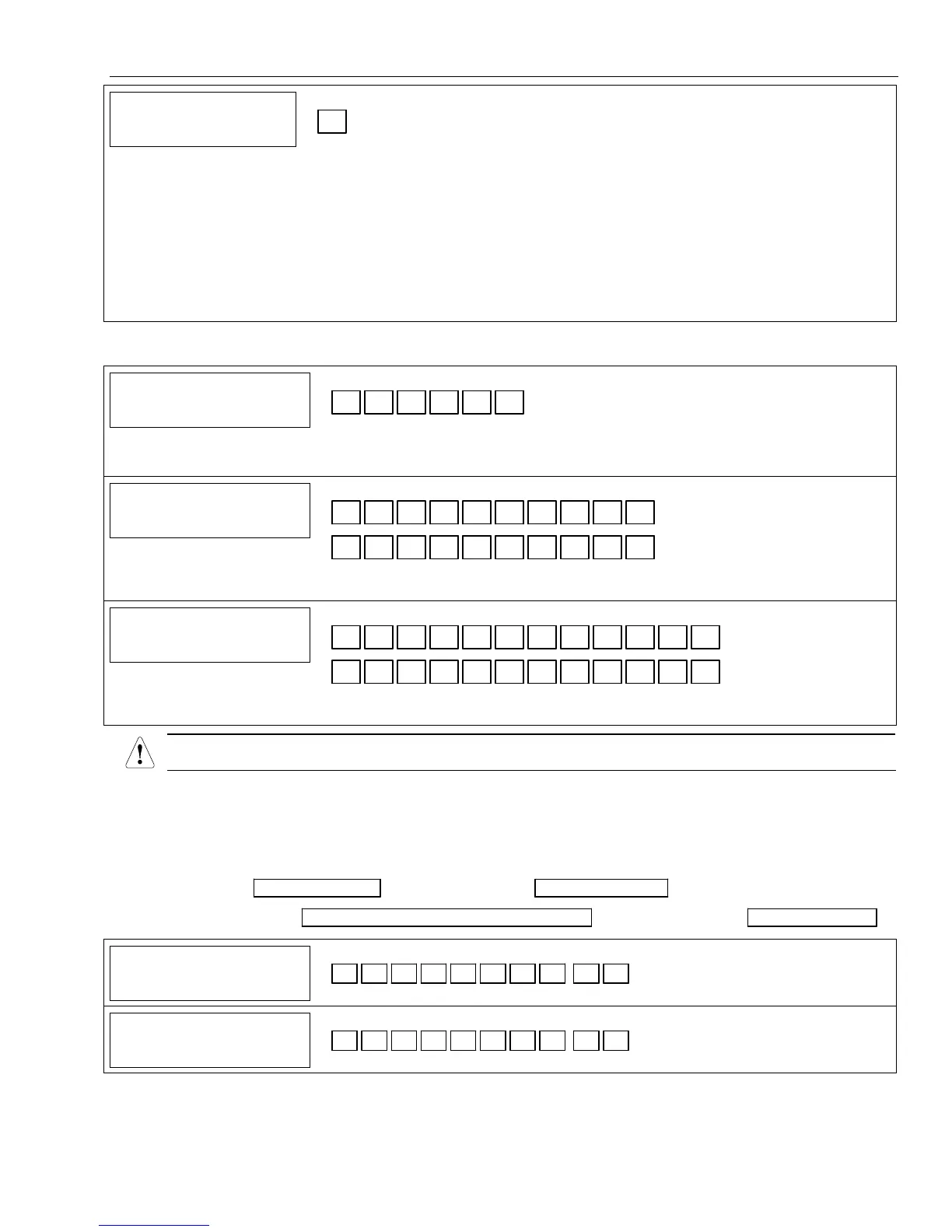
CROSS ZONE TIMER
CROSS ZONE TIMERCROSS ZONE TIMER
CROSS ZONE TIMER
Cross Zone Timer
† [0]
Value Time Window Value Time Window
0 = No Cross Zoning 8 = 2 minutes
1 = 15 seconds 9 = 2 minute, 15 seconds
2 = 30 seconds # + 10 = 2 minute, 30 seconds
3 = 45 seconds # + 11 = 2 minute, 45 seconds
4 = 60 seconds # + 12 = 3 minutes
5 = 1 minute, 15 seconds # + 13 = 3 minute, 15 seconds
6 = 1 minute, 30 seconds # + 14 = 3 minute, 30 seconds
7 = 1 minute, 45 seconds # + 15 = 3 minute, 45 seconds
Note: If option
✻
39 is set to “0” Zone List 2 can be used for other purposes.
UL This option is not for use in UL installations.
DIALER PROGRAMMING (✻40– ✻53) In fields ✻40, ✻41, ✻42, enter up to the number of digits shown.
Enter 0–9; #+11 for '
✻
'; #+12 for '#'; #+13 for a pause.
40
4040
40
PABX ACCESS CODE
PABX ACCESS CODEPABX ACCESS CODE
PABX ACCESS CODE
PABX/Call Waiting Disable
Enter up to 6 digits if PABX is needed to access an outside line. To clear entries from
field, press
✻
40
✻
OR
Enter“# + 11+ 7+ 0” to program touch-tone sequence “✻70” and cancel call waiting.
41
4141
41
PRIMARY
PRIMARY PRIMARY
PRIMARY
TEL
TEL TEL
TEL
NUM
NUMNUM
NUM
Primary Phone Number
Enter up to 20 digits; Do not fill unused spaces. If fewer than 20 digits entered, pressing
✻advances to the next field. To clear entries from field, press ✻41✻.
42
4242
42
SECOND
SECOND SECOND
SECOND
TEL
TELTEL
TEL
NUM
NUM NUM
NUM
Secondary Phone Number
Enter up to 24 digits; Do not fill unused spaces. If fewer than 24 digits entered, pressing
✻advances to the next field. To clear entries from field, press ✻42✻.
All four digits of the subscriber account number must be entered in Fields
✻
✻✻
✻
43 and
✻
✻✻
✻
44.
If ten digit format is selected
in
✻
✻✻
✻
48 (option 5), all ten digits of the Subscriber Account number must be entered.
In fields ✻43, ✻44, enter 4 to 10 digits. Enter 0–9; #+11 for B; #+12 for C; #+13 for D; #+14 for E; [#+15 for F].
Enter ✻ as 4th digit, if 3+1 dialer reporting is to be used. If only 3 digits used, pressing ✻ advances to the next
field. Enter [✻] as the fifth digit if a 4-digit account number (for 4+1, 4+2, CID®) is used. To clear entries from
field, press ✻43✻ or ✻44✻.
Examples:
For Acct. 1234, enter: 1 | 2 | 3 | 4 ; For Acct. B234, enter: #+11| 2 | 3 | 4
For Acct. 1234567890, enter: 1| 2 | 3 | 4 | 5 | 6 | 7 | 8 | 9 | 0 ; For Acct. 123, enter: 1 | 2 | 3 | ✻
43
4343
43
PRIMARY
PRIMARY PRIMARY
PRIMARY
ACCOUNT
ACCOUNTACCOUNT
ACCOUNT
#
Primary Subscriber Account Number
See note above.
44
4444
44
SECNDRY
SECNDRYSECNDRY
SECNDRY
A
AA
ACCOUNT
CCOUNTCCOUNT
CCOUNT
#
Secondary Subscriber Account Number
See note above.
† Entering a number other than the one specified may give unpredictable results.


 To Next Page