INSTALLATION MANUAL
page 24 / 40 3300039745 R11 000 04/735
3.2 CONNECTIONS
Reminder of Safety Instructions:
Select an electrical power supply outlet that corresponds to the general safety requirements listed in section 1
of this document.
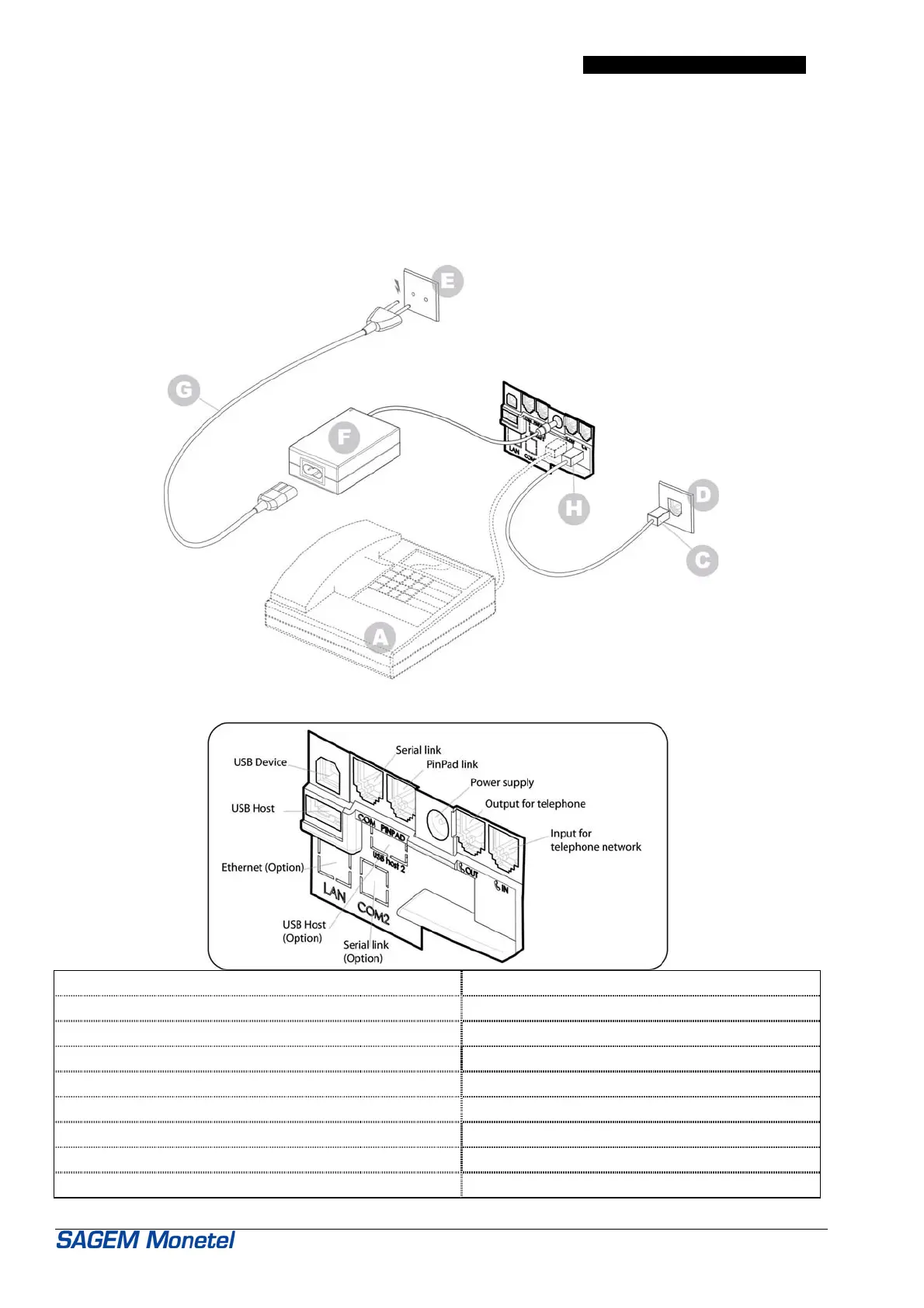
Equip the EFTsmart terminal by making the following connections:
- plug in telephone cord (H) in jack "IN" of the EFTsmart terminal,
- plug in the jack of its power supply unit (F).
A = telephone (if needed)
C = connection to the telephone network D = telephone network outlet jack
E = mains power supply network F = power supply block
G = mains supply cable H = connection to IN of EFTsmart
IN = input for telephone network OUT = output for telephone
COM = serial link (cash register, Local Loading Tool…) PIN PAD = Pin-Pad link
USB Host = Universal Serial Bus host (PPR30, P30) USB S = Universal Serial Bus function
Ethernet plug = LAN link (optional) COM 2 = 2
nd
serial link (optional)
USB Host 2 = 2
nd
universal serial bus host (optional)



 To Next Page