INSTALLATION MANUAL
page 26 / 40 3300039745 R11 000 04/735
4. INSERTING PAPER
Careful: The use of unsuitable paper may damage your terminal's printer.
Use only paper approved by SAGEM Monetel.
1- If you are inserting a new roll, tear
off the first length (one complete
turn).
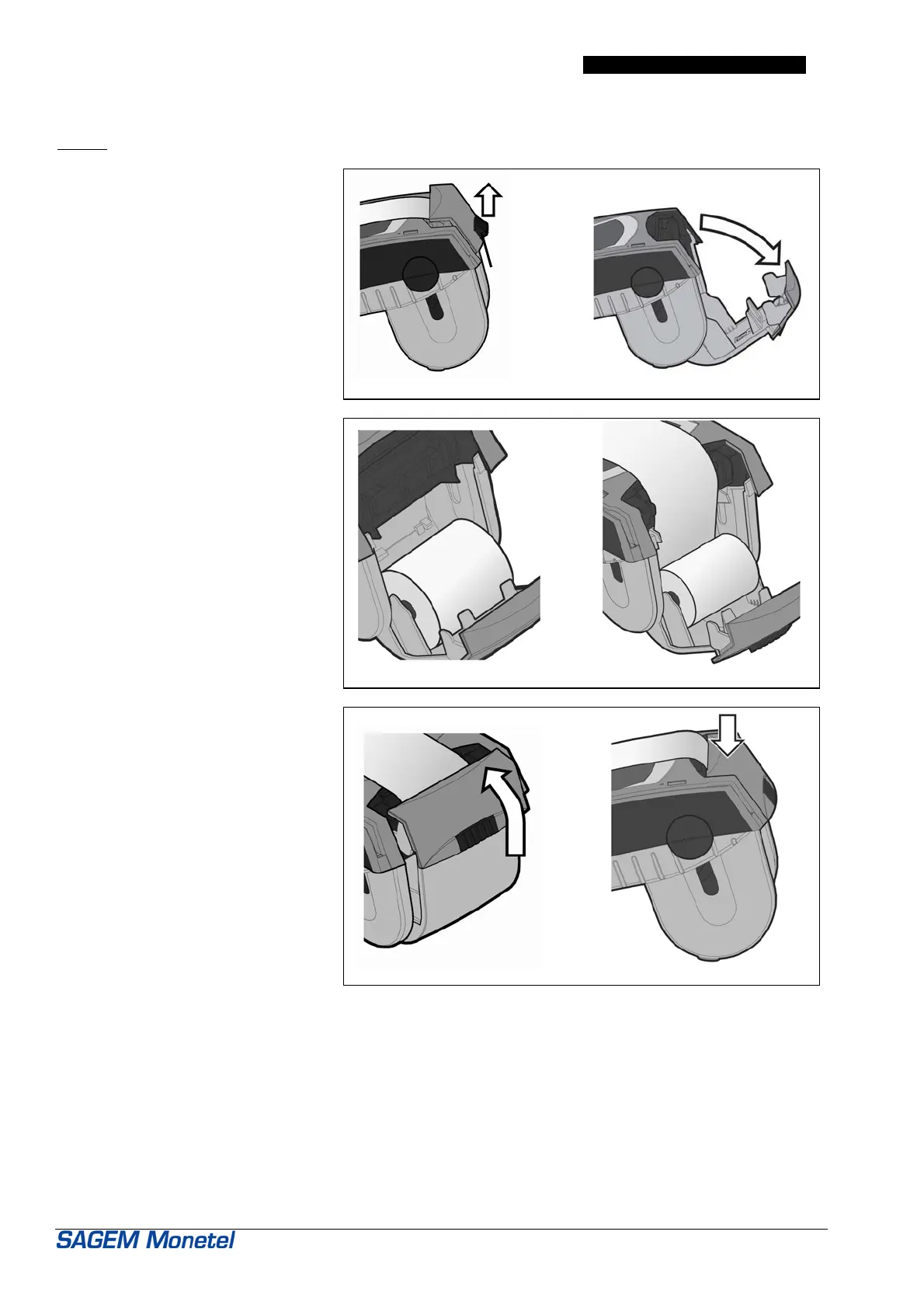
2- Open the paper recess cover plate
(figure 1a) as follows:
• Completely raise the catch
located on the rear of the
EFTsmart.
• Grip the cover plate and tilt it
down from the rear of the
terminal. (figure 1b)
3- Insert the roll of paper in the
direction shown in figure 2a. Insert
the roll between the two support
arms.
4- Pull the paper up to the top of the
terminal (figure 2b).
Center the paper with respect to the
printer paper guides.
Hold it in this position.
5- Hold the paper in position and push
up the cover plate fully home.
(figure 3a).
6- Press firmly on the top of the paper
flap (figure 3b) until it clips into
position and holds the paper.
The EFTsmart terminal is now ready for
use.
fig.1a fig.1b
fig.2a fig.2b
fig.3a fig.3b
Handy tip: the amount of paper remaining can be checked by looking through the side slots.
Catch


 To Next Page