INSTALLATION MANUAL
page 31 / 40 3300039745 R11 000 04/735
7. INSTALLING AND REMOVING MICRO SD MEMORY
(OPTIONAL)
Precaution to be taken prior to opening the cover flap : Disconnect the power supply unit.
To gain access to the micro SD memory, open the secondary reader cover flap.
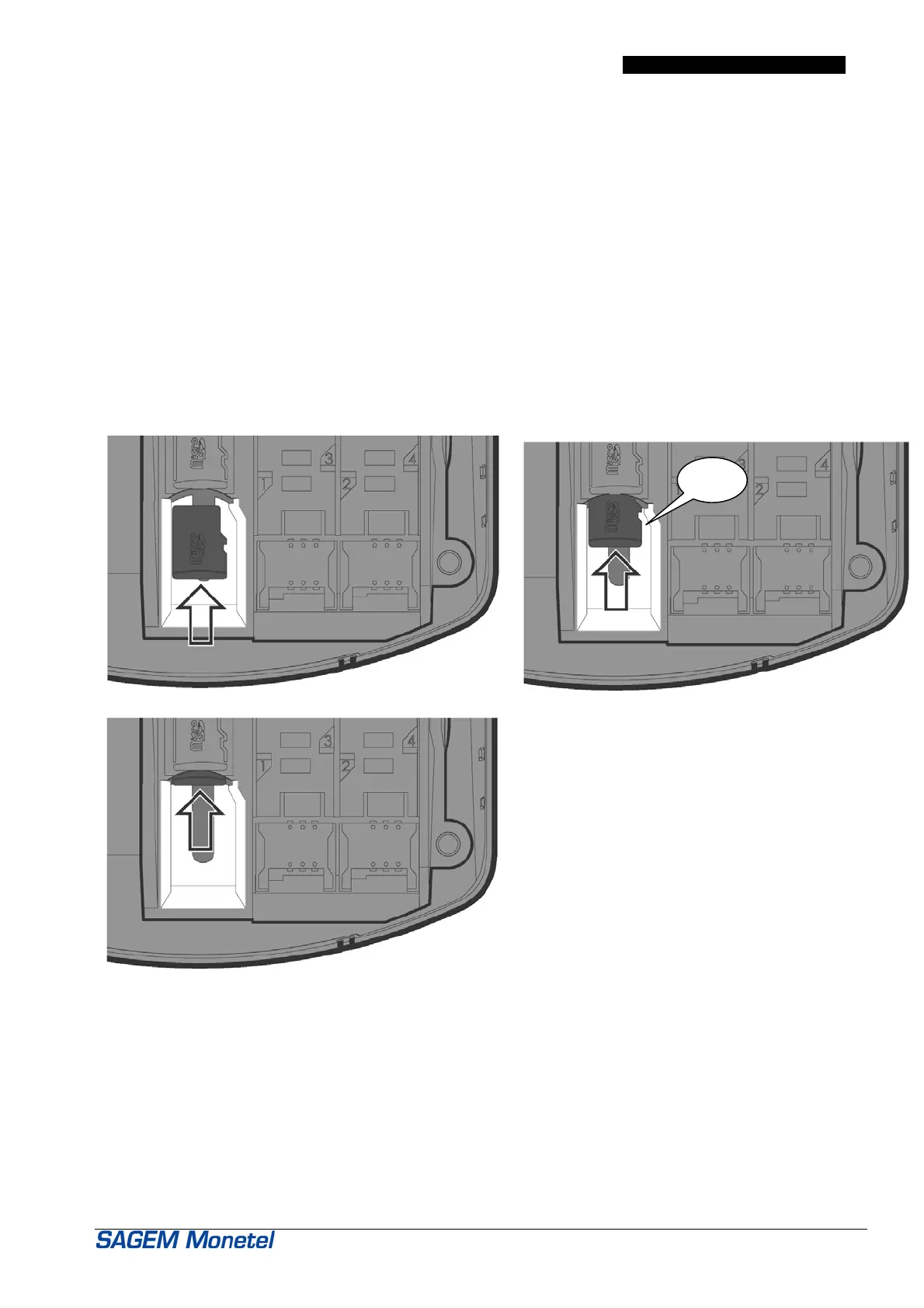
To instal a micro SD memory :
• Open the secondary reader cover flap as indicated § 5.2,
• Insert completely the micro SD memory in the slot as indicated on the figure 1 and 2,
• Close the secondary reader cover flap as indicated § 5.5.
Figure 1
Figure 2
Figure 3
To remove the micro SD memory :
• Open the secondary reader cover flap as indicated § 5.2,
• Remove the micro SD memory by pushing it, as indicated on figure 3,
• Close the secondary reader cover flap as indicated § 5.5.
Clic


 To Next Page