INSTALLATION MANUAL
page 28 / 40 3300039745 R11 000 04/735
5.2 OPENING THE SECONDARY READER COVER FLAP
Precaution to be taken prior to opening the cover flap : Disconnect the power supply unit.
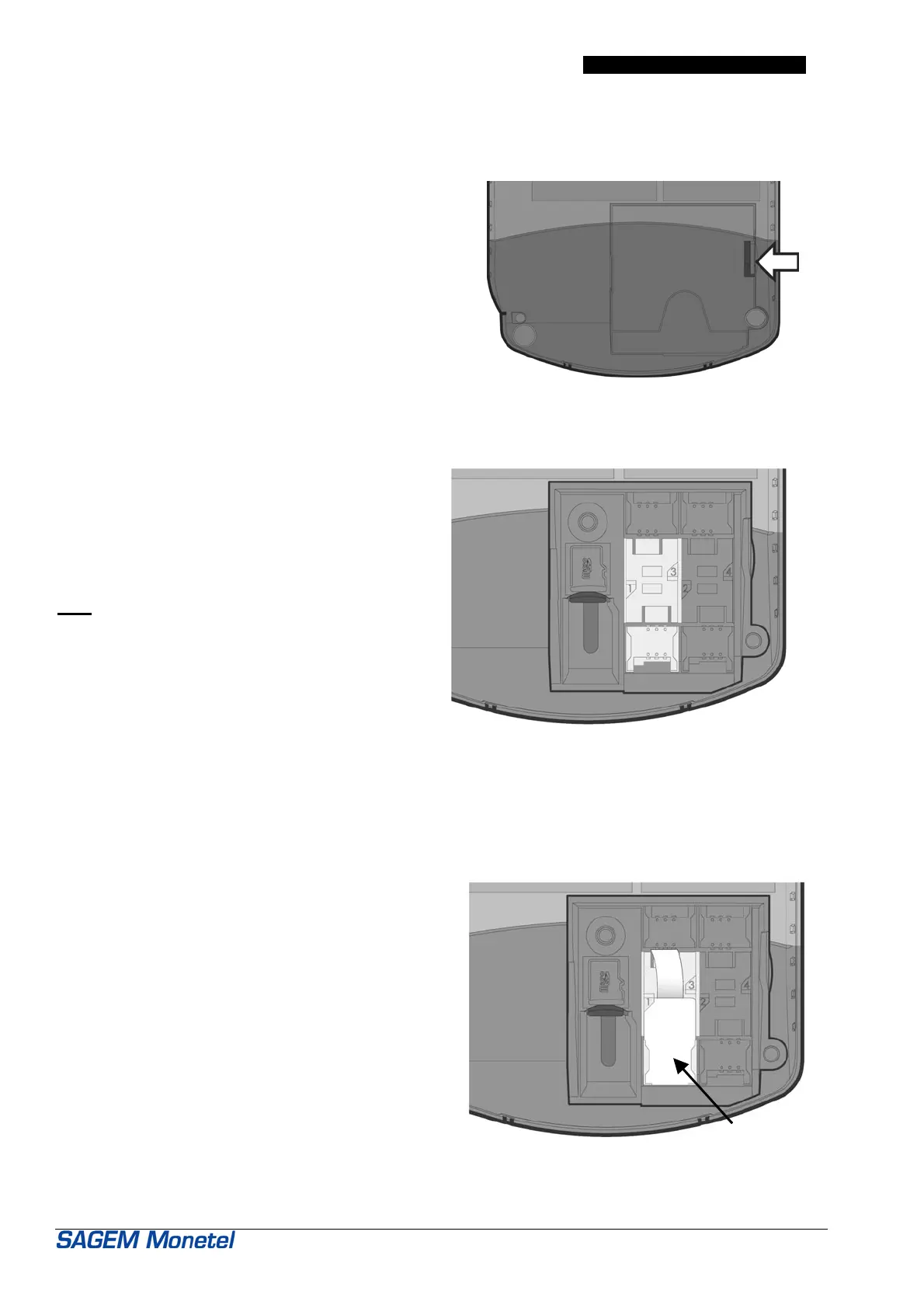
To open the SAM support cover flap:
• Turn the terminal round to gain access to the
flap.
• Using a fingernail, unclip the flap and pull in the
direction of the arrow (see figure opposite) to
remove it.
5.3 INSTALLING A SAM ON ITS SUPPORT
To install a SAM on its support:
• First determine the location of SAM supports
• Slide the SAM into its housing so that the cut edge
of the SAM coincides with the cut edge of the SAM
support.
Note : According to the product type, the number of
SAM supports might be different.
5.4 REMOVING A SAM
Precaution : Take care not to bend or twist the SAM when withdrawing it according to the procedure below.
To remove a SAM:
• Identify the number of the SAM to be removed
(see the numbers engraved beside).
Delicately withdraw the SAM, taking care not to bend
it.
Handy tip: use a piece of adhesive tape as shown
opposite to make withdrawal easier.
SAM module



 To Next Page