If the paper slides through easily, the nozzle and build plate are too far apart. Rotate the knob clockwise to decrease the
distance between them. If the paper cannot slide through, rotate the knob anticlockwise.
5. After leveling the first adjustment point,repeat step 4 for the other three points.
6. When you finish adjusting all the 4 points, confirm again that the piece of paper slides between the nozzles and plate
with a moderate amount of friction. Now that you have completed leveling and you are ready to load filament.
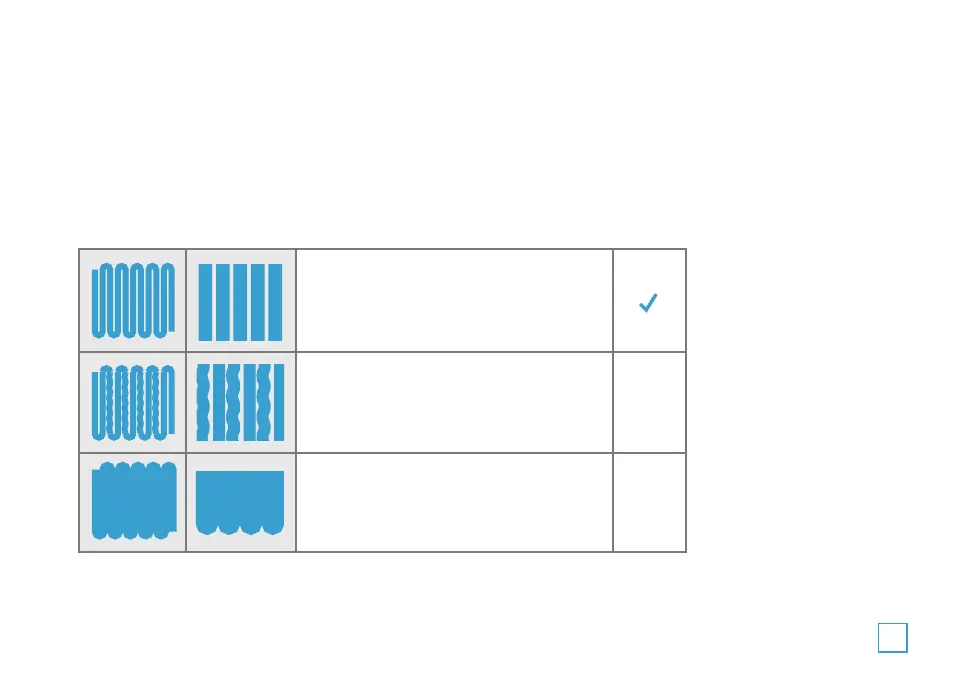
Successful First Layer
Check out the below images to see a successful first layer and two unsuccessful ones.
Notice: In general, you do not need to level your build plate before every print. As you continue to use your printer,
the frequency with which you need to level your plate will diminish.
The nozzle is too far from the platform.
This can result in the extruded material
not sticking to the build platform.
The nozzle is at the correct height above
the platform.
The nozzle is too close to the platform.
This can result in damage to the nozzle
and build platform.
X
X
21


 To Next Page