As you've seen, you can print a model directly from a gcode file on a microSD™ card and this is the preferred method,
as it does not require a continuous connection to your computer. You can download gcode files to the microSD™ card
and print them without building any model files by yourself.
Or you can create your own gcode files using an open source program, such as Cura or Repetier-Host, which are
pre-installed on the microSD™ card that comes with the printer. These programs support the most commonly used files
formats (such as STL, OBJ and FBX files, etc.). We recommend you start with Cura, since it includes a Slicing Engine.
Installing Cura for Windows
1. Use a card reader to read the contents on the
microSD™ card included in the printer. Locate
and double-click the Cura_15.04.6.exe file to
start the setup program.
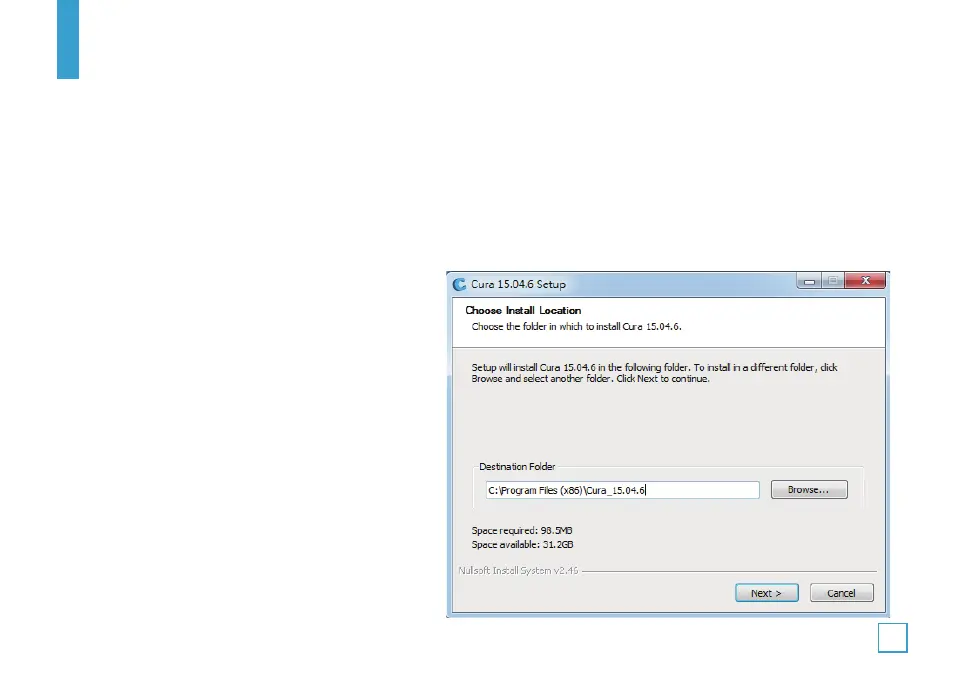
2. You may choose a new location for the program
files or accept the default (recommended). Click
Next to continue.
V. SOFTWARE INSTALLATION
23


 To Next Page