• Feeding Filament
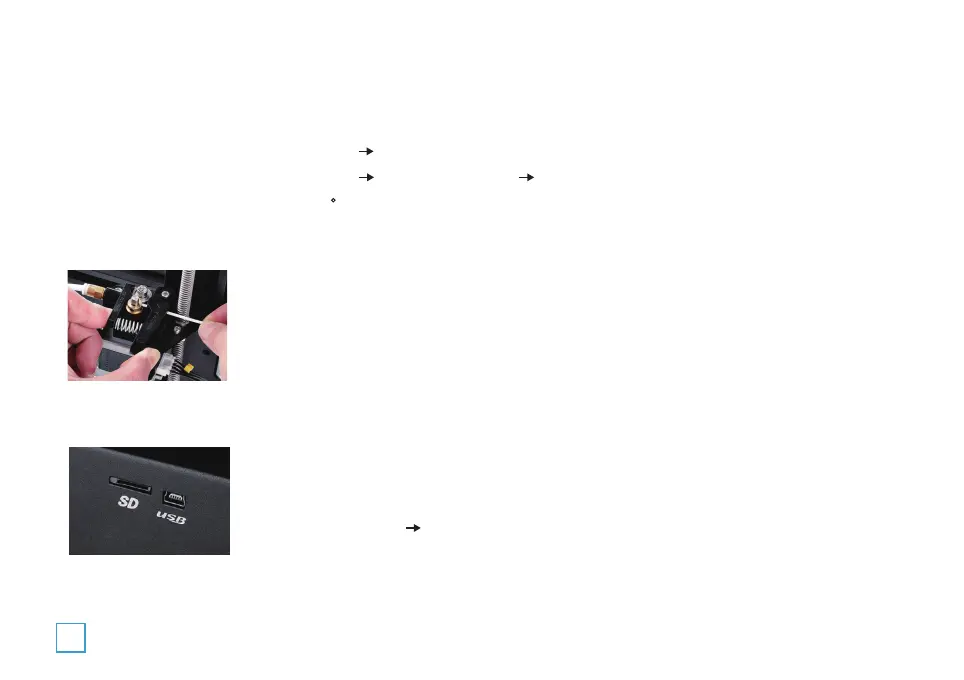
1.Press and hold the extruder lever then insert 1.75mm filament through the small hole of the
extruder. Continue feeding until the filament comes out the nozzle.
2. For replacing filaments, preheat the nozzle then pull out the existing filament. Next, insert
the new filament.
• Printing
1. Insert the SD card
2. TAP Print from SD Select the file to print
3. Basic Printing
• Pre-Heat
1. Press the control knob,TAP Prepare TAP Prepare PLA/Prepare ABS
2. Press the control knob,TAP Control TAP Temperature TAP Nozzle, rotate control knob to
set the temperature as at least 180 C. Wait until the required temperature is met.
22


 To Next Page